2.3 Server Installation
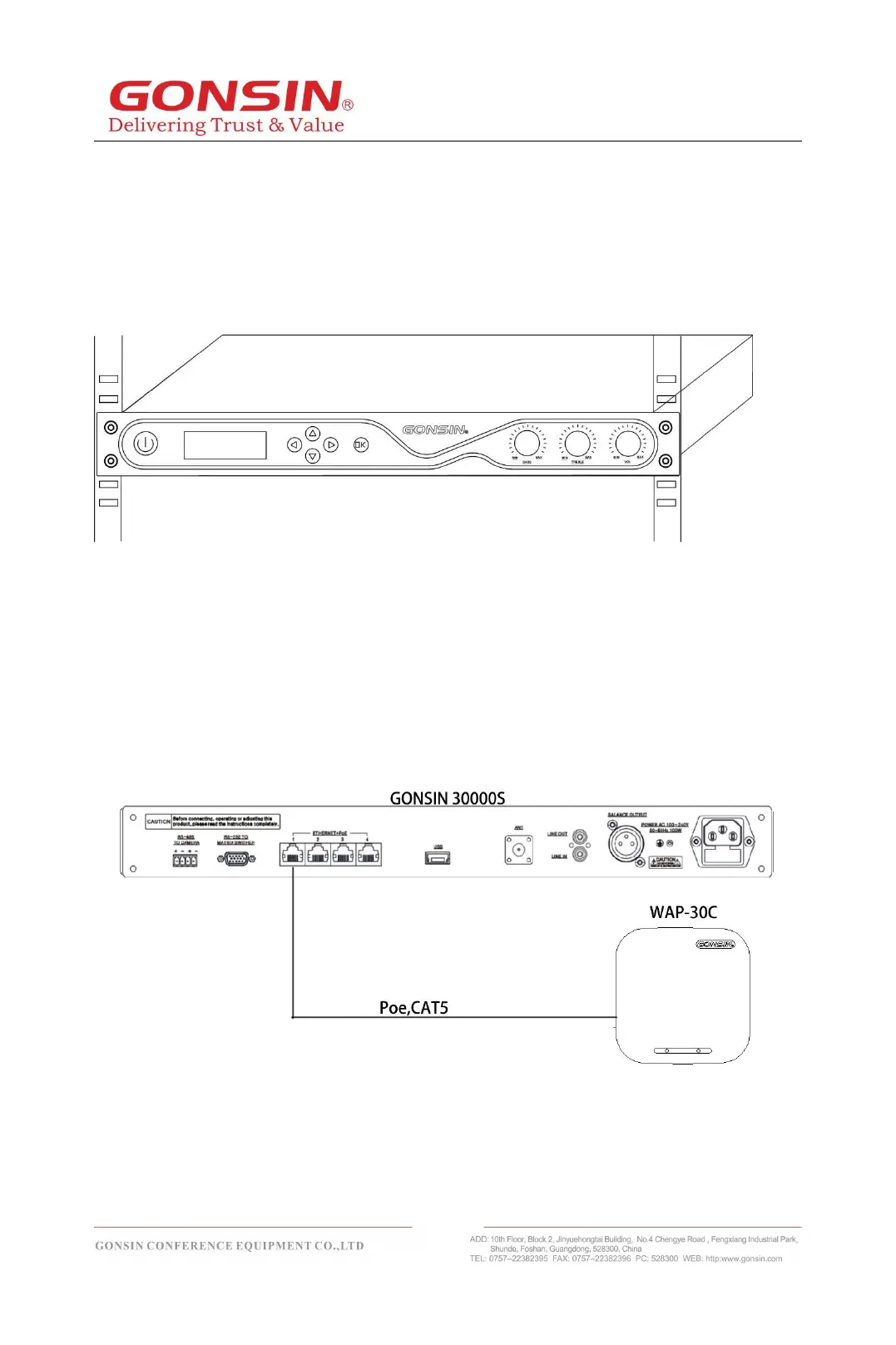
The congress server is 1U high, and therefore it can be installed in a 19-inch rack.
It has two accompanied brackets. Screw up the bracket fixed in two sides of the
congress server, put the congress server into the rack, then screw up it with the rack
screws, as shown in the following figure:
2.4 Connection
2.4.1 Connection with Congress Terminal
To connect the congress server with a wireless terminal, i t is ne c e s s a r y t o c o n n e c t a
netw o r k c a b l e exce e d i n g ca t e g o r y 5 o r ab o v e to W A P - 3 0 C in th e
co n f e r e n c e ha l l fr o m t h e P O E po w e r sup ply ne t wo r k po rt RJ-45 o f the
se rv e, as shown in the following figure:
2.4.2 Connection with Wireless conference access points
extend cascading
When the server is connected to the wireless conference access point, pay attention to the
required coverage of the conference venue. If the area to be covered by the conference venue



 To Next Page