2.4.7 Congress Server Setting and Operation
The LCD screen has five keys:
“▲”,“▼”,“▶”,“◀”, and “OK”. After entering
the setting interface, the current option is
displayed on a contrast background. The
leftward and rightward arrow buttons are
used to enter or exit a menu.
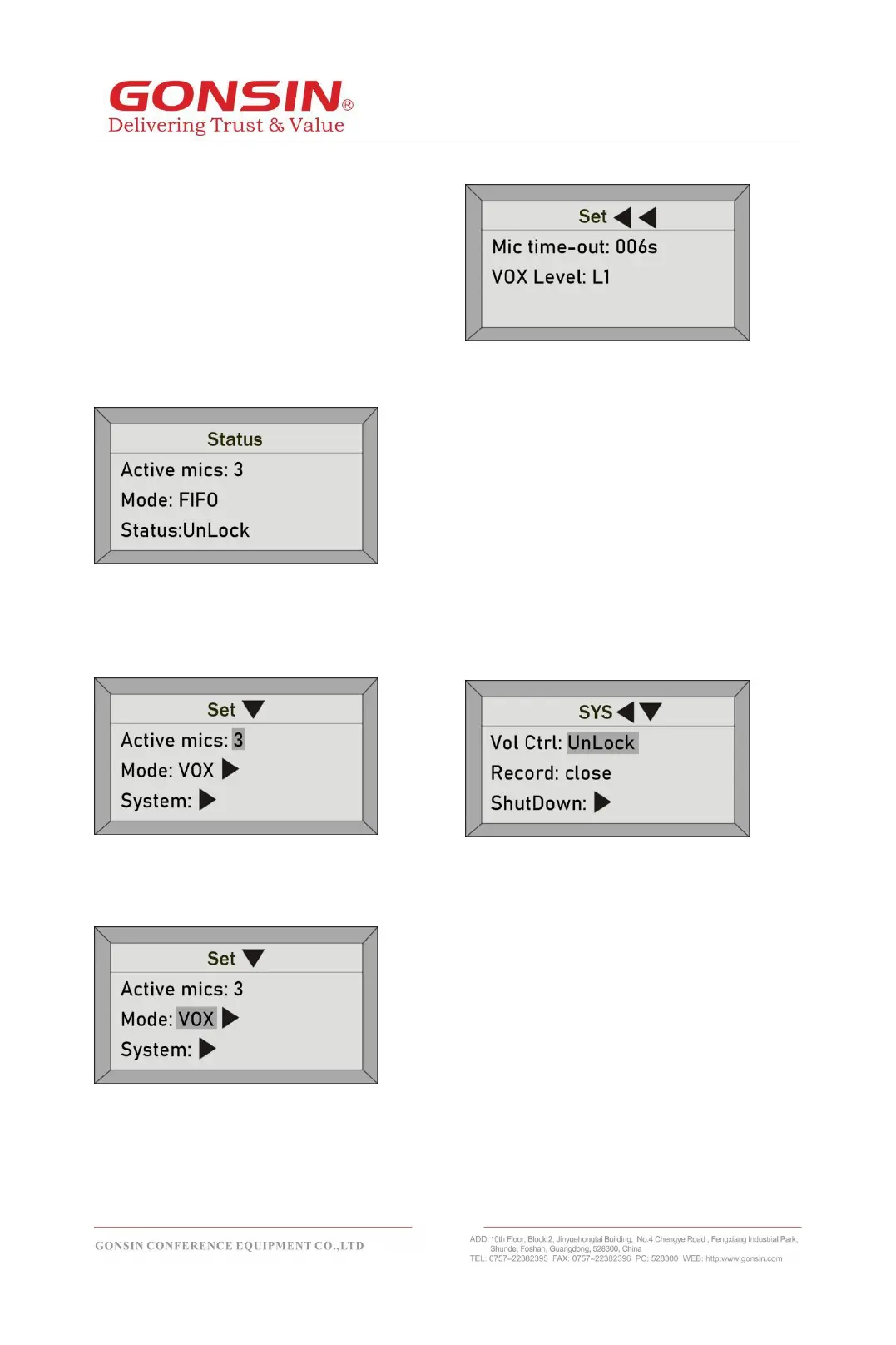
(1) Status: when the system works normally,
the OLED shows the number of active
microphones,speaking mode and status, as
shown in the following figure:
(2) Active mics: Press OK to enter the setting
interface, press arrow buttons to select the
value after Active mics, and then press “▲”
or “▼” key to change the number of mics
(1/2/3) that can be activated at the same time.
(3)Speaking mode: on the setting interface,
press arrow buttons to select the value after
Mode and press “▲” or “▼” key to change a
speaking mode: AUTO or FIFO or VOX.
VOX: on the setting interface, press arrow
buttons to select and enter the “VOX” setting
interface. The interface has the following
parameters for users to set:
① Mic time-out: the time when there is no
voice input in the unit can be set to 006
seconds, 030 seconds, 060 seconds, 120
seconds, 180 seconds.
② VOX Level: the sensitivity of all units are
be set uniformly by the host, which is divided
into three levels: L1, L2 and L3. The
sensitivity of picking up the sound source will
increase successively, and the microphone
will automatically turn on the microphone
from the off state.
(4)System: on the setting interface, press
arrow buttons to select and enter the
“System” setting interface. The interface has
the following parameters for users to set:
①Volume control lock
If volume control is locked, rotating the
volume knob will not work.
If volume control is unlocked, rotating the
volume knob will work.
② Record:
If record is close, recording function will be
turned off.
If record is open, the recording function will
be turned on. The FAT32 formatted U-disk
need to be inserted into the USB port of the
server to record the conference content. Turn
off the recording function and save it as an
audio file.
③ Shutdown: Enter the “Shutdown” interface
and select "Yes". The system will shut down



 To Next Page