Page 16
Scrolling Screen and Display Options
1
User Setup:
Scrolling Display Method (Setup Step 17)
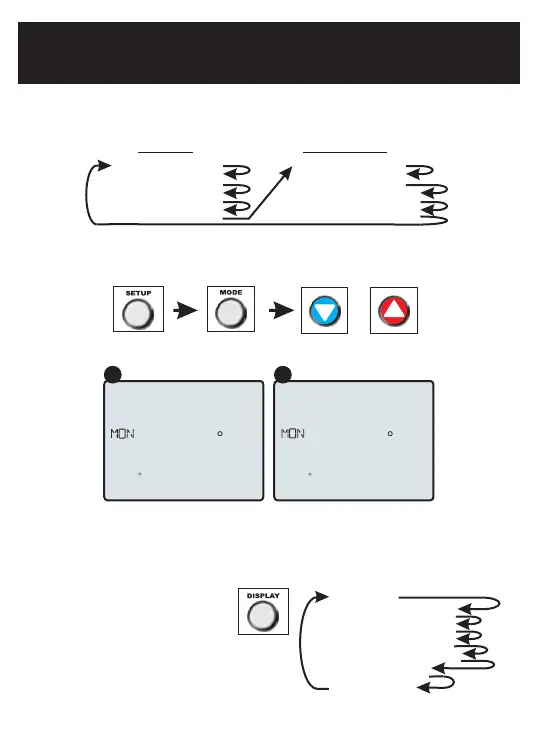
This option allows the user to choose how the scrolling text is displayed. Options are:
Display
This option allows the user to “de-clutter” the thermostat display screen by removing
icons from the main display. The room temperature will always be shown. Service
information may also be viewed by pressing and holding the DISPLAY button.
Press the SETUP button, then press MODE repeatedly until the Scrolling Method
setup step appears. Use the UP or DOWN buttons to make a selection. Press
MODE to advance to the next step. Press SETUP to leave the setup screens.
Example of “Whole Words Centered”:
Each press of the DISPLAY button
will remove icons. Keep pressing
DISPLAY to make icons reappear.
Press and hold DISPLAY for 5 seconds
to view a name and phone number to
call for service.
Any removed icons will be displayed temporarily when a setting change is made.
Show All
Remove Scrolling Text
Remove Day of Week
Remove Current Time
Remove Outdoor Temp
Remove Setpoint
Remove Mode
Scroll Letters Slow
Scroll Letters Fast
Scroll Words Slow
Scroll Words Fast
Scrolling
Non-Scrolling
Whole Words Slow
Whole Words Fast
Words Centered Slow
Words Centered Fast
Program On
Outdoor
COOL
HEAT
12:00
72
74
78 68
SERVICE
Pm
Program On
Outdoor
COOL
HEAT
12:00
72
74
78 68
FILTER
Pm
A B


 To Next Page