30
RUNTIME
05
Setup Step
Page 18
Current Service Filter Runtime Hours (Setup Step 5) - This counter keeps track of
the number of hours of fan runtime in the Heating mode, Cooling mode, and in stand
alone Fan operation. Press FAN to reset.
Current Service Filter Calendar Days (Setup Step 6) -
total number of calendar days that have elapsed since the counter was reset to help
the user track Fan runtime. Press FAN to reset.
This counter displays the
User Setup:
System Runtimes
Service Filter Runtime (Setup Steps 5-6, 12-13)
Set Service Filter Runtime Hours (Setup Step 12) - This timer allows the user to
specify the number of hours the fan will run before the “Replace Filter” alert will be
displayed. Press DOWN continuously until OFF is displayed to disable this alert.
Set Service Filter Calendar Days (Setup Step 13) - This timer allows the user to
specify the number of calendar days that will elapse before the “Replace Filter” alert
will be displayed. Press DOWN continuously until OFF is displayed to disable this
feature.
These setup steps allow the user to monitor equipment runtimes and program
service alerts.
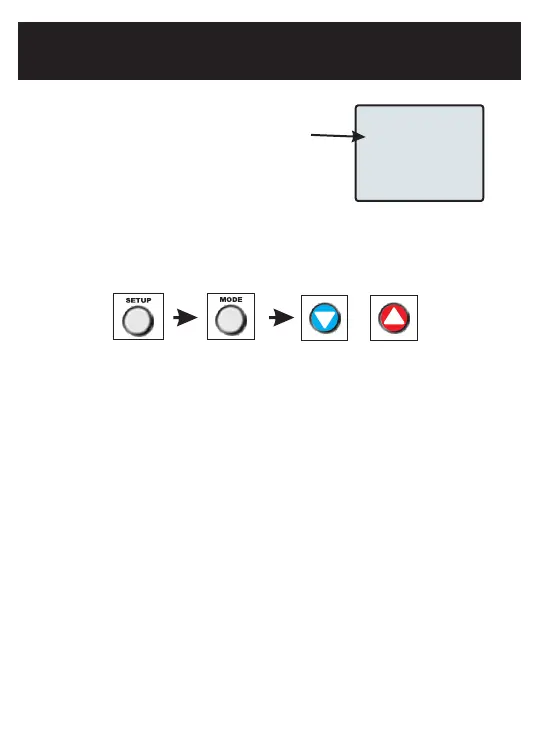
Runtime hours or days appear
in the clock display.
Press the SETUP button, then press MODE repeatedly until the desired setup
step appears. Use the UP or DOWN buttons to make a selection. Press MODE
to advance to the next step. Press SETUP to leave the setup screens.
Set UV Lamp Calendar Days (Setup Step 14) - This timer allows the user to specify
the number of calendar days the UV Lamp will operate before the “Replace UV Lamp”
alert will be displayed. Press DOWN continuously until OFF appears to disable this
alert.
Current UV Lamp Calendar Days (Setup Step 10) -
number of calendar days that have elapsed to help the user track UV lamp runtime.
Press FAN to reset.
This counter displays the total
UV Lamp Runtime (Setup Steps 10, 14)


 To Next Page