Troubleshooting 6
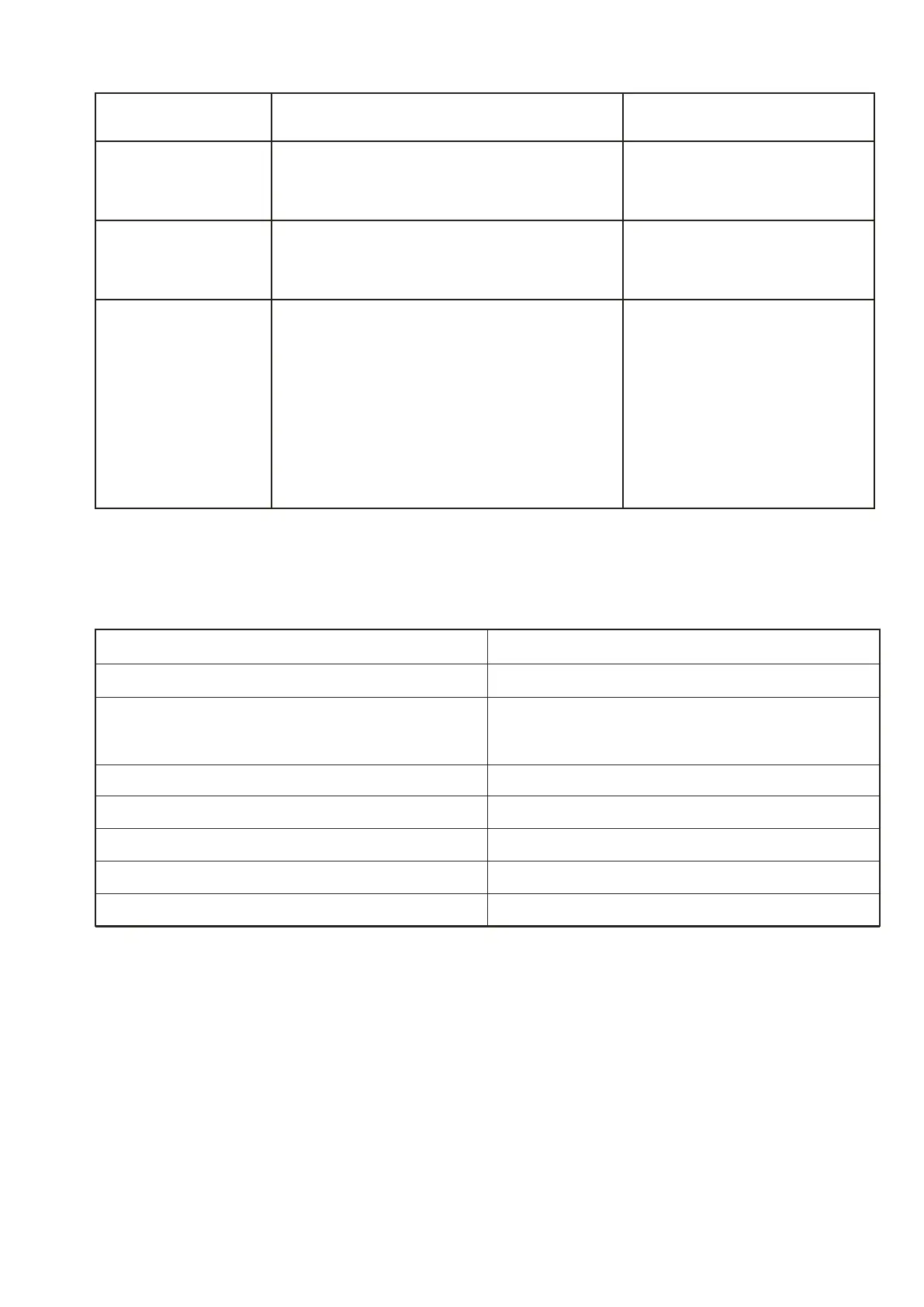
Possible Cause Solution
Low sound level
Increase the volume on
your speaker and the
input device.
Decrease the volume on
the speaker and your
input device.
The input volume of your device is
too low.
Sound distorted The volume is too high.
The speaker or input device is turned off.
The volume on the speaker or the input
device is too low.
Audio playback is in pause mode.
Battery power is low.
Turn on the speaker and
the input device.
Increase the volume on the
speaker and the input
device.
Press the Play button to
continue with playback.
Recharge the battery.
No sound
Model Number
Power Supply
AC Adapter(supplied)
Audio Power
Speaker Impedance
Bluetooth Specification
Frequency Bands
Built-in Battery:
335230
DC 5V 1A
Input: 100-240V~, 50/60 Hz, 0.25A
Output: 5V,1A
10W
4Ω
V4.2
2402MHz - 2480 MHz
3.7V/1800mAh
Technical Specification7
Problem



 To Next Page