1. Your High Power Bass Party Speaker has a built in rechargeable
battery so it can be used anywhere. Before using it for the first time
please fully charge the battery.
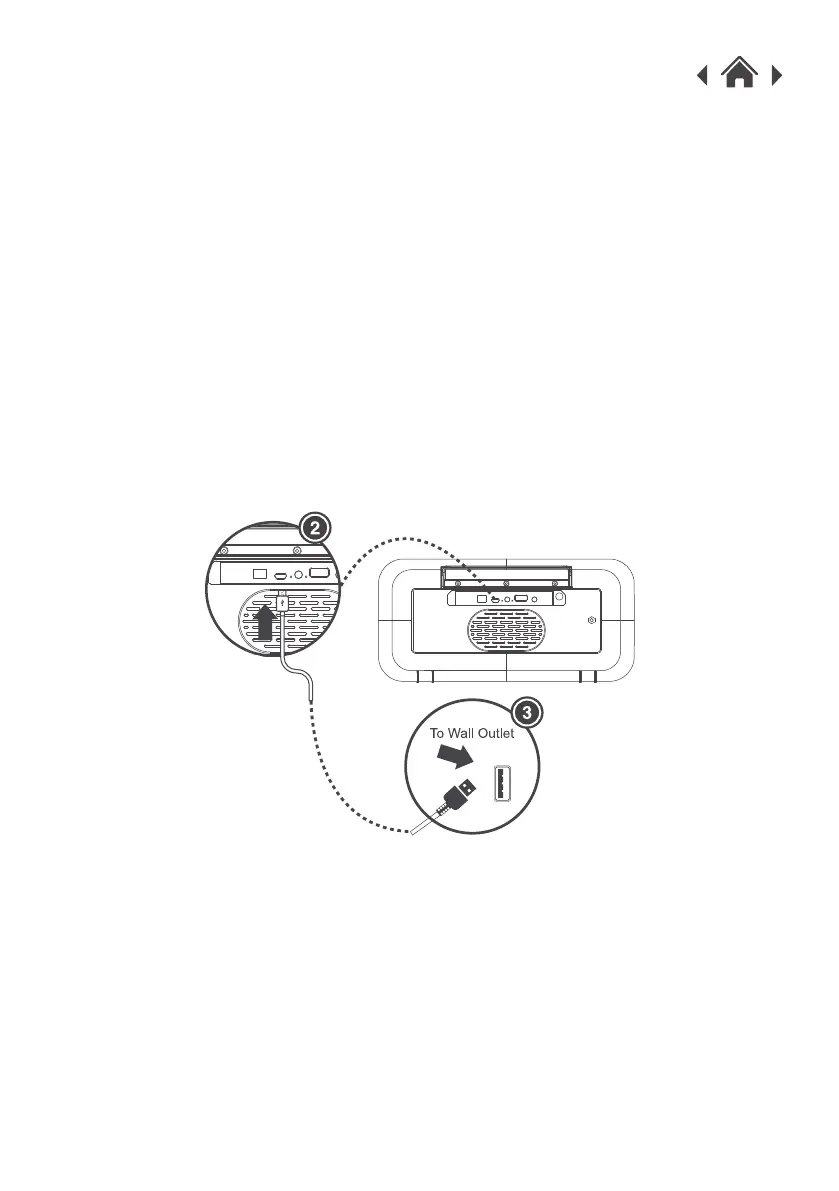
2. Connect the Micro USB charging cable supplied to the DC IN
connector.
3. Connect the other end of the Micro USB cable to a USB port on your
computer, or a 5V 1A USB wall charger. A wall charger is not included.
When your High Power Bass Party Speaker is charging the indicator
light will show.
4. When the battery is fully charged the LED light will turn off.
Note: when the battery is getting low, the low battery warning alert
will sound, when you hear this, please recharge the battery.
3.1Charging Your High Power Bass Party Speaker
1. Slide the Power ON /OFF” button to ON. The High Power Bass Party
Speaker will automatically start in Bluetooth mode. You will hear
“Power On, Bluetooth Mode”.
2. Using your Bluetooth phone or tablet, turn on Bluetooth and search for
Bluetooth devices.
3. Enable Bluetooth on your Smartphone and search for Bluetooth
connections. Select “GOODMANS LED SPEAKER” from the list of
devices. If you are are asked for a pass code enter "0000".
4. When successfully paired, you will hear “connected”.
3.2Pairing with a Bluetooth Devices
Quick Setup3
ON OFF DC-IN USB MIC INLINE IN
ON OFF DC-IN USB MIC INLINE IN



 To Next Page