5. DISC CLEANING AND TROUBLESHOOTING GUIDE
Cleaning the Disc
Note
When a disc becomes dirty, clean it with a cleaning cloth. Wipe the disc from the centre out.
Do not use solvents such as benzine petrol, thinner, commercially available cleaners or anit-static
spray intended for analogue discs.
Should you experience difficulties in the use of this player please refer to the following chart before
contacting your dealer or the place of purchase.
Troubleshooting Guide
Disc may be inserted upside down
Disc not mounted correctly on chuck
Dirty or defective disc
Dirty pick up lens
Player lid not closed
Moisture/condensation allow player to warm up to
room temperature for 60 minutes.
AC Power to adaptor switched off
Weak batteries
Auto Power off has occurred.
Earphone plug is not firmly inserted into the Green
Phones socket
Earphones have been inserted into the Black line
output socket
Volume Control on remote is set to zero
Connection is incorrect
Power to external amplifier not switched on
No sound when played
through an external amplifier
No sound from Earphones
Player fails to function
Problem Points to Check
Intermittent Sound
Dirty or defective disc
Dirty pick up lens
Player is subject to excessive vibration or shock switch on
ASP function
Low battery power
Poor Earphone connection
4. PLAYER MAINTENANCE
Wipe with a soft cloth. If the cabinet is very dirty, dampen the cloth with a weak solution of neutral
detergent and water,and then wipe clean.
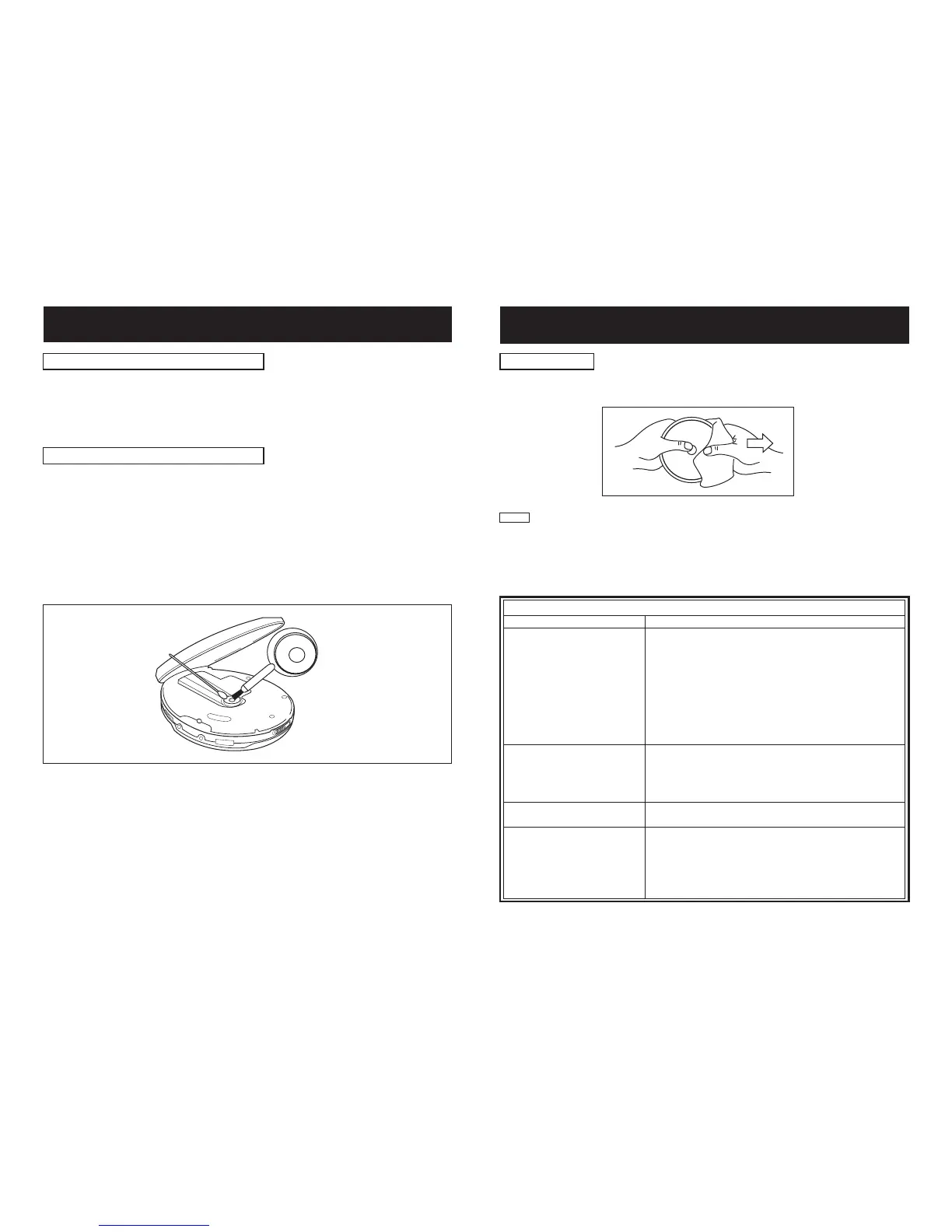
A dirty lens will cause sound skipping and, if the lens is very dirty, the CD may not work. Open the
disc cover and clean the lens as follows:
Using a camera lens brush/blower, blow on the lens couple times, then wipe it lightly with the
brush to remove dust. Then, blow on the lens once more.
If the lens cannot be cleaned by using a brush/blower, use a dry cotton swab starting in the middle
and working to the outside edge.
Dust or Dry Particles
Finger prints
Cleaning the Cabinet
Cleaning the lens


 To Next Page