HELPLINE PHONE NUMBER 0870 873 0080 HELPLINE PHONE NUMBER 0870 873 0080
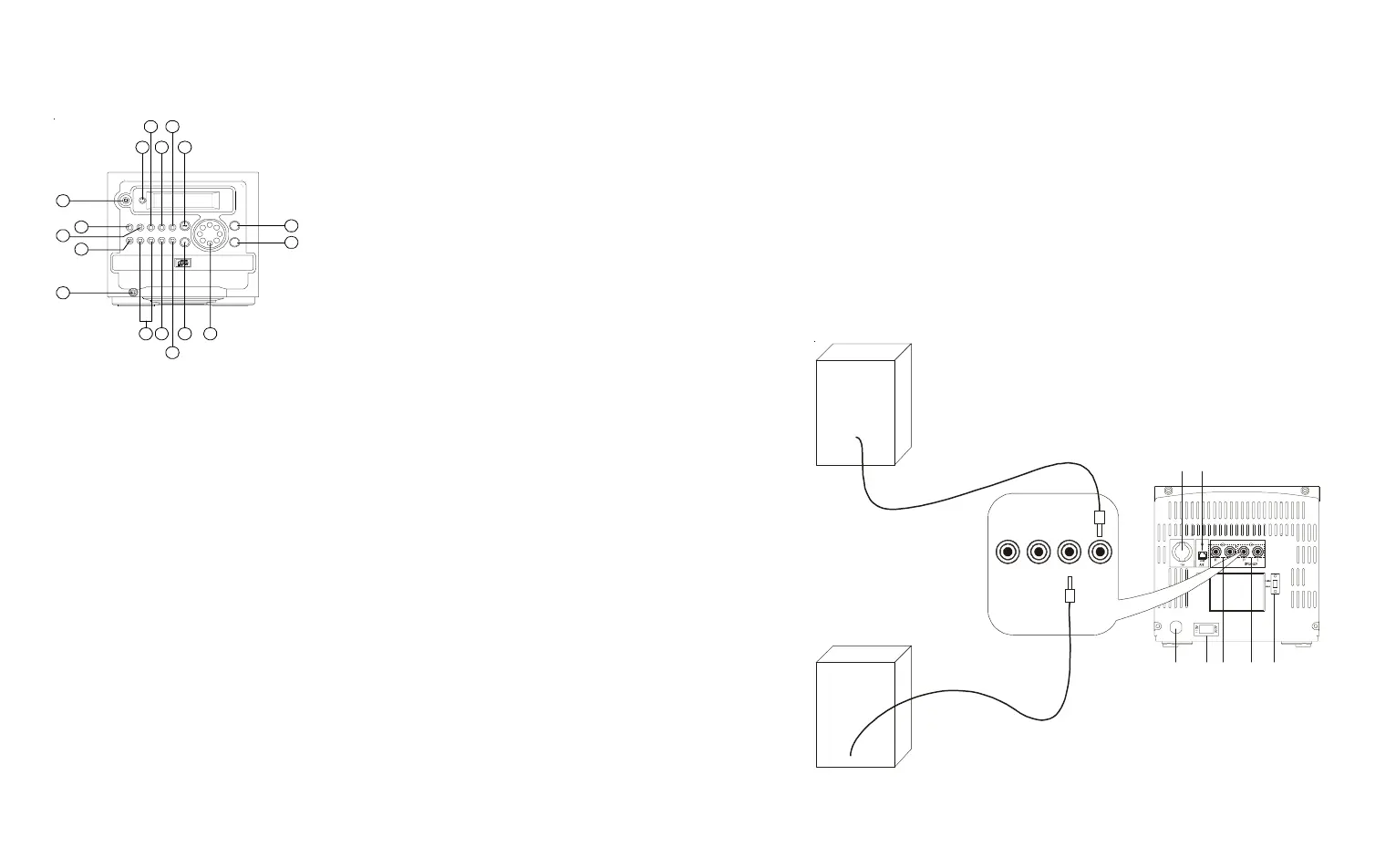
1. POWER Key
• Press to turn the power ON/Stand-by.
2. CD Key
• For compact disc.
3. TUNER Key
• To select the Tuner source.
4. MEMORY/CLOCK ADJUSTMENT
Key (MEM/CLK ADJ)
• In the Radio mode: the preset memory
is called in ascending order.
• In the CD mode: for setting program.
• In the clock mode: for setting of the
clock or timer adjustment.
5. PHONES JACK
• Connection for headphones.
6. SEARCH/CLK
7. SLEEP/TIMER
8. MUTE Key
• To mute the sound output.
9. STOP/BAND Key
• In the CD mode: to stop the
compact disc or clear program.
• In the Radio mode: to select
the receiving band.
10. VOLUME Key
• To adjust the volume level.
11. PRESET EQUALIZER Key(EQ)
• For selecting Digital Sound
Control: CLASSIC, ROCK, POP
and FLAT.
12. OPEN/CLOSE Key
13. PLAY/PAUSE Key
• In the CD mode: to start or
interrupt play.
14. MEMORY-UP/REPEAT Key
(REPEAT/M-UP)
• In the Radio mode: for recalling
the preset memory in order.
• In the CD mode: for selecting
the all repeat or track repeat mode.
15. DISPLAY Key
• To indicate the functioning of the
unit.
16. AUX Key
17. REMOTE SENSOR
•To receive signals from the
remote control.
5
LOCATION OF CONTROLS
17
16 14
15 13
4
6
8
97
1
2
10
11
12
3
5
6
18. AC POWER CORD
19. FM AERIAL
20. POWER SWITCH
21. AUX INPUT SOCKET
22. SPEAKER SOCKET
23. STEREO/MONO SELECTOR
24. AM AERIAL
18 22 2321
19
20
SPEAKER
CONNECT THE
LOUDSPEAKERS TO
THESE SOCKETS
L
24


 To Next Page