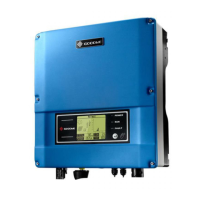
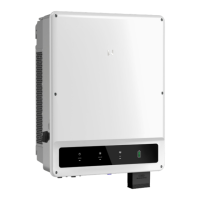
This document describes the GoodWe NS/DNS Series Solar Inverter, a device designed for converting direct current (DC) electricity from solar panels into alternating current (AC) electricity for use in homes or businesses. The manual covers installation, system operation, troubleshooting, technical parameters, certificates, and maintenance.
Function Description
The GoodWe NS/DNS Series Solar Inverter serves as the core component in a photovoltaic (PV) system, enabling the conversion of DC power generated by PV modules into usable AC power for the grid. The NS series refers to single-MPPT (Maximum Power Point Tracking), single-phase inverters, while the DNS series denotes dual-MPPT, single-phase inverters. This distinction allows for optimized energy harvesting from PV arrays, especially in scenarios with varying sunlight conditions or panel orientations. The inverter includes integrated safety features such as anti-islanding protection, input reverse polarity protection, insulation resistor detection, residual current monitoring, and output overcurrent, short-circuit, and overvoltage protection. It also offers communication capabilities via Wi-Fi or RS485 for monitoring and control. Optional features include CT and DRED functions for power limiting and demand response.
Important Technical Specifications
The NS/DNS Series inverters come in various power ratings, with the NS series ranging from 1000W to 3000W and the DNS series from 3000W to 5000W.
For the NS series (e.g., GW1000-NS to GW3000-NS):
- Max. DC Input Power: Ranges from 1300W to 3900W.
- Max. DC Input Voltage: 500V.
- MPPT Range: 80~450V.
- Start-up Voltage: 80V.
- Nominal DC Input Voltage: 360V.
- Max. Input Current: 10A (for 1-2.5KW models) or 18A (for 3KW model).
- No. of MPP Trackers: 1.
- Nominal Output Power: Ranges from 1000W to 3000W.
- Nominal Output Voltage: 220~230V.
- Nominal Output Frequency: 50/60Hz.
- Max. Output Current: Ranges from 5A to 13.5A.
- Max. Efficiency: 96.5% to 97.5%.
- Europe Efficiency: 96.0% to 97.0%.
- MPPT Efficiency: 99.9%.
For the DNS series (e.g., GW3000D-NS to GW5KD-NS):
- Max. DC Input Power: Ranges from 3900W to 6500W.
- Max. DC Input Voltage: 580V.
- MPPT Range: 80~550V.
- Start-up Voltage: 120V.
- Nominal DC Input Voltage: 360V.
- Max. Input Current: 11A/11A (dual string).
- No. of MPP Trackers: 2.
- Nominal Output Power: Ranges from 3000W to 5000W.
- Nominal Output Voltage: 220~230V.
- Nominal Output Frequency: 50/60Hz.
- Max. Output Current: Ranges from 13.6A to 22.8A.
- Max. Efficiency: 97.8%.
- Europe Efficiency: 97.5%.
- MPPT Efficiency: 99.9%.
General Specifications (common to both series):
- Operating Temperature Range: -25°C to 60°C.
- Relative Humidity: 0~95%.
- Operating Altitude: ≤4000m.
- Cooling: Natural convection.
- Noise: <25 dB.
- User Interface: LCD & LED.
- Communication: Wi-Fi or RS485.
- Protection Degree: IP65 (suitable for outdoor and indoor environments).
- Night Self-Consumption: <1W.
- Dimensions (WidthHeightDepth): 344274.5128mm (NS series) and 347432145mm (DNS series).
Usage Features
The inverter is designed for user-friendly operation with an LCD display and indicator lights providing real-time status and error information.
- Installation: The manual provides detailed instructions for mounting the inverter, emphasizing optimal performance through ambient temperature considerations (below 45°C), eye-level installation for convenience, and avoidance of direct sunlight, rain, or snow. Clearances around the inverter are specified for heat dissipation and maintenance access. Electrical connections for both AC and DC sides are meticulously outlined, including specifications for circuit breakers, cable types, and connector brands (VACONN, WIELAND, SUNCLIX, MC4, AMPHENDL H4). Proper earthing is mandatory, and specific instructions are given for connecting the earth terminal.
- Communication: The inverter supports RS485 communication for connecting to an EzLogger Pro for monitoring, and Wi-Fi communication (with an optional Wi-Fi BOX) for creating PV stations and remote monitoring. USB communication is available for after-sales service.
- Power Limiting & DRED: Optional CT and DRED (Demand Response Enabling Device) functions allow for power limiting and demand response, particularly relevant in regions like Australia and New Zealand. The manual details the wiring of the CT device and the configuration of power limiting settings via the user interface.
- User Interface: The LCD display provides access to various operational parameters and settings. Users can view daily and total energy generation, PV voltage and current, grid voltage, current, and frequency. The interface also allows for setting the safety country, language, time, and configuring special functions like "Shadow MPPT" for optimized performance in shaded conditions and power limiting. Error codes are displayed on the LCD, aiding in quick troubleshooting.
- Safety: The inverter incorporates multiple safety features, including a built-in RCMU (Residual Current Monitoring Unit) to detect leakage currents. It is crucial to follow all safety regulations during installation and operation, including disconnecting AC and DC inputs and waiting 5 minutes before performing any maintenance to avoid electric shock. The inverter's surface can reach high temperatures during operation, so direct contact should be avoided.
Maintenance Features
The GoodWe NS/DNS Series Inverter is designed for minimal maintenance, but the manual provides guidance for troubleshooting and special adjustable setpoints.
- Troubleshooting: The manual includes a comprehensive troubleshooting guide, listing common error codes (e.g., Fac Fail, Isolation Fail, Vac Fail, PV Over Voltage, Over Temperature, Utility Loss) and their corresponding solutions. These solutions often involve checking connections, measuring voltages, or contacting local service offices if the problem persists. The inverter's self-diagnosis capabilities, indicated by LED lights and LCD error messages, facilitate quick identification of issues.
- Wi-Fi Reset & Reload: For Wi-Fi model inverters, functions to reset Wi-Fi configuration to default values or reload settings are available, which can be accessed through specific button presses on the LCD.
- Special Adjustable Setpoints: The inverter features field-adjustable functions such as trip points, trip times, reconnect times, and active/invalid QU/PU curves. These advanced settings are typically adjusted through special software and require contacting after-sales support for access and guidance. The methods document for using this software can be downloaded from the GoodWe website.
- Earth Fault Alarm: The inverter complies with IEC62109-2 chapter 13.9, activating an alarm (fault indicator LED, email for Wi-Fi models, or buzzer for non-Wi-Fi models) in case of an earth fault, ensuring prompt notification and resolution.

 Need help?

 To Next Page
 General