10
Photo Mode
Photo Mode icon
Selected Field of View (see card 17)
Press POWER button repeatedly to get to Photo Mode.
You can take one photo: pressing SHUTTER button
You can take several continuous photos: pressing and holding SHUTTER button (for this the
shot frequency must be set in card 17)
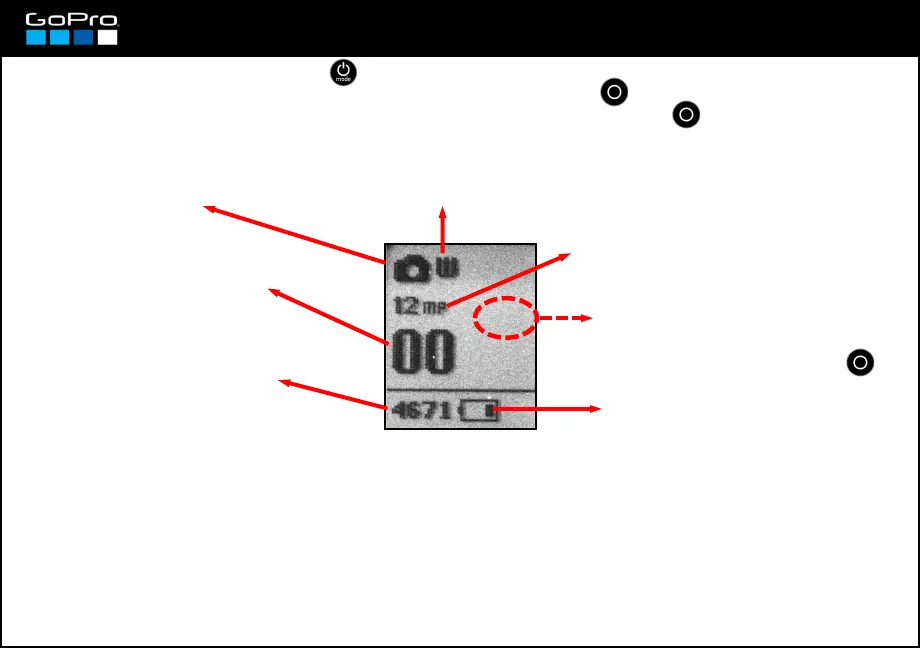
In the screen you see this:
Photo Resolution (see card 17)
Remaining battery life (see card 5)
Remaining photos in SD
card with the selected
resolution
Shows the number of
photos in the SD card.
Photo Mode has these settings: Resolution & Field of View, which are dependant from one another, and
Shot Frequency.
Photo Mode doesn´t have Protune mode and its settings, like White Balance.
Nor it has Shutter setting nor Sensitivity (Gain) setting, all that works automatically.
Focus is fixed. Fixed aperture at f2.8
Here you´ll see the shot frequency if
you select more than one photo in
card 17. In that case, remember you
must press and hold SHUTTER
To change these settings see cards 13 to 16.
IF YOU PRESS THE POWER BUTTON WHILE RECORDING VIDEO THE CAMERA TAKES A PHOTO
(only with certain video formats, see card 18)














 To Next Page