8
Operation Modes
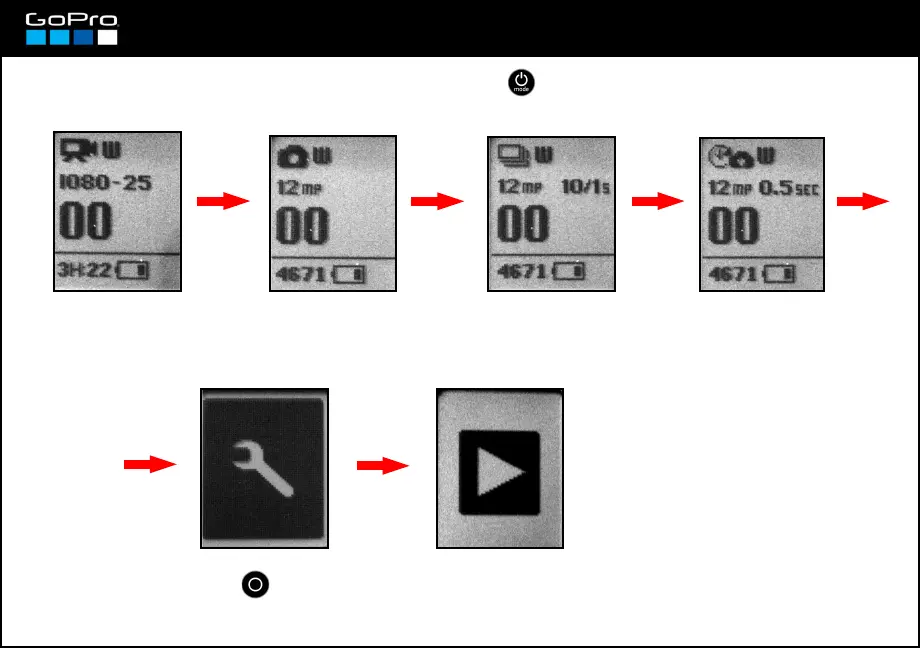
The camera can operate in 4 modes. Pressing POWER we go through them. Beyond them is the
Settings Screen, where we find all settings. Beyond that is Playback.
Video Mode
Screen: see card 9
Photo Mode Screen:
see card 10
Burst Photo Mode Screen:
see card 11
Time Lapse Mode
Screen: see card 12
Settings Screen: press
SHUTTER button to enter
the settings menu.
Playback Screen: you´ll only see it if you mount
the Lcd Touh Screen (card 2) or connect a
television to the camera (card 3).
For Playback see card 21.














 To Next Page