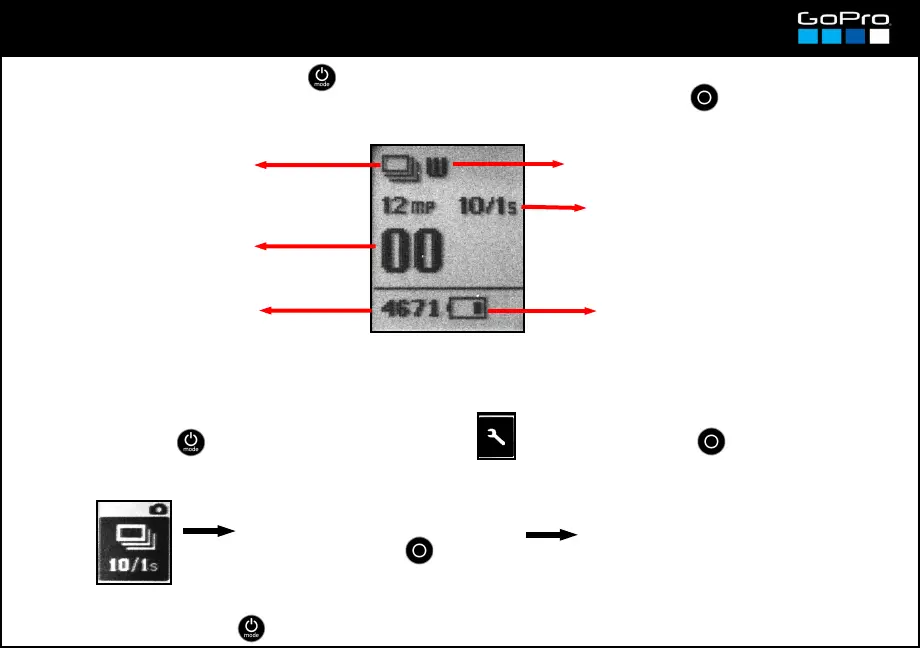
Burst Photo Mode
Burst Photo
Mode icon
Selected Field of View (see card 17)
Press POWER button repeatedly to get to Burst Photo Mode.
This mode takes a number of photos continuously when you press SHUTTER . The difference with
Photo Mode selecting various photos is that there you must press and hold SHUTTER to shoot
Photo Resolution and Shot
Frequency (see card 17 and here
below)
Remaining battery life (see card 5)
Remaining photos in SD card
with the selected resolution
Shows the number of
photos in the SD card.
The photos are taken in the Resolution and Field of View selected for Photo Mode (card 17)
- Press POWER until you see the Settings Screen , enter with SHUTTER button and go to:
- To exit press POWER until you get to EXIT.
3/1SEC: 3 photos in 1 second
5/1SEC: 5 photos in 1 second
10/1SEC: 10 photos in 1 second
10/2SEC: 10 photos in 2 seconds
30/1SEC: 30 photos in 1 second.
30/2SEC: 30 photos in 2 seconds
30/3SEC: 30 photos in 3 seconds
Enter and select the number of
photos that will be taken when you
press the SHUTTER button.
11
To select the Shot Frequency:














 To Next Page