4
Gopro App
The GoPro App for smart phones allows you to operate the camera via Wi-Fi and watch the live image as
well as transferring images to the phone (only certain formats).
1 – With the camera On, press Wi-Fi button twice, then press SHUTTER and then select GoPro App.
2 - Search and connect your smart phone to a Wi-Fi network called goprohero (key:goprohero).
3 - Start the GoPro App in the phone and follow the instructions that will guide you to personalize name
and key of the camera´s network. You´ll loose connexion, connect again to the network.
4 - After that process, every time you want to use the App make sure you: turn On the camera Wi-Fi and
select GoPro App + connect your smart phone to the camera´s Wi-Fi network + launch the App.
After that…:
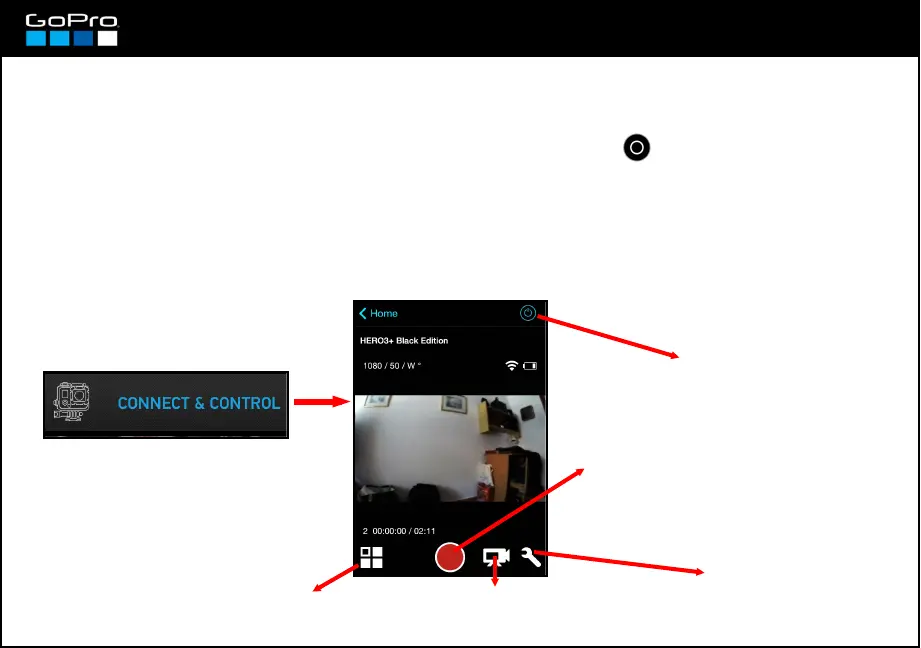
Press here in the App:
Turns On/Off the camera.
Only works if the camera
Wi-Fi is On (even if the
camera is Off)
Press to Record/
Take a photo
Press to change operation
mode: Video / Photo / Burst
Photo / Time-Lapse
Press to watch videos and
photos in the card and transfer
then to the phone.
Press to enter the
Settings menu.
To link camera and phone for the first time:














 To Next Page