88 89
DEVICES, CONTROLS + PREFERENCES
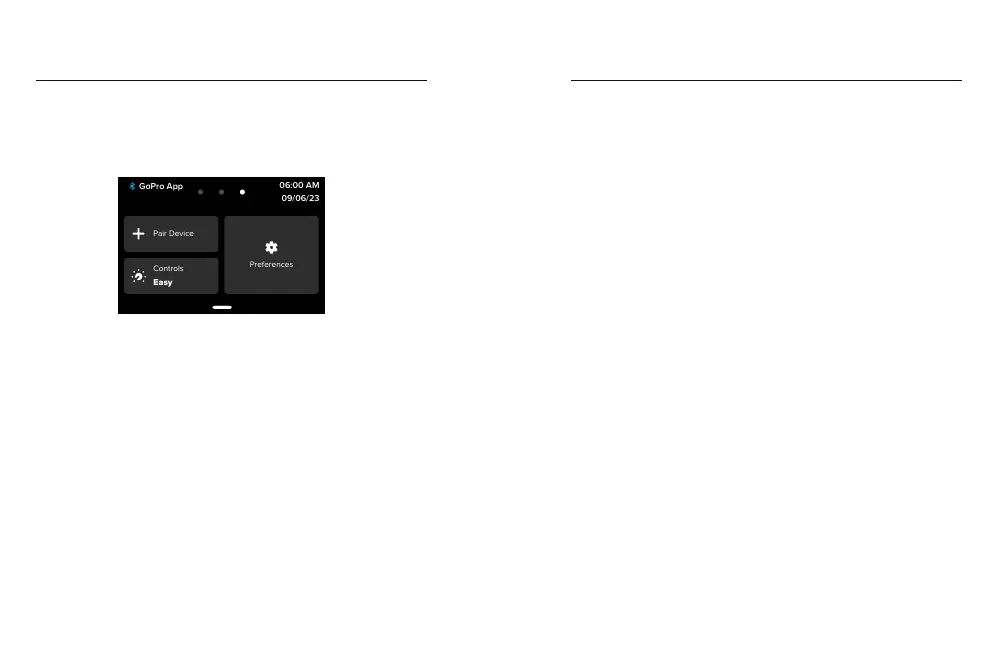
With your camera in landscape orientation swipe down on the rear
screen to access the Dashboard, and then swipe left to add devices,
change controls, and access preferences.
Pair Device
Tap to pair new devices with your GoPro. For details, see Bluetooth
Connectivity (page 71).
Controls
Tap to toggle between Easy and Pro Controls.
Preferences
Tap to set up your GoPro exactly the way you want it.
Setting Your Preferences Setting Your Preferences
AUTO UPLOAD
Set up and turn on auto upload to the cloud with your GoPro
subscription.
Manual Upload
Lets you start uploading media to the cloud immediately.
Auto Clear
Automatically clears all media from your SD card after it's been uploaded
to the cloud.
CONNECTIONS
Wireless Connections
Turn your camera’s wireless connections on and o.
Camera Info
See your camera’s name and password.
Wi-Fi Band
Choose 5GHz or 2.4GHz as your connection speed. Set 5GHz only if
your phone and region support it.
To learn more, see Setting the Connection Speed (page 77).
Reset Connections
Clear all connections to your devices and reset your camera’s password.
This means you’ll have to reconnect each device.



 To Next Page