30
MDE-option_Wi-Fi_horloges_HANDI_LEDI-1103V1.1
3.6. TIMER OPTION
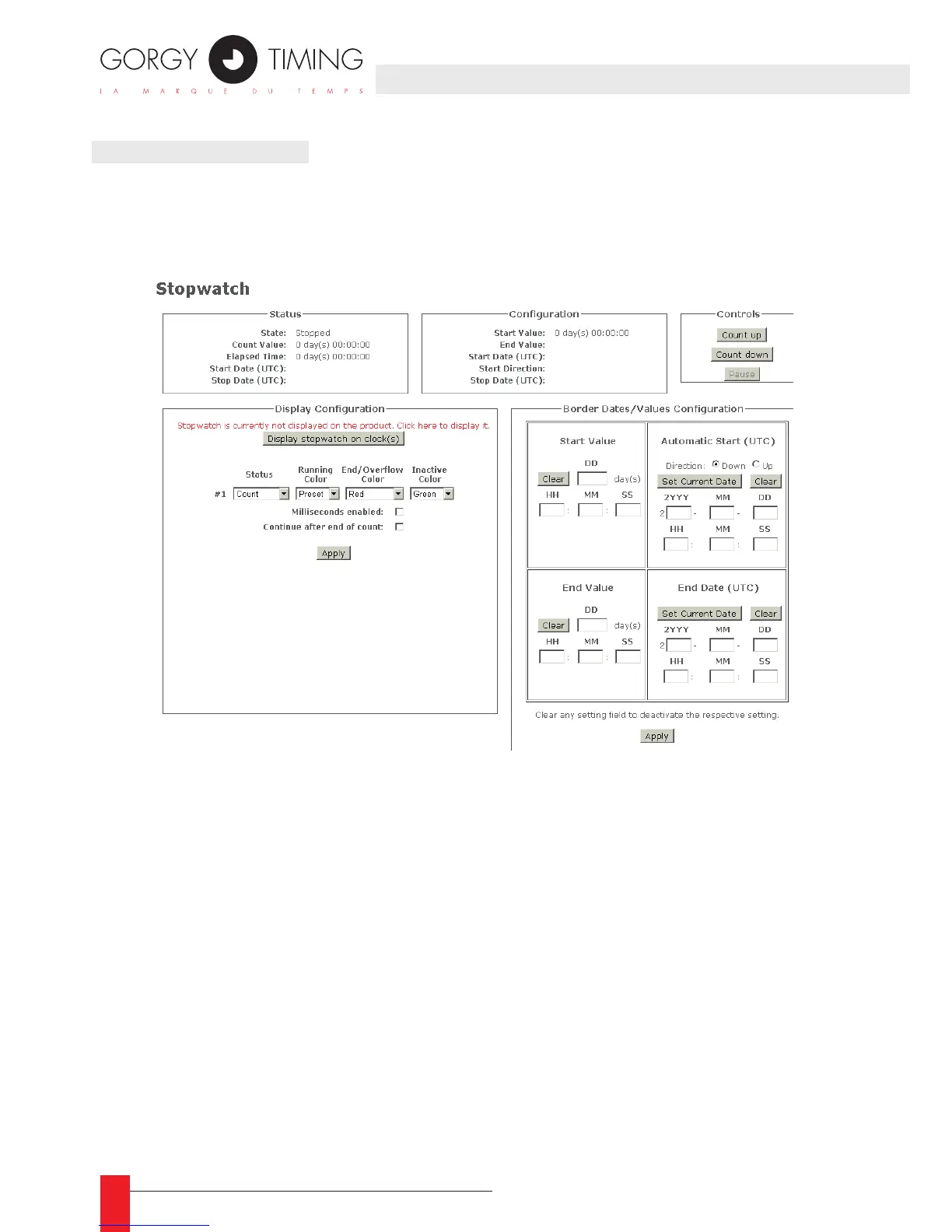
► If the clock has the timer option, you can set the timer using the web page. The
"Stopwatch" page reports an instantaneous state of the Stopwatch and allows
conguring and commanding it.
► The "Status" section gives the Stopwatch state at the last refresh.
► The "Conguration" section report the validated border dates/values conguration.
Moreover, it displays the defaults and computed dates/values.
► The "Controls" section allows to manually initiate the stopwatch basic actions.
► The "Display Conguration" section allows to choose the way the stopwatch is dis-
played on the product.
► This conguration can be applied anytime, even when the stopwatch is running.
► The button "Display/Mask stopwatch on clock(s)" is used to switch between the real
time display and the stopwatch display. This button has no incidence on the state of the
stopwatch. Indeed the stopwatch can count in background without being displayed on
the product.
► The "Border Dates/Values Conguration" section allows to choose the "Start Value" and
"End Value" as well as the "Start Date" and "End Date". This conguration can only be
applied when the stopwatch is stopped, i.e. after a reset or an end without the "Continue
after end of count" option.
► After each change, click "Apply"



 To Next Page