2.Quick Install Instructions
2.1Configuration
The G626 is supplied with USB cable. Connect the USB cable to the device and connect it with the
computer. The computer may require USB driver. It can automatically update the USB driver if not
then please download the USB driver from http://www.gosafesystem.com/downloads.asp and then
click on the G626 USB driver.
After downloading the USB driver update the USB driver and establish the connection between G626
and your computer.
Use the configuration software to configure. For further details, please refer to the documents for
configuration.
2.2 Insert SIM card
The user must arrange a SIM card with valid data plan. Before inserting the SIM card it must be
tested with your own mobile.
Insert the SIM card in your own mobile and try to send out SMS and receive SMS if it works fine
then try to connect to internet by opening any website in mobile browser.
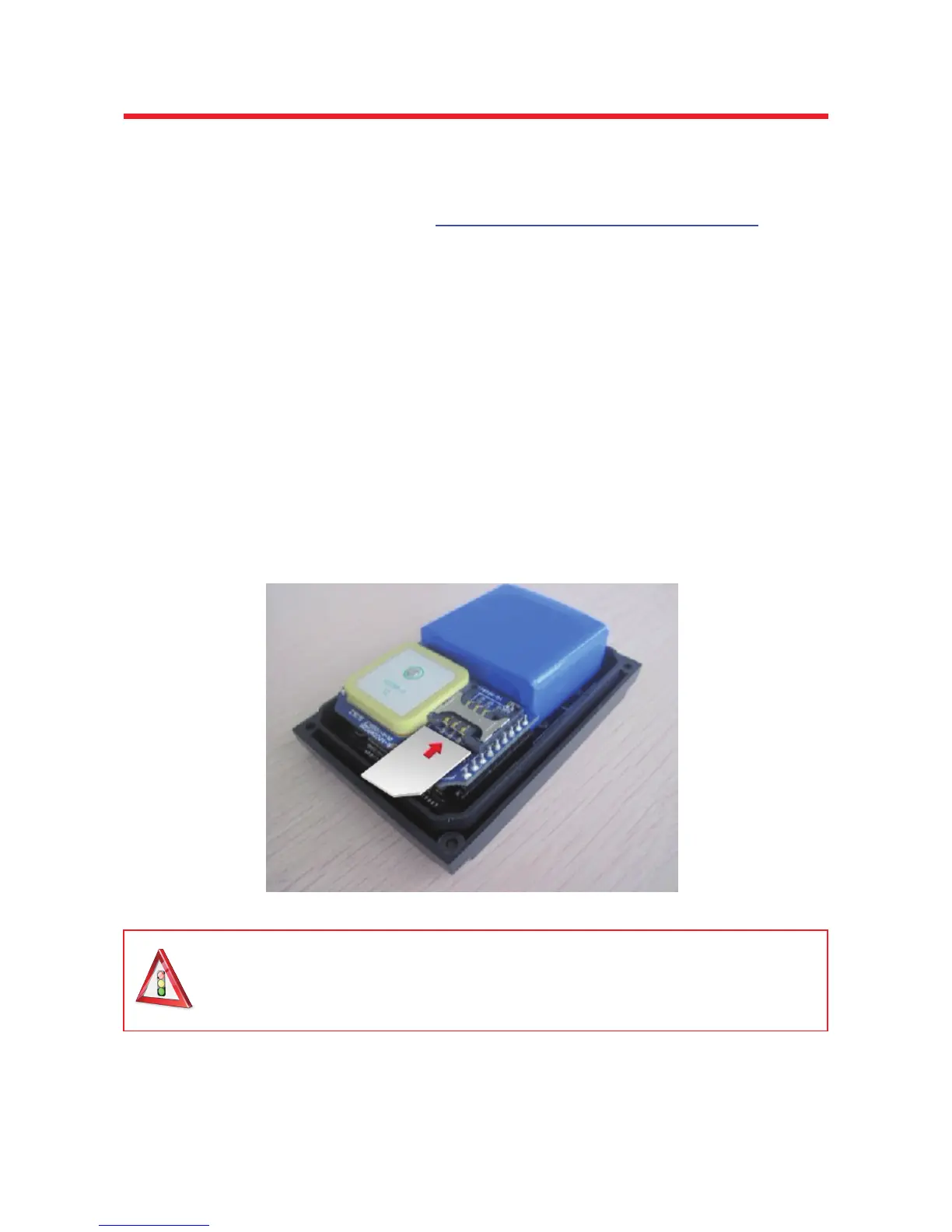
Now you can disassemble the G626 by screwing off the four screws, which are used to fasten the
enclosure carefully, and then open the enclosure carefully. Insert SIM card into the SIM card jacket
correctly according to the below picture.
Note:
Please do activate the SIM card, disable its PIN code function, and make sure
SIM card has enough balance before operating the device.
Each time before taking SIM card out of or inserting SIM card into the device, you
would better cut the power supply, or it would damage device and/or your SIM card.



 To Next Page