Advanced Features
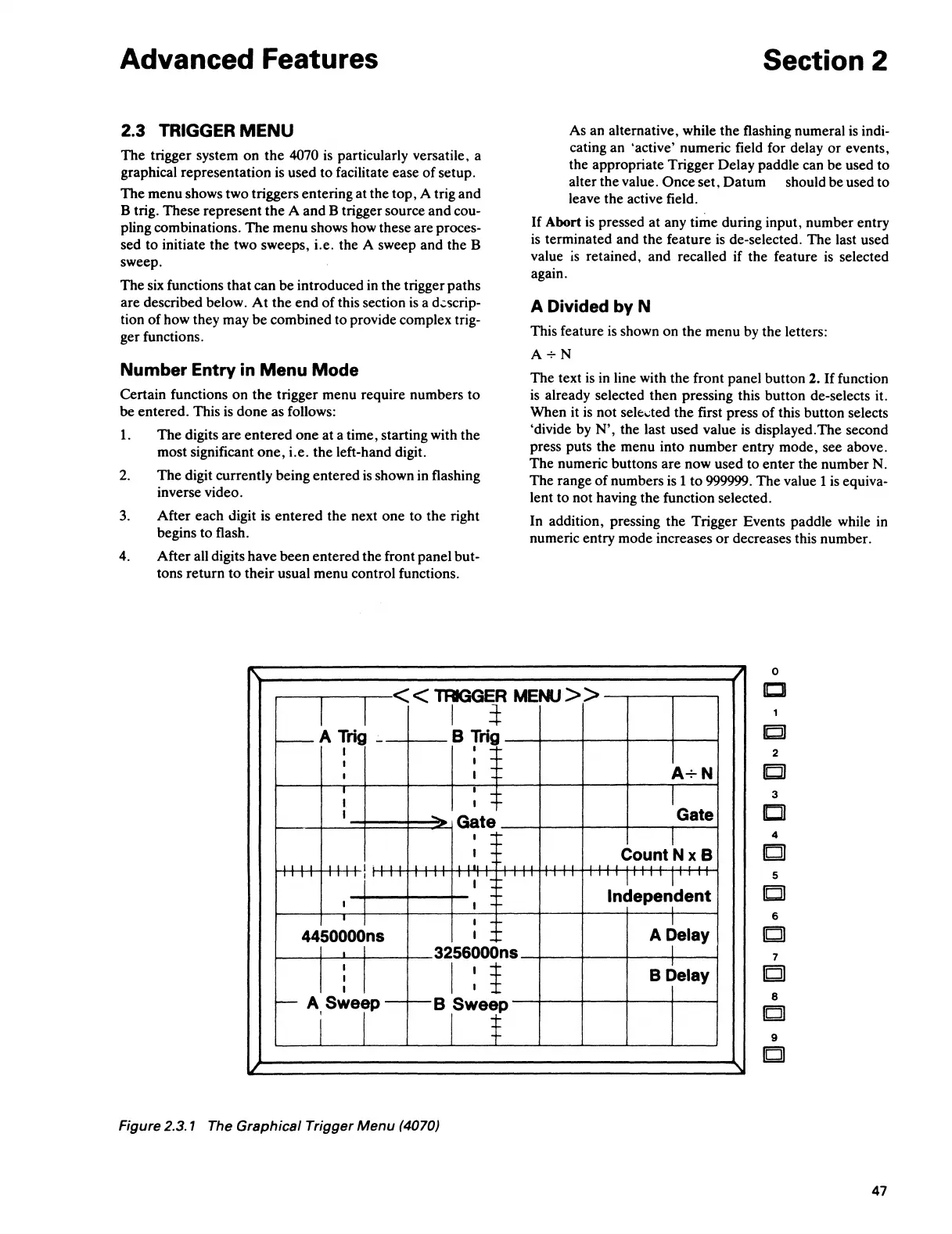
2.3 TRIGGER
MENU
The trigger system on the
4070
is
particularly versatile, a
graphical representation
is
used to facilitate ease of setup.
The menu shows two triggers entering at the top, A trig and
B trig. These represent the A and B trigger source and cou-
pling combinations. The menu shows how these are proces-
sed to initiate the two sweeps, i.e. the A sweep and the B
sweep.
The
six
functions that can be introduced
in
the trigger paths
are described below.
At
the end of this section
is
a d.;scrip-
tion of how they may be combined to provide complex trig-
ger functions.
Number Entry in
Menu
Mode
Certain functions on the trigger menu require numbers
to
be entered. This
is
done as follows:
1.
The digits are entered one at a time, starting with the
most significant one, i.e. the left-hand digit.
2.
The digit currently being entered
is
shown
in
flashing
inverse video.
3.
After each digit is entered the next one to the right
begins to flash.
4. After all digits have been entered the front panel but-
tons return to their usual menu control functions.
Section 2
As an alternative, while the flashing numeral
is
indi-
cating an 'active' numeric field for delay
or
events,
the appropriate Trigger Delay paddle can be used to
alter the value.
Once set, Datum should be used to
leave the active field.
If Abort
is
pressed at any time during input, number entry
is
terminated and the feature
is
de-selected. The last used
value
is
retained, and recalled if the feature
is
selected
again.
A Divided by N
This feature
is
shown on the menu
by
the letters:
A+N
The text
is
in
line with the front panel button 2.
If
function
is
already selected then pressing this button de-selects it.
When it
is
not sele..:ted the first press of this button selects
'divide
by
N', the last used value
is
displayed.The second
press puts the menu into number entry mode, see above.
The numeric buttons are now used to enter the number
N.
The range
of
numbers
is
1
to
999999. The value 1
is
equiva-
lent to not having the function selected.
In addition, pressing the Trigger Events paddle while
in
numeric entry mode increases
or
decreases this number.
0
I
I
<<TAGGER
MENU>>
Cll
I
l
-A
Trig
B
Trig
I
I
_,_
I
I
_,_
--
A+N
I
I
--
I
I
-
I
I I
_
....
I
....
Gate
Gate
3
a
I _._
I
-
....
I
_._
CountNxB
4
lbjJ
'''
''
l'
I
'"'
'
I I
I
I I I I I I
I I I I
,_1 I I I
II
JO
'
I
'
I
I :
5
....
Independent
_
....
I
I
_._
I
IEjJ
I
I I
....
I
6
4450000ns
I
....
A Delay
c
I
3256000ns
I
I
I
I
1
I
I
B Delay
I
I
7
[QI
,__A
Sweep
B Sweep
i I
I $ 9
c
Figure 2.3. 1 The Graphical Trigger Menu (4070)
47



 To Next Page