Troubleshooting
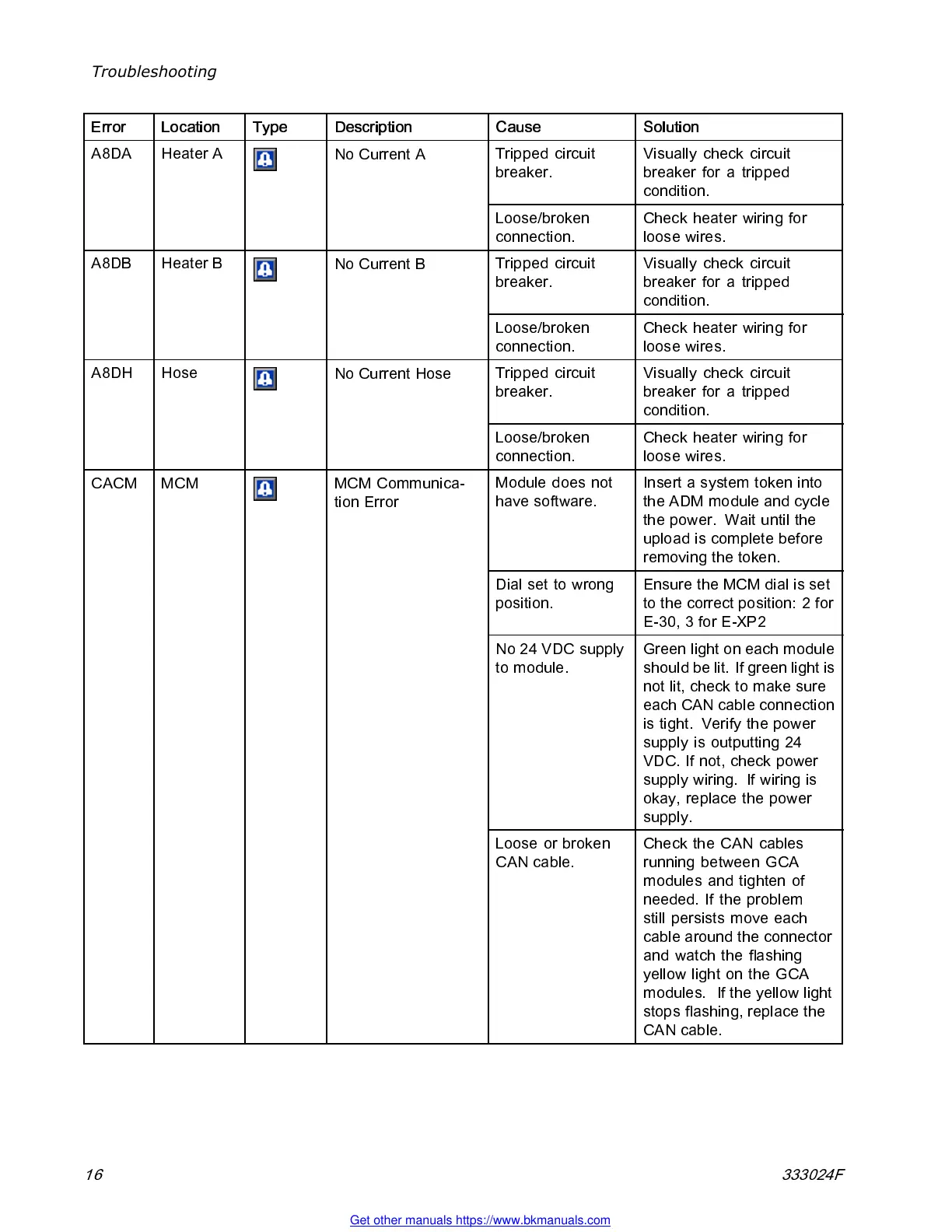
Error Location Type Description
Cause Solution
Tripped circuit
breaker.
Visually check circuit
breaker for a trip ped
con d ition.
A8DA Heater A
No Current A
Loose/broken
connection.
Check heater wiring for
loose wires.
Tripped circuit
breaker.
Visually check circuit
breaker for a trip ped
con d ition.
A8DB Heater B
No Current B
Loose/broken
connection.
Check heater wiring for
loose wires.
Tripped circuit
breaker.
Visually check circuit
breaker for a trip ped
con d ition.
A8DH Hose
No Current Hose
Loose/broken
connection.
Check heater wiring for
loose wires.
Module does not
have software.
Inse rt a system token into
the ADM module and cycle
the power. Wait until the
upload is complete before
removing the token.
Dial set to wrong
position.
Ensure the MCM dial is set
to the co rrect position: 2 for
E-30, 3 for E-XP2
No 24 VDC supply
to module.
Green light on each module
sho uld be l it. If gre en light is
not lit, check to make sure
each CAN c ab le connec tio n
is tight. Verify the power
supply is outputting 24
VDC. If not, check power
supply wiring. If wiring is
okay, replace the power
supply.
CACM MCM MCM Communica-
tion Error
Loose or broken
CAN cable.
Check the CAN cables
running between GCA
modu les a nd tighten of
needed. If the problem
still persists move each
cable around the connector
and watch the flashing
yellow light on the GCA
modu les. If the yellow light
stops flashing, replace the
CAN cab le .
16 333024F
Get other manuals https://www.bkmanuals.com



 To Next Page