EasyManua.ls Logo

Graco Reactor E-30 Series - User Manual

Graco Reactor E-30 Series
76 pages
Print Icon
To Next Page IconTo Next Page
Loading...
Repair - Parts
Electric, Heated, Plural Component Proportioner. For spraying polyurethane foam and
polyurea coatings. For professional use only.
Not approved for use in European explosive atmosphere locations.
See pages 3 and 4 for model information, including
maximum working pressure and approvals.
Important Safety Instructions
Read all warnings and instr uctions in this
manual. Save these instructions.
312066ZAD
EN
WLE
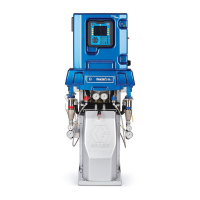
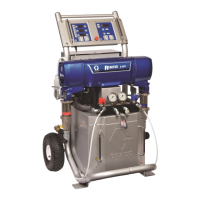
Model E-XP1 Shown

Table of Contents

Other manuals for Graco Reactor E-30 Series

Questions and Answers

  • M
    Michelle LiNov 24, 2025
    Why does my Graco Industrial Equipment have no hose heat or low hose heat?
    • M
      Michele RossNov 24, 2025
      Several factors can cause low or no hose heat: * Loose electrical connections: Check and repair hose electrical connections. * Tripped circuit breakers: Reset breakers CB1 or CB2. * Hose zone: Ensure the hose zone is turned on by pressing the zone key. * Temperature settings: Verify A and B temperature setpoints and the hose temperature setpoint are appropriately set and increase if needed. * Temperature control board: Check if the board LED is blinking; if not, check power connections. If the board has power but the LED isn't blinking, replace the board. * Flow rate: Use a smaller mix chamber or decrease pressure if the flow is too high. * FTS installation: Install the FTS if it is not installed. * Heat-up time: Allow sufficient time for the hose to heat up, or preheat th...
  • D
    David HicksAug 23, 2025
    What to do if my Graco Industrial Equipment motor does not operate?
    • T
      Thomas ParkerAug 23, 2025
      If the motor isn't working, consider these potential causes: * Loose connections: Check the connections at the motor control board. * Circuit breaker: Reset the breaker (CB5) and check the voltage output. * Worn brushes: Inspect the brushes and replace if shorter than 0.7 in (17 mm). * Brush springs: Realign or replace broken or misaligned brush springs. * Brush holder: Clean the brush holder if brushes or springs are binding. * Armature: Replace the motor if the armature is shorted. * Motor commutator: Have the motor commutator resurfaced if damaged. * Motor control board: Replace the board if it's damaged.
  • K
    Kimberly KhanAug 27, 2025
    What causes erratic display on Graco Industrial Equipment; display turns on and off?
    • J
      jessicapotterAug 27, 2025
      An erratic display that turns on and off may be due to: * Low voltage: Ensure the input voltage is within specifications. * Poor display connection: Check cable connections and replace any damaged cables. * Damaged display cable: Clean corroded connections or replace the cable if damaged. * Ungrounded display cable: Ground the cable. * Excessively long display extension cable: Ensure the cable does not exceed 100 ft (30.5 m).
  • S
    samuel38Aug 27, 2025
    Why is my Graco Industrial Equipment hose temperature exceeding the set point?
    • R
      Rebecca MahoneyAug 28, 2025
      If the hose temperature exceeds the set point, consider these causes: * Overheating heaters: Check primary heaters for thermocouple problems or a failed element. * Faulty thermocouple connections: Ensure FTS connections are snug and clean. Also, check the connections of thermocouples to the long green plug on the heater control board, cleaning off any debris and re-plugging the wires and connector. * Damaged insulation: Ensure the hose bundle has adequate insulation evenly covering the entire length and connection joints.
  • J
    Jeffrey OconnorAug 29, 2025
    How to troubleshoot a Graco Industrial Equipment fan that is not working?
    • W
      wallerbridgetAug 29, 2025
      If the fan isn't working, check for these potential issues: * Blown fuse: Replace the fuse. * Loose wire: Check the wiring. * Defective fan: Replace the fan.
  • K
    Kevin StoutSep 23, 2025
    What to do if there is no pressure on one side of Graco Industrial Equipment?
    • R
      rriosSep 23, 2025
      If there is no pressure on one side, check if fluid is leaking from the heater inlet rupture disk (314). If so, check if the heater (2) and PRESSURE RELIEF/SPRAY valve (SA or SB) are plugged; clear them if necessary. Replace the rupture disk (314) with a new one, and do not replace it with a pipe plug.
  • H
    hcollierSep 17, 2025
    What to do if temperature display does not illuminate on Graco Industrial Equipment?
    • L
      luisdavenportSep 17, 2025
      If the temperature display does not illuminate: * Check cable connections. * Clean corroded connections or replace the cable if damaged. * Swap the display connection to the motor control board with the connection to the heater control board to see if the heater control board is causing the problem. Otherwise, the display cable or display is failing.
  • K
    Keith EllisSep 18, 2025
    What to do if pressure display does not illuminate on Graco Industrial Equipment?
    • J
      john39Sep 18, 2025
      If the pressure display does not illuminate: * Check the cable connections. * Clean corroded connections or replace the cable if damaged. * Swap the display connection to the motor control board with the connection to the heater control board to see if the motor control board is causing the problem. Otherwise, the display cable or display is failing.
  • M
    Mrs. Jessica King DDSSep 7, 2025
    What to do if Graco Industrial Equipment primary heater(s) does not heat?
    • E
      Eric HowellSep 7, 2025
      If the primary heater(s) do not heat, check the following: * Heat turned off: Press the A or B zone keys to turn the heat on. * Temperature control alarm: Check the temperature display for a diagnostic code. * Thermocouple signal failure: Check for a disconnected Fluid Temperature Sensor (FTS) or thermocouple.
  • A
    Arthur JohnsonSep 5, 2025
    What causes low pump output in Graco Industrial Equipment?
    • D
      Dr. Melissa WoodardSep 5, 2025
      Low pump output can be attributed to: * Obstructions: Clear any obstructions in the fluid hose or gun, and use a hose with a larger ID. * Pump valves: Consult the pump manual regarding worn piston or intake valves in the displacement pump. * Pressure setpoint: Reduce the pressure setpoint to increase output.

Summary

Safety Instructions

Electrical Safety

Hazards and precautions related to electricity, including grounding and proper usage.

Material Hazards

Risks from toxic fluids, fumes, skin injection, and handling hazardous materials.

Operational Hazards

Risks associated with fire, explosion, equipment misuse, and moving parts.

Material Handling and Safety

Isocyanate Handling

Precautions and safety measures for working with isocyanate-based materials.

Diagnostic Codes

Temperature Control Codes

Troubleshooting codes and procedures for temperature control system errors.

Motor Control Codes

Troubleshooting codes and procedures for motor control system errors.

Communication Codes

Troubleshooting codes and procedures for communication errors between modules.

Troubleshooting Guide

Common Problems and Solutions

Addresses common issues like no power, motor failure, and pump output problems.

Reactor Electronics Troubleshooting

Display Issues

Diagnosing and resolving problems related to the unit's displays.

Heater System

Primary Heaters

Troubleshooting and maintenance procedures for the primary heaters.

Hose Heat System

Troubleshooting and maintenance procedures for the hose heat system.

Repair Procedures

Preparation for Repair

Essential steps and safety precautions before commencing any repair work.

Pressure Relief

Critical safety procedure for safely relieving system pressure before maintenance.

Maintenance and Flushing

Flushing Equipment

Step-by-step instructions for flushing the equipment thoroughly.

Motor Brushes

Electrical Component Tests

Electric Motor Service

Motor Control Board

Motor Control Board Operation and Connectors

Understanding board indicators, DIP switches, and connector pinouts.

Sensors and Fan Service

Temperature Control Module

Temperature Control Testing

Primary Heater Elements

Thermocouple Service

Over-Temperature and Hose Heat

Fluid Temperature Sensor (FTS) Cables

Fluid Temperature Sensor (FTS)

FTS Test and Removal

Instructions for testing and removing the Fluid Temperature Sensor.

Transformer Service

Display and Controls Service

Inlet Fluid Strainer

Pump Lubrication System

Sub Assemblies

Fluid Heater Specifications

Single Zone Fluid Heater

Display Module Components

Temperature Control Module Components

Motor Control Module Components

Fluid Manifold Components

Circuit Breaker Module Diagrams

Circuit Breaker Module Diagrams

Circuit Breaker Module Parts List

Technical Data

Key Technical Specifications

Performance data including pressure, temperature, output, voltage, amperage, and sound levels.

Graco Reactor E-30 Series Specifications

General IconGeneral
BrandGraco
ModelReactor E-30 Series
CategoryPaint Sprayer
LanguageEnglish

Related product manuals