Repair
Replace Power Supply
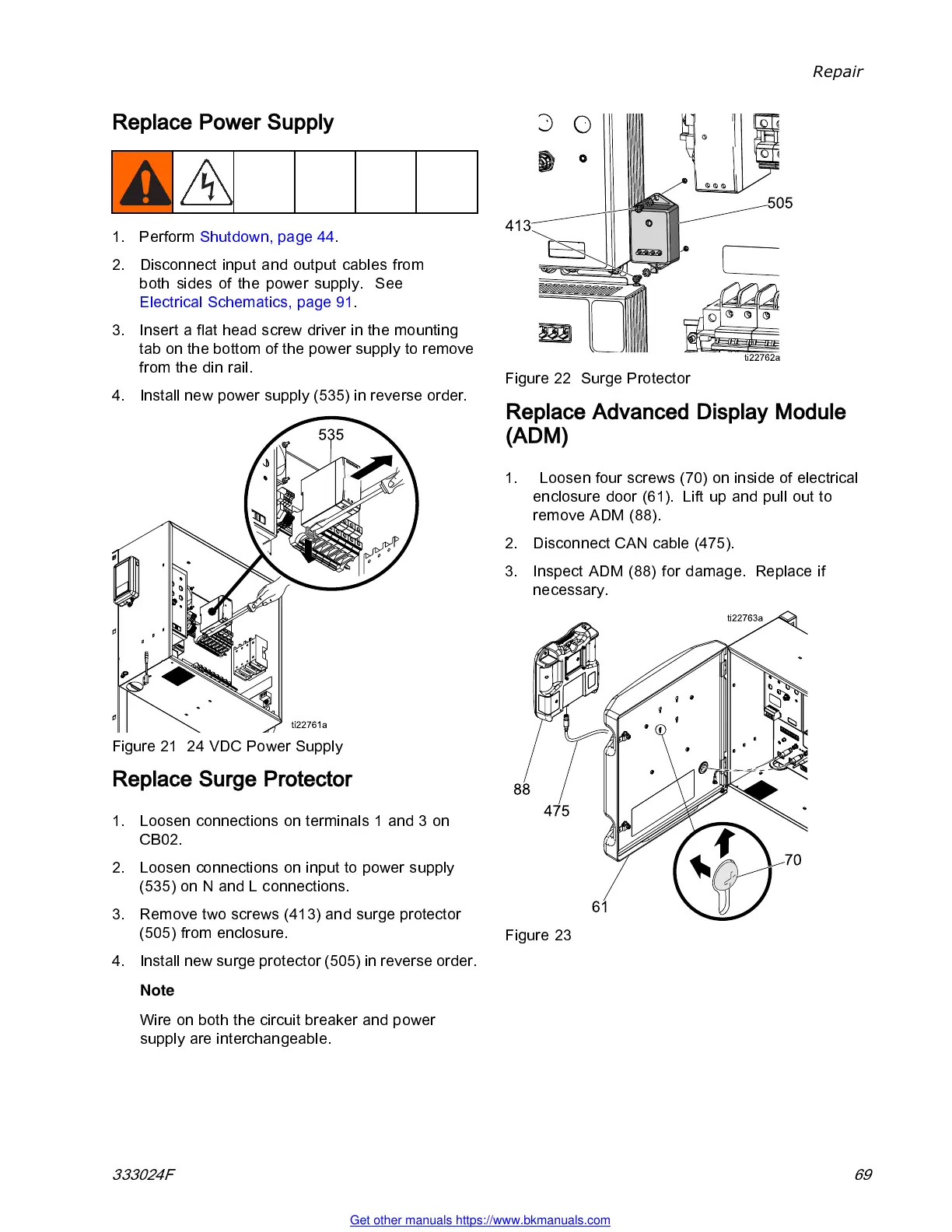
1. Perform Shutdown, page 44.
2. Discon nec t input and output cables from
both sides of the power supply. See
Electrical Schematics, page 91.
3. Insert a flat head screw driver in the mounting
tab on the bottom of the power supply to remove
from the din rail.
4. Install new power supply (535) in reverse order.
Figure 21 24 VDC Power Supply
Replace Surge Protector
1. Loosen connections on terminals 1 and 3 on
CB02.
2. Loosen connections on input to power supply
(535) on N and L con nections.
3. Remove two screws (413) and surge protector
(505) from enclosure.
4. Install new surge protector (505) in revers e order.
Note
Wire on both the circuit breake r and power
supply are interchangeable.
Figure 22 Surge Protector
Replace Advanced Display Module
(ADM)
1. Loosen four screws (70) on inside of electrical
enclosure door (61). Lift up and pull out to
remove ADM (88).
2. Discon nec t CAN cable (475).
3. Inspect ADM (88 ) for damage . Replace if
necessary.
Figure 23
333024F 69
Get other manuals https://www.bkmanuals.com



 To Next Page