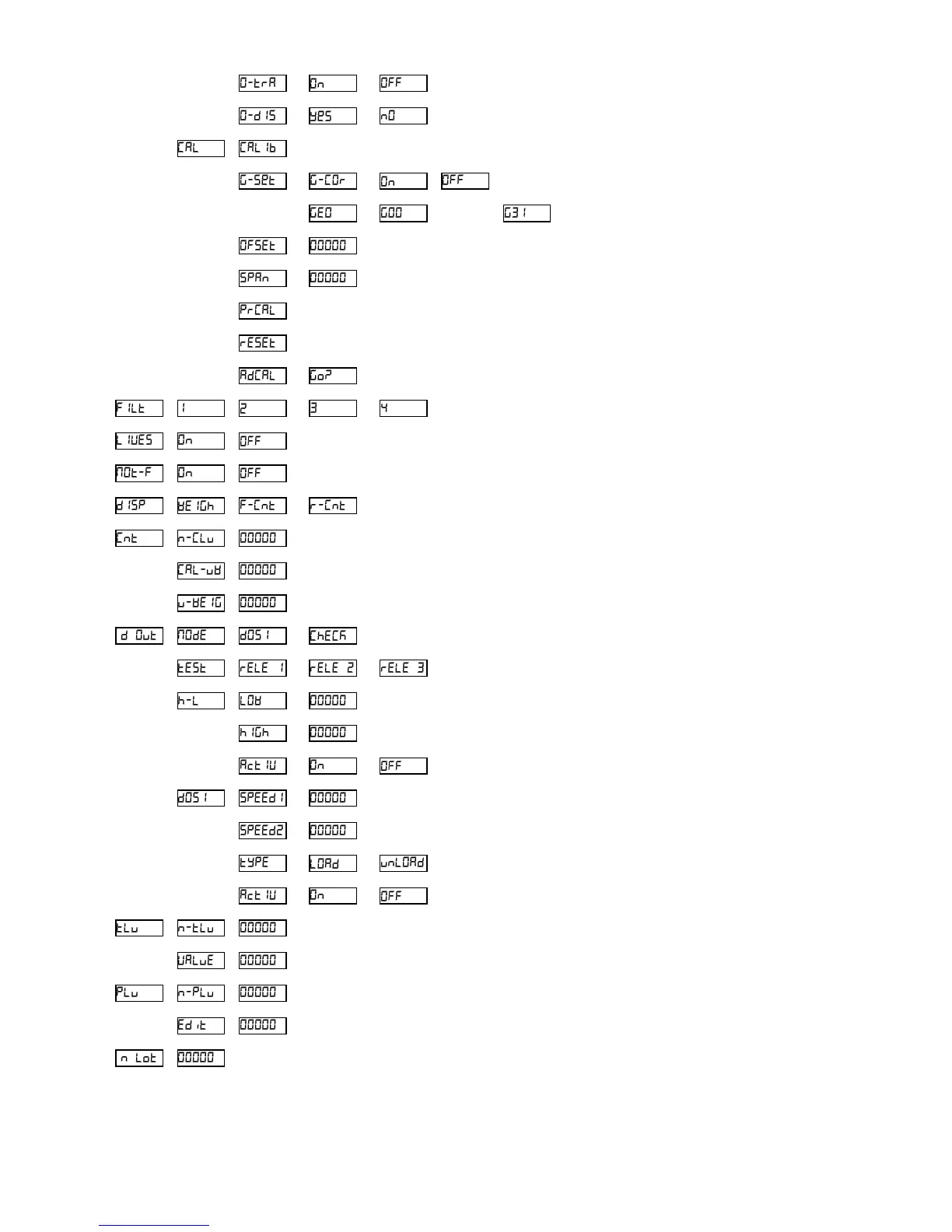
Activating zero-tracking device
Procedure for calibrating the scale
Activating automatic correction depending on geographical location
Selecting geographical location
Zero value in AD/C counts
Conversion factor of AD/C counts to measurement units
Printing of the configuration
Resetting the configuration to default values
AD/C pre-calibration procedure
Additional filtering for weighing moving objects or live animals
Activating movement filter
Selecting information to be viewed on the display
Piece counter: Selecting unit weight record (1-20)
Piece counter: Calculating unit weight from a sample.
Piece counter: Manually inputting the factor for calculating unit weight
Digital outputs: Operating mode
Digital outputs: ON/OFF test for each relay
Checkweigher mode: Lower limit
Checkweigher mode: Upper limit
Checkweigher mode: Activating limit control
Dosage mode: Set point for speed 1
Dosage mode: Set point for speed 2
Dosage mode: Selecting the “filling” or “emptying” mode of a receptacle.
Dosage mode: Activating dosage mode
Tares in memory: Selecting record number (1-20)
Tares in memory: Tare value for the selected record number
PLU memory: Selecting record number (1-85)
PLU memory: Alphanumerical description associated to the selected record
Batch number to be printed on the ticket
NOTE: The • symbol in the above table shows the default value for each
configuration parameter.



 To Next Page