15.1. Settings menu
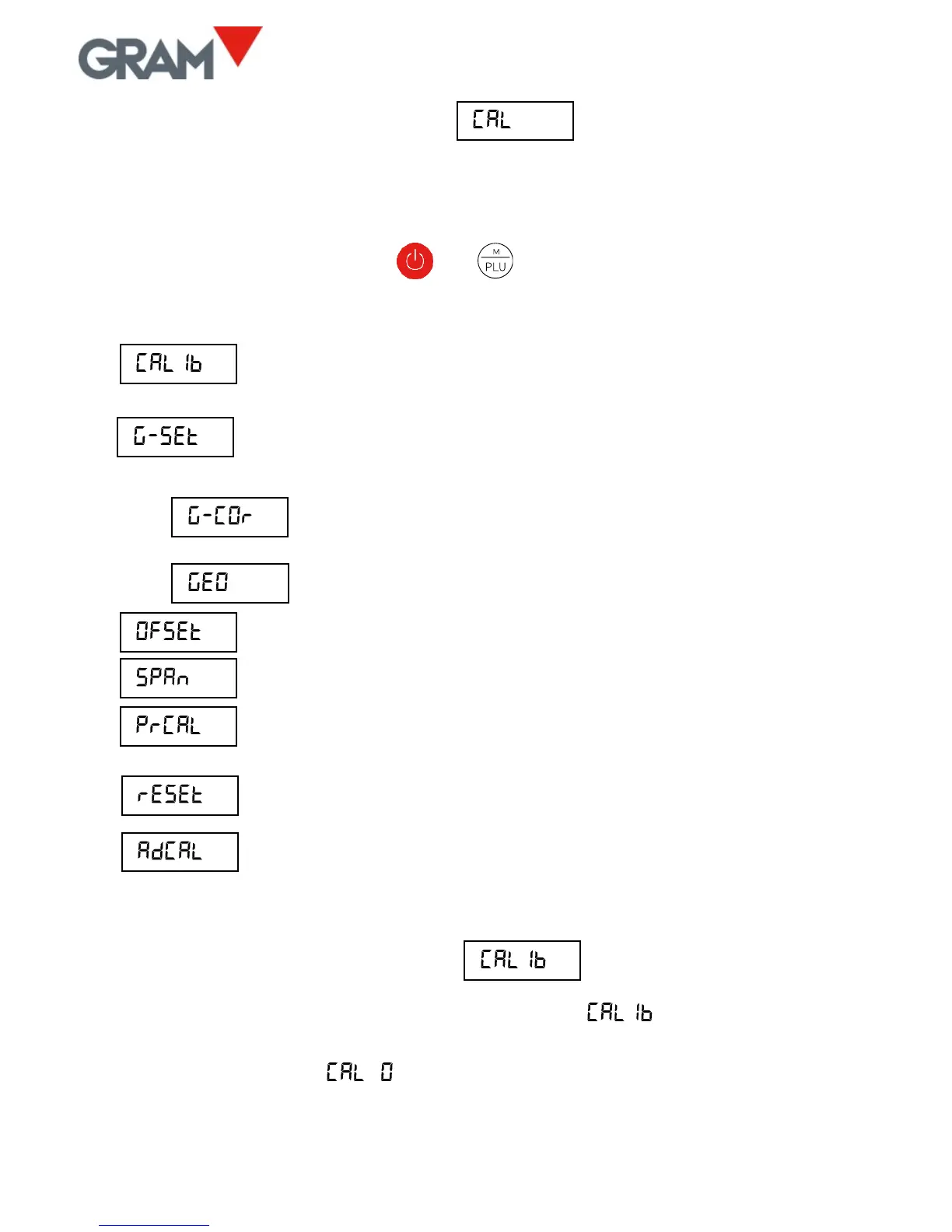
The settings menu can be directly accessed when switching on the unit. To do
this, switch on the unit and, while the LCD test appears with all segments on,
at the same time press on the and keys (a short press, not
sustained).
Calibration using a known weight (automatically sets the
initial zero and pending calibration).
Gravity adjustment depending on the scale’s geographical
location:
ON / OFF correction (activates/deactivates automatic
correction according to geographical location).
Geographical location code (see attached table).
Manual input (keypad) of the initial zero (in ADC accounts).
Manual input of the span slope, 5 digits.
Prints a ticket with the configuration and calibration settings
in the device’s memory.
Resets all configurations to factory settings.
ADC span pre-calibration. Only to be used at factory using the
correct load cell reference.
15.2. Scale calibration
1. With the platform free of any load, select the “ ” option.
2. The display will show that the initial zero value is in progress with the
blinking message “ ”.



 To Next Page