15
USING THE FRIDGE/FREEZER
1
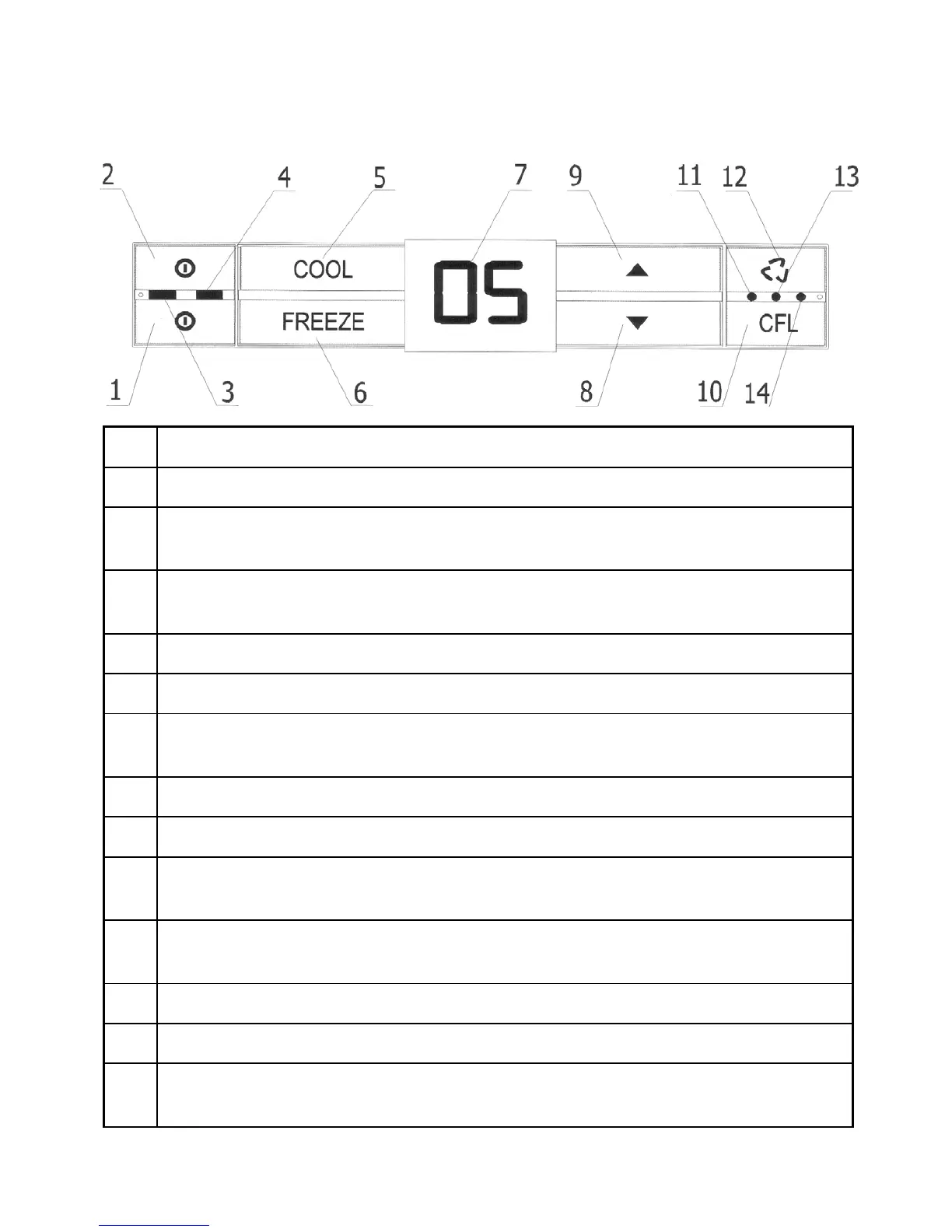
Freezer’s ON/OFF button.
2
Refrigerator’s ON/OFF button.
3
Green light-emitting LED signalling that the refrigerator’s chamber
has been switched on.
4
Blue light-emitting LED signalling that the freezer’s chamber has
been switched on.
5
“COOL” button.
6
“FREEZE” button.
7
Display showing the set temperature, time of super freezing, and
alarm status codes.
8
Button for displaying real temperature inside freezer’s chamber.
9
Button for displaying real temperature inside fridge’s chamber.
10
Function button for quick freezing, quick cooling and adjustment
of the display light.
11
Blue light-emitting LED signalling that the quick cooling function
has been switched on.
12
The button turning the vent on and off.
13
The control light (yellow) signals initiation of the vent function.
14
Blue light-emitting LED signalling that the quick freezing function
has been switched on.



 To Next Page