The LiBase GNSS Receiver is a sophisticated surveying and mapping instrument designed for high-precision positioning applications. Manufactured by GreenValley International, this device offers a range of functionalities for various field operations, including point surveying, stakeout, and data management.
Function Description:
The LiBase GNSS Receiver primarily functions as a Real-Time Kinematic (RTK) system, capable of receiving and processing differential data for accurate positioning. It supports multiple operating modes, including Built-in Radio Mode, External Radio Mode, Host Network Mode, and CORS Mode, providing flexibility for different field conditions and data transmission requirements.
In Built-in Radio Mode, the receiver can act as a base station, transmitting differential corrections via its internal radio, or as a rover, receiving these corrections. The default frequency for this mode is 460.050MHz, though custom frequencies can be configured.
The External Radio Mode allows for the use of an external radio for transmitting or receiving differential data, offering increased power and range compared to the built-in option. This mode also supports various channels with corresponding frequencies, such as 455.05MHz, 460.05MHz, and 463.05MHz.
Host Network Mode utilizes a built-in SIM card for network-based differential corrections. The receiver connects to a server (default IP: 211.144.120.104, port: 8888) and uses its SN number as the source list, with CMNET as the APN. This mode enables the base station to transmit corrections over the network, and the rover to receive them.
CORS Mode (Continuously Operating Reference Station) allows the receiver to connect to a CORS network for differential data. This involves configuring the data link (host network or handbook network), selecting CORS as the communication mode, and entering server details (name, IP address, port, username, and password) to obtain the source list.
Beyond basic positioning, the LiBase receiver supports advanced surveying functions:
- Parameter Calculation: Essential for coordinate system parameter conversion, this function requires at least three evenly distributed control points within the survey area. It allows for manual or automatic pairing of known control points with measured GNSS points, enabling plane correction and elevation fitting.
- Point Survey: This feature allows users to collect coordinates of points, with options for adjusting rod height and enabling tilt measurement for increased efficiency and accuracy in challenging environments.
- Stakeout: Users can stake out points by entering coordinates directly or importing them from a library. The display method for prompt data (e.g., east-west, north-south, front-back, left-right distances, and elevation) can be customized.
- CAD Stake: This function integrates CAD drawings (dxf or dwg format) into the stakeout process. Users can select points or lines from the drawing to stake out, with options for setting starting point mileage, offset distance, and stakeout intervals for lines.
- Curve Stake: Designed for staking out curves, this feature allows users to define curves by selecting a line type and entering parameters such as starting point mileage, coordinates, azimuth, line length, radius, and deflection.
- Data Import/Export: The device facilitates data management by allowing import of various file formats and export of measured data in CSV, TXT, and DAT formats. More detailed data can be exported using "More Formats" options.
Important Technical Specifications:
- Differential Light: Flashes orange once per second in RTK mode when differential data is sent/received.
- Satellite Light: Flashes quickly when searching for satellites; flashes green N times every 5 seconds when N satellites are found.
- Display Panel: Shows receiver status, WIFI/4G status (on/off, signal strength), number of satellites (involved in workflow, tracking), PDOP satellite position accuracy, DC power supply icon, and battery status (A and B). It also displays data link, communication protocol, mode, and frequency status during configuration.
- Function Key (FN): Used for page-turning on the LED display panel.
- Power Button: Switches the machine on/off, confirms functions. A 4-second press in power-on state initiates shutdown with a "shutdown" display and continuous buzzer sound.
- Built-in Radio Frequency: Default 460.050MHz.
- Host Network IP/Port: Default 211.144.120.104:8888.
- Control Point Accuracy for Parameter Calculation: Horizontal residual should be within 2 cm.
- Scale Factor for Two Control Points: 0.9999 < scale factor < 1.0001.
Usage Features:
- User-Friendly Interface: The device is operated via a handbook (LP1) with a clear display and intuitive menu navigation for connecting devices, configuring modes, and performing survey tasks.
- Flexible Mode Configuration: Users can easily switch between built-in radio, external radio, host network, and CORS modes to adapt to different project requirements and available infrastructure.
- Customizable Settings: Frequencies for radio modes, display methods for stakeout data, and coordinate conversion methods for parameter calculation can be customized.
- Tilt Measurement: An optional feature that allows for inclination measurement, improving efficiency in situations where the rod cannot be perfectly vertical. It requires initialization following on-screen instructions.
- Data Management: Integrated data import and export capabilities streamline workflow, allowing for easy transfer of project data to and from the device.
- Project Management: The system supports creating and managing multiple projects, each with its own coordinate system and projection settings.
- Device Registration: The receiver requires registration to ensure continued functionality. This involves entering a registration code, which can be obtained by contacting sales or scanning a QR code.
Maintenance Features:
- Technical Support: GreenValley International provides technical services and upgrade policies from the date of purchase. Support can be reached via phone (+1(510)345-2899) or email (info@greenvalleyintl.com).
- Firmware Updates: Users can access the latest developments and technical information, including potential firmware updates, from the GreenValley International website (www.greenvalleyintl.com).
- Recalibration: The receiver may require recalibration if the base station is re-erected, the tripod is moved, or the base station receiver restarts. This involves collecting a GNSS point at a known control point and applying the calibration.
- Troubleshooting Guide: The manual includes a section on common faults and their disposing methods, such as issues with power supply, battery, differential data, network mode stability, and configuration parameters.
- Warranty: The main operating system of LiBase is guaranteed for 1 year, and accessories for 3 months. Warranty recalculation applies for replacements due to quality problems or paid repairs.
- Environmental Responsibility: Users are advised to hand over invalid products and accessories to qualified waste recycling organizations for disposal.
- Precautions:
- Waterproof Treatment: GNSS receiver must be placed in an outdoor, open-air environment with good ventilation.
- Physical Handling: Avoid dropping the product or subjecting it to strong shocks.
- Cable Connections: Do not plug or unplug connecting cables (especially serial ports) when the power is on. Connect cables strictly according to the manual, pinching the root of the plug for seven-core data cables.
- Power Supply: Adhere to equipment power supply requirements.
- Overheating: The transmitting station may overheat during long usage; avoid unnecessary coverings and maintain ventilation. Keep a distance of over 2 meters from the transmitting antenna to avoid radiation.
- Lightning Protection: Implement appropriate lightning protection measures for outdoor antenna installations.
- Damaged Cables: Replace damaged cables promptly to prevent further damage and ensure proper operation.
- Warranty Void: Damage due to force (lightning strike, high voltage, collision) or unauthorized disassembly voids the warranty.

 Need help?
 General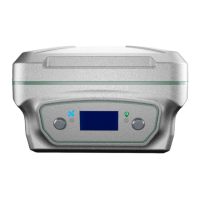

 To Next Page