01
Product Introductions
02
PAGE
03
PAGE
Familiarity with the functions of the buttons on the receiver panel and the
meanings of the indicator lights are of great help for the correct use of the
equipment and can greatly improve the efficiency of project implementa-
tion.
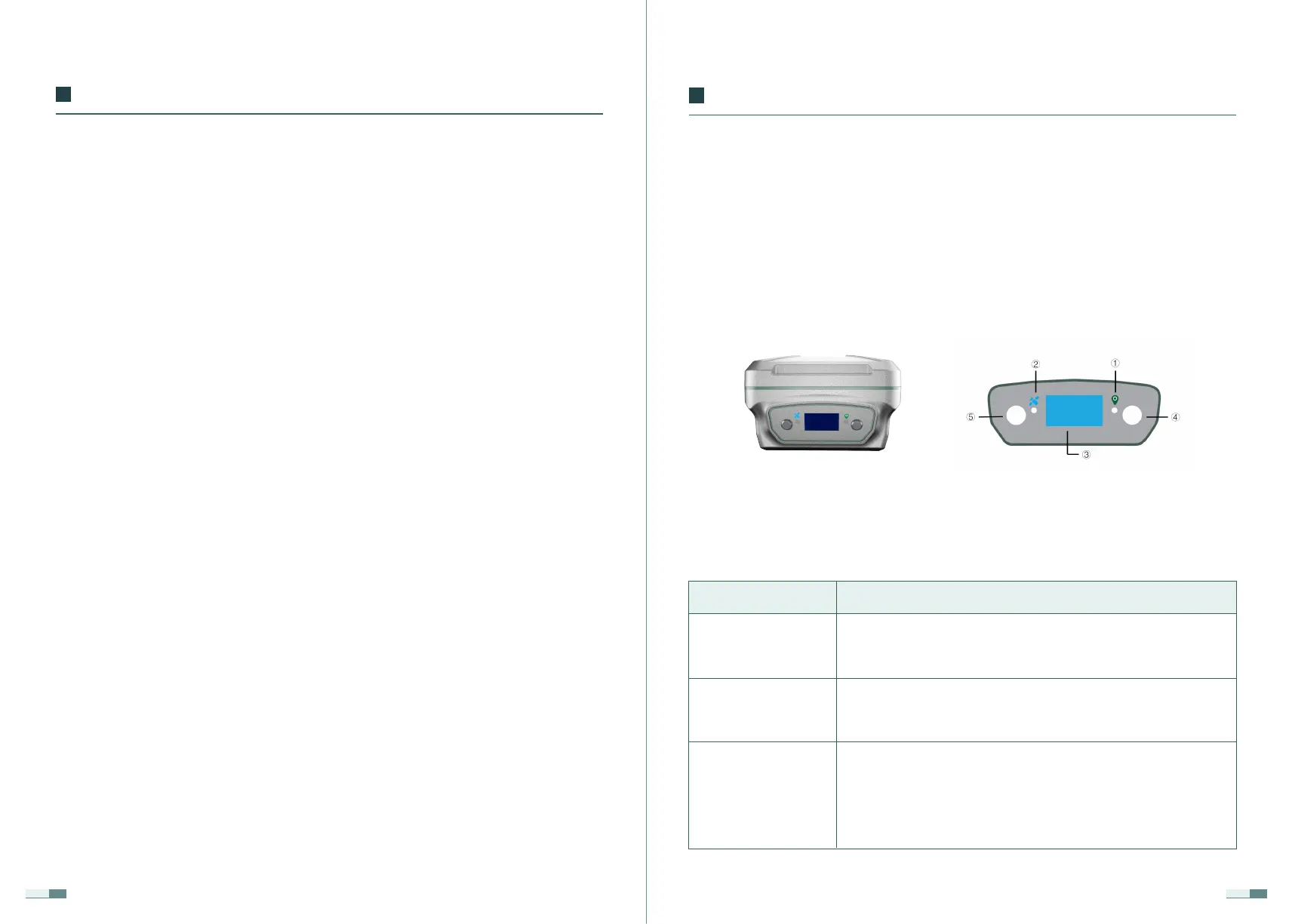
LiBase GNSS Receiver
1.1 Receiver Details
③ Display panel
① Differential light
② Satellite light
In RTK mode, the differential data is sent and received,
and the orange differential signal light flashes once per
second.
flashing quickly when searching for satellites; when N
satellites are found, the green LED light flashes N times
every 5 seconds;
First page:
The left side of the first row displays the receiver status,
and the receiver is configured through the panel or the
handbook, and the receiver displays the status; the right
side of the first row displays the WIFI and 4G status; WIFI
off/on, 4G signal strength;
Part Indication/Function
should pay attention to waterproof treatment, and the GNSS receiver must
be placed in the outdoor open-air and open environment when using or
testing.
·Be careful not to drop the product on the ground or take any strong direct
shocks.
·Do not plug or unplug any connecting cables such as serial ports when the
power is turned on.
·Please connect your device strictly according to the requirements stated in
the manual. For cables such as seven-core data cables, you need to pinch
the root of the plug and gently plug it in and pull it out.
·When supplying power to this product (system), pay attention to the power
supply requirements of the equipment.
·The transmitting station may overheat during long periods of usage. Please
be careful to avoid burns. In addition, you must avoid or reduce unneces-
sary coverings on the surface of the station, and maintain a good ventilation
environment.
·When using the transmitting station for a long time, personnel should keep
a distance of more than 2 meters from the transmitting antenna to avoid
radiation.
·When the antenna is installed outdoors, users should take appropriate
lightning protection measures to prevent lightning strikes.
·Please do not continue to use the connected cables after they are dam-
aged. Please purchase and replace the new cables in time to avoid unneces-
sary damage and affect the use effect.
·If the equipment is damaged due to force (lightning strike, high voltage,
collision), it no longer belongs to the scope of our company's free mainte-
nance policies.
·Please do not disassemble the casing of this product by yourself, other-
wise, the warranty will not be granted.
Introduction


 To Next Page