04
PAGE
05
PAGE
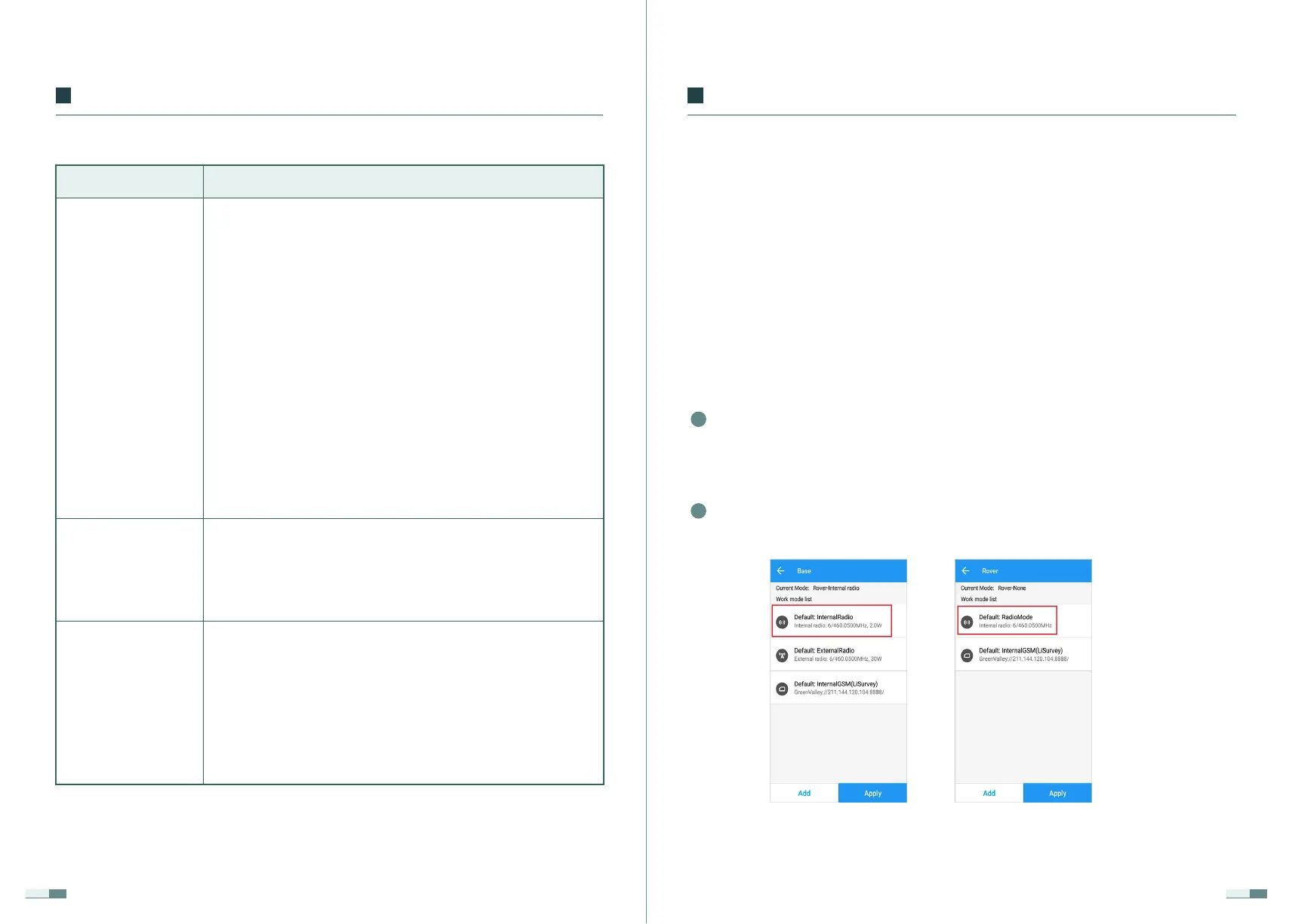
Connect the handbook to the rover receiver, click (Rover), select the
default: radio receiver differential, and enable.
2
Connect the handbook to the LiBase receiver, click (Base Station), select
default: use the built-in radio to start the base station, enable, after the
base station is successfully enabled, the status is displayed as the base
station.
1
2.1 Receiver Connection
2.2 Mode Settings
2.2.1 Built-in Radio Mode
(Device) → (Connect Device) → (Target Device), start searching for the target
device, select the device to be connected, and connect the device success-
fully.
The frequency set in the default mode is 460.050MHz. If there is no other
Receiver Connection and Mode Settings
02
③ Display panel
④ Function key
⑤ Power button
The second line shows the number of satellites, the left is
the number of satellites involved in the current workflow,
and the right is the number of tracking satellites;
The left side of the third row displays the PDOP satellite
position accuracy value, the right side displays the DC
power supply icon, and the icon does not display if there
is no DC power supply;
The fourth line shows the battery status of battery A and
battery B;
The second page:
When configuring the receiver through the panel or
configuring the receiver in different modes, the data link,
communication protocol, mode, and frequency display
status;
page three:
Smart base station, radio configuration, clear memory,
static switching, WIFI control, language selection, power-on
auto-start configuration, restore factory settings and exit
settings and other functions.
Press the FN key to perform the page-turning operation of
the LED display panel.
Press this button to switch on or off the machine or to
confirm a function;
Press this button to turn on the power in the off state, all
the lights will be on, and they will turn off after the
self-test is completed;
In the power-on state, press and hold this button for 4
seconds to turn off, the display indicates "shutdown", and
the buzzer continues to sound.
Part Indication/Function
01
Product Introductions


 To Next Page