06
PAGE
07
PAGE
Receiver Connection and Mode Settings
02
The frequency set in the default mode is 460.050MHz. If you need to modify
the transmission frequency of the external radio, you can change it on the
external radio. After modification, the mobile station selects the corre-
sponding channel to receive the difference.
CDL plug-in radio "channel-frequency comparison table"
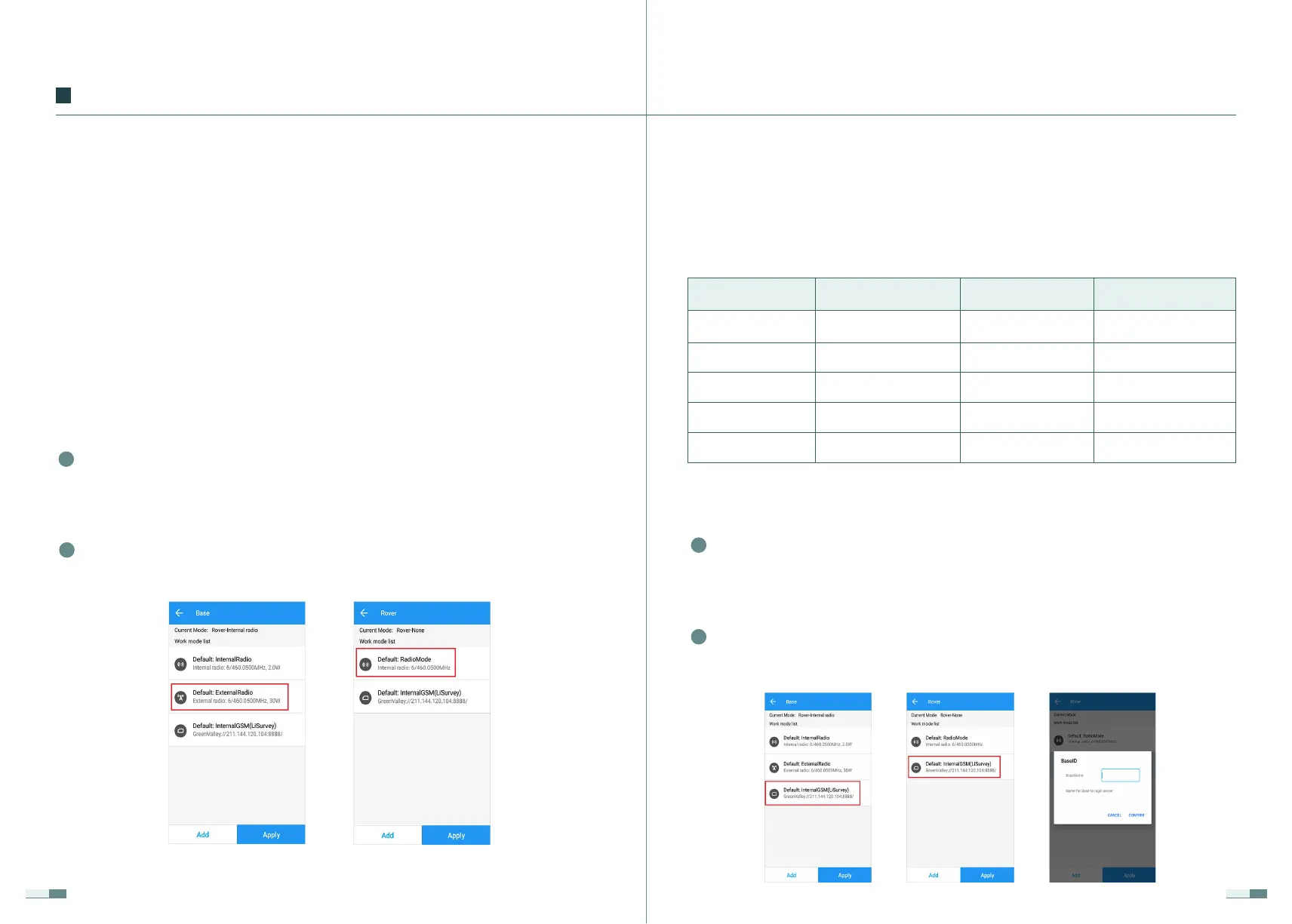
2.2.3 Host Network Mode
Connect the handbook to the rover receiver, click (Rover), select the
default: receiver network service difference, enable, and the base
station name fills in the SN number of the base station receiver.
2
Connect the handbook to the LiBase receiver, click (Base Station), select
Default: Receiver network service difference, enable, after the base
station is successfully enabled, the status is displayed as the base
station.
1
Custom
Channel
Custom 5
6
7
8
9
1 455.05
456.05
457.05
458.05
459.05
460.05
461.05
462.05
463.05
2
3
4
Frequency(MHz)
Frequency(MHz)
Channel
Connect the handbook to the rover receiver, click (Rover), select the
default: radio receiver differential, and enable.
2
Connect the handbook to the LiBase receiver, click (Base Station), select
default: use an external radio to start the base station, enable, after the
base station is successfully activated, the status is displayed as the base
station.
1
2.2.2 External Radio Mode
base station around to use this frequency, you can choose the above short-
cut operation.
If you want to change the frequency of the base station for transmission,
select (Add) in the lower-left corner to add the mode, and set the built-in
radio mode parameters by modifying the channel. After the setting is com-
pleted, (Save), customize the mode name, and click (Enable). It should be
noted that the mobile station also needs to add the corresponding startup
mode, and the parameter settings such as the protocol frequency must be
consistent with the base station.


 To Next Page