9
ASSEMBLY
BATTERY
IMPORTANT! The battery pack is not charged when it is purchased. Before using the sweeper
sure to read all safety precautions, and follow the instructions in the Battery Charger section.
With regular use it will need shorter charging times. If storing for a prolonged period of time,
remove the battery. When ready to use again, charge the battery pack for at least 24 hours
again. Nickel-cadmium batteries develop a memory for usages and storage times.
To remove
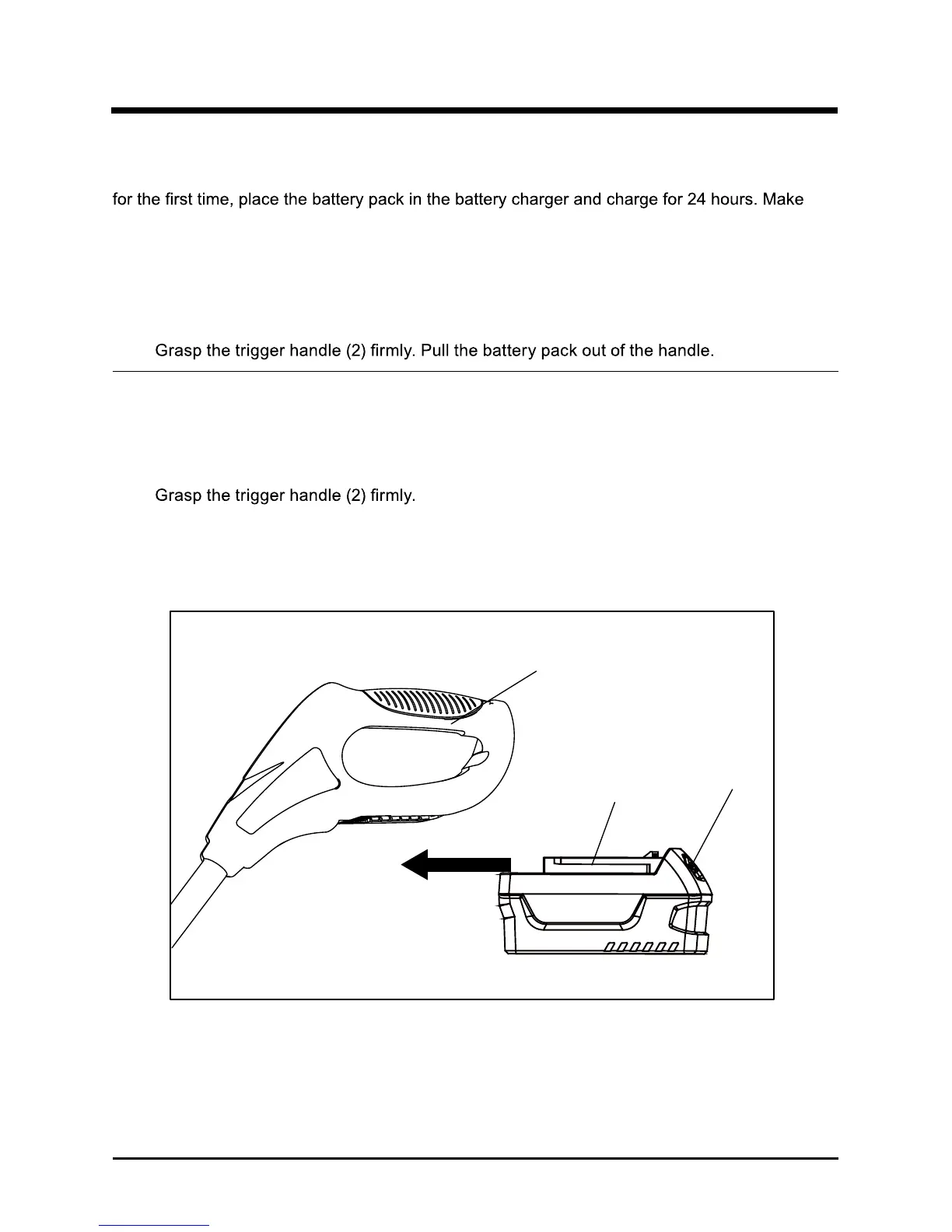
(See Figure 2.)
1.
Press in and hold the latch buttons (1) on the top of the battery pack.
2.
NOTE:
To install
(See Figure 2.)
1. Align the tongue (3) of the battery pack with the cavity in the handle housing.
2.
3. Push the battery pack into the handle. The latch buttons will click when they lock.
4. Do not use force when inserting the battery pack. It should slide into place and click.
1
2
3
Fig. 2
The battery pack fits snugly into the handle to prevent accidental dislodging.It may requires
a strong pull to remove.



 To Next Page