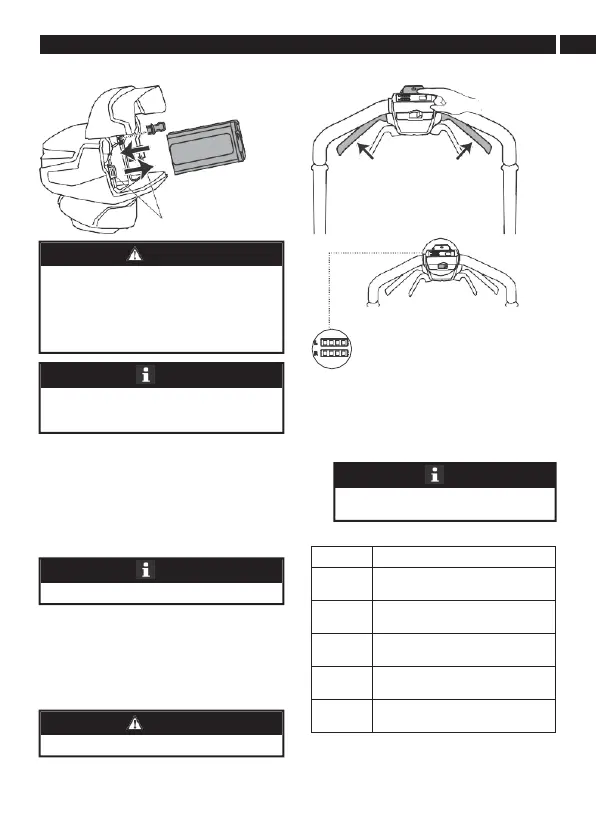
7.8 INSTALL THE BATTERY PACK 8.1 START THE MACHINE
1. Open the battery door.
2. Align the ribs on the battery pack with the
grooves in the battery compartment.
3. Push the battery pack into the battery
compartment until the battery pack locks into
place.
4. When you hear a click, the battery pack is
installed.
5. Close the battery door.
7.9 REMOVE THE BATTERY PACK
1. Open the battery door.
2. Remove the safety key.
3. Push and hold the battery release button (21).
4. Remove the battery pack from the machine.
8 OPERATION
1. Make sure safety key is inserted into slot.
2. Push and hold the start button.
3. While you hold the start button, grab the start
handles in the direction of the handle bar.
4. Once the machine has started, you can release
the start button.
Battery capacity indicator
The battery is above 80% capacity
The battery is between 80% and 60%
capacity
The battery is at between 60% and
40% capacity
The battery is between 40% and 20%
capacity
The battery is less than 20% capacity
and requires charging immediately
8.2 STOP THE MACHINE
1. Release the start handle to stop the machine.
Press the Turbo button to speed up to 3,200
RPM.
• If the battery pack or charger is damaged, replace
the battery pack or the charger.
• Stop the machine and wait until the engine stops
before you install or remove the battery pack.
• Read, know, and follow the instructions in the
battery and charger manual.
The machine has an automatic switch function that
lets the other battery work when the first cannot
operate.
The motor starts only when you put in the safety key.
Wear eye protection during operation.





 To Next Page