-34-
Model G0708 (Mfd. Since 1/15)
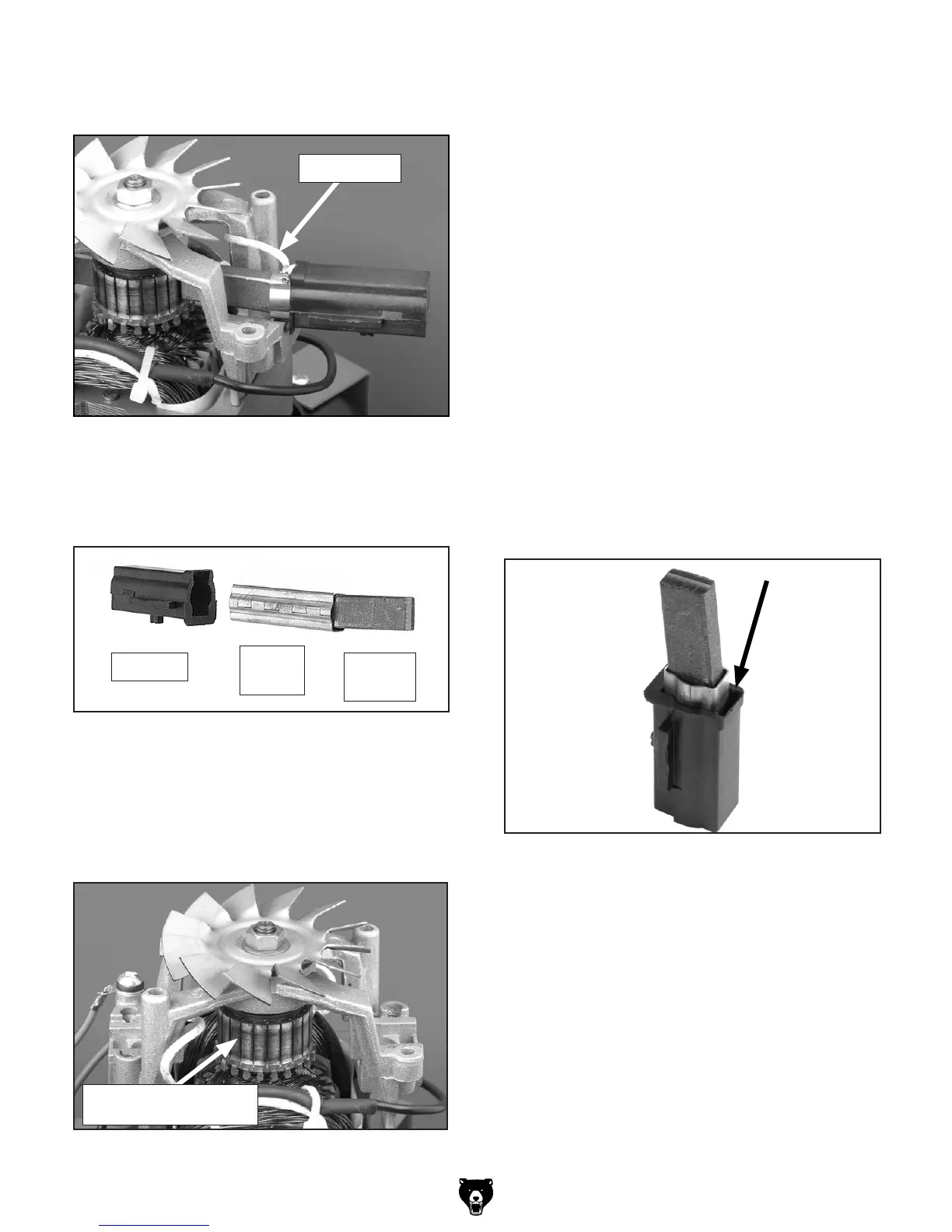
6. Lift each brush housing out of its seat and
unplug the power wire (Figure 35).
Figure 35. Brush housing removal.
Power Wire
7. Slide the brush assembly apart, clean the
housings and brass sleeves with mineral spir-
its, and allow the parts to dry (Figure 36).
Figure 36. Brush assembly.
8.
Reassemble the housings with the brass
sleeves and the new carbon brushes (Figure
36) and set aside.
9.
Inspect the commutator surface (Figure 37).
Housing
Brass
Sleeve
Carbon
Brush
—If the brushes have worn deep grooves in
the commutator, we recommend replacing
the motor. Typically the labor involved with
re-turning the commutator on a lathe and
then undercutting the insulator segments
far exceeds the price of a new motor.
—If the commutator only has minor wear and
black-colored carbon tracking (Figure 37),
use a fine crocus cloth to polish the com-
mutator where the brushes ride. DO NOT
use emery cloth or sandpaper to clean
the commutator or you will make it out-of-
round, which will cause the new brushes to
arc, overheat, and wear out quickly.
Finish the cleaning process by using acetone
and a cotton rag to wipe off any oils or con-
taminants from the commutator.
10.
Insert the power wire spade terminal into the
brush assembly between the brass sleeve
and the housing (Figure 38).
Figure 37. Commutator.
Insert Power Wire Spade Terminal Here.
Figure 38. Brush power lead location.
Carbon Tracking on
Commutator Surface


 To Next Page