Model G0922 (Mfd. Since 07/20)
-5-
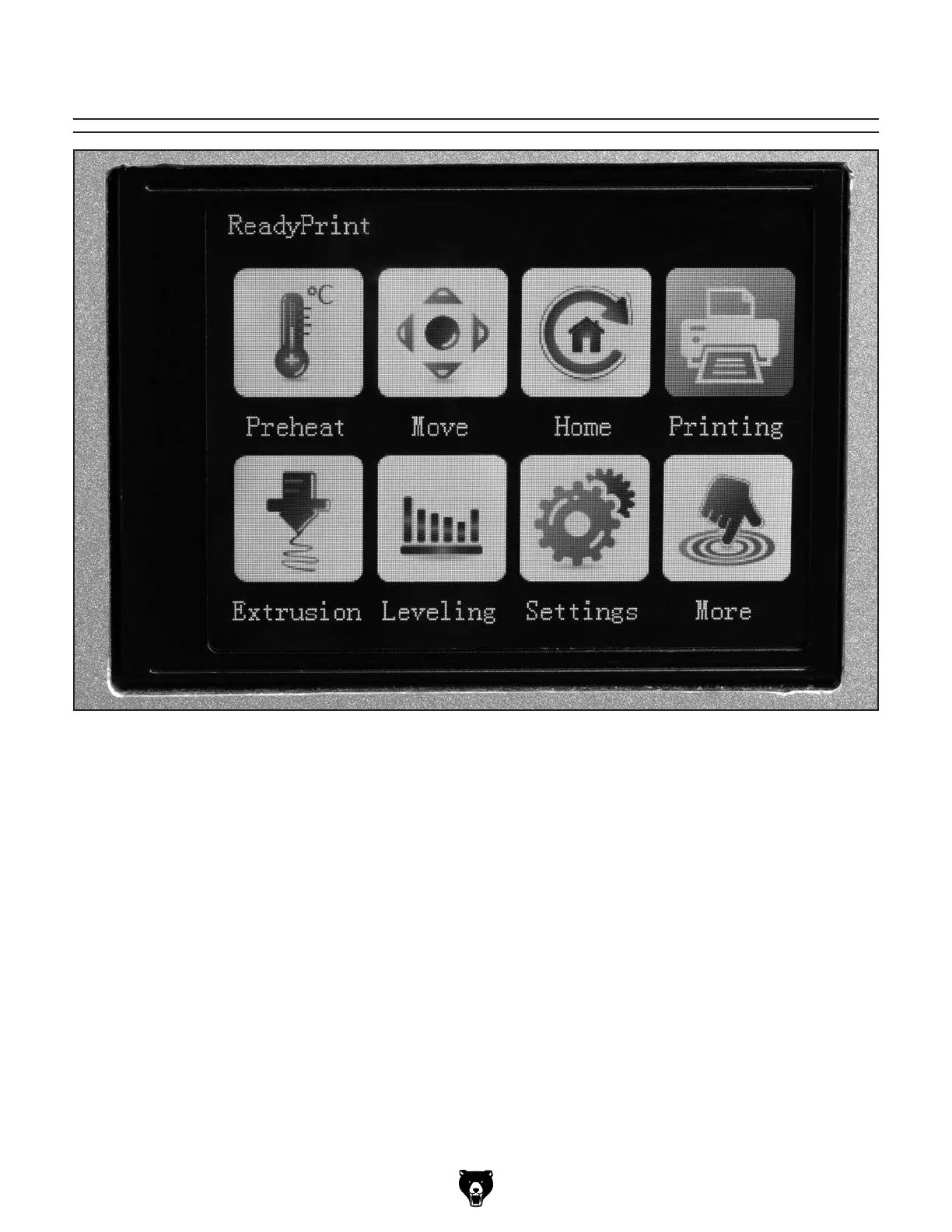
Main Menu
Figure 3. Touch screen main menu.
Preheat: Opens menu to start and adjust pre-
heat process. For more information, refer to
Preheating Nozzle on Page 26.
Move: Opens menu to independently move X,
Y, and Z axes. For more information, refer to
Moving Axes on Page 29.
Home: Opens menu to home X, Y, and Z axes.
For more information, refer to Moving Axes on
Page 29.
Printing: Opens menu to choose file from SD
card and start printing. For more information,
refer to Printing on Page 26.
Extrusion: Opens menu to independently extrude
filament. For more information, refer to Extruding
Filament on Page 30.
Leveling: Opens menu which moves X, Y, and Z
axes for easy build plate leveling. For more infor-
mation, refer to Leveling Build Plate on Page 24.
Settings: Opens menu with additional machine
functions. For more information, see Settings
Menu on next page.
More: Opens menu with functions to turn printer
LED ON/OFF.


 To Next Page