EasyManua.ls Logo

Grizzly G0922 - User Manual

Grizzly G0922
56 pages
Print Icon
To Next Page IconTo Next Page
Loading...
COPYRIGHT © AUGUST, 2020 BY GRIZZLY INDUSTRIAL, INC.
WARNING: NO PORTION OF THIS MANUAL MAY BE REPRODUCED IN ANY SHAPE
OR FORM WITHOUT THE WRITTEN APPROVAL OF GRIZZLY INDUSTRIAL, INC.
#AI20900 PRINTED IN CHINA
V1.08.20
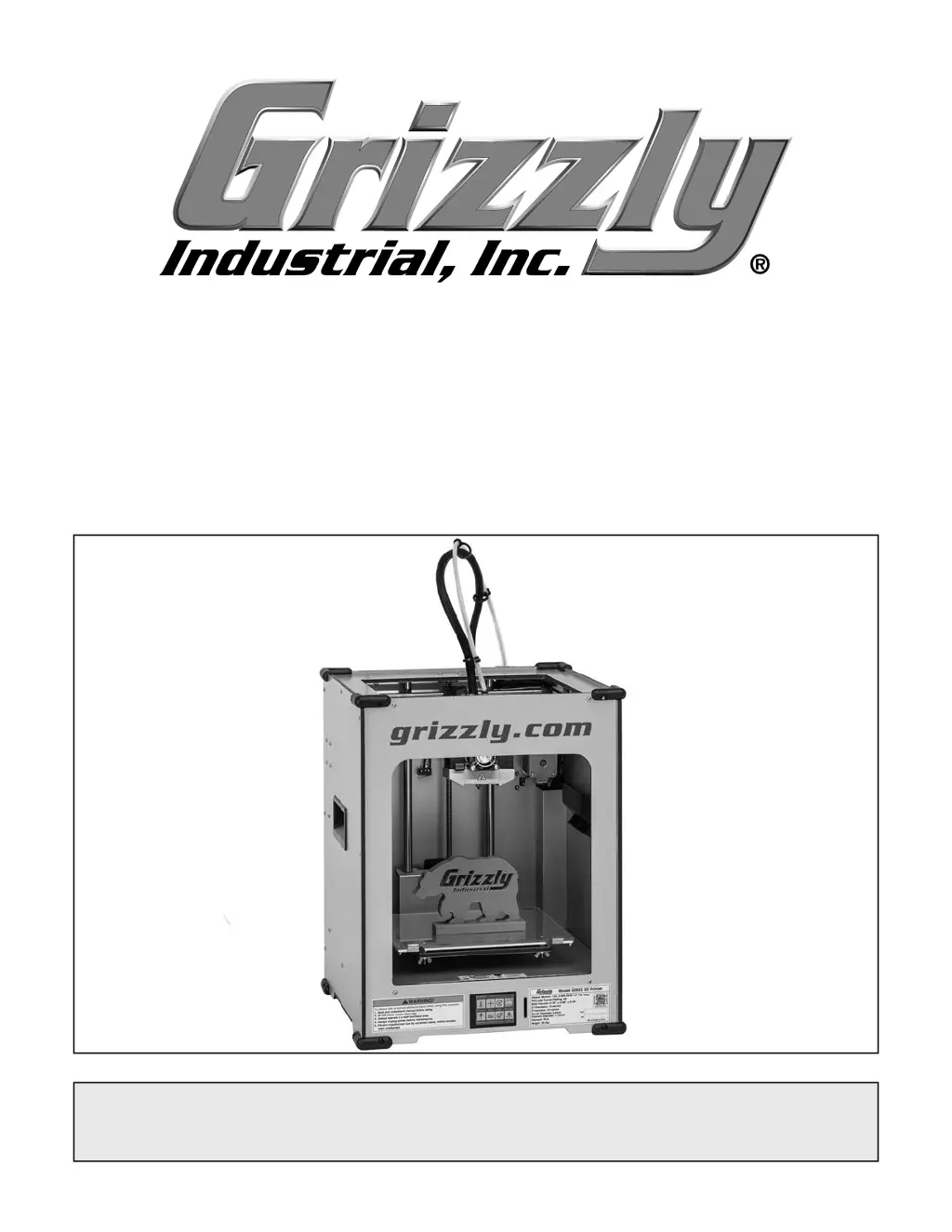
MODEL G0922
ENCLOSED 3D PRINTER
OWNER'S MANUAL
(For models manufactured since 07/20)

Questions and Answers

Summary

Introduction

Contact Information

Provides contact details for technical support and feedback.

Manual Accuracy and Updates

Explains manual accuracy and how to find updated versions online.

Identification

Printer Components Identification

Identifies key controls and features of the 3D printer with labels.

Controls & Components

Front of Machine Controls

Details components located on the front of the 3D printer.

Back of Machine Controls

Details components located on the back of the 3D printer.

Main Menu

Main Menu Navigation

Explains the functions of each icon on the touch screen main menu.

Settings Menu

Settings Menu Options

Describes the options available within the printer's settings menu.

Glossary of Terms

3 D Printing Terminology

Defines common terms and phrases used in the manual for 3D printing.

Machine Data Sheet

Product and Shipping Dimensions

Lists physical dimensions, weight, and shipping details of the printer.

Electrical and Motor Specifications

Details power requirements and specifications for the stepper motors.

Machine Data Sheet (Continued)

Printing and Software Specifications

Lists key printing parameters, software details, construction, and features.

Other Specifications and Information

Covers connectivity, temperature ranges, country of origin, and warranty.

Section 1: Safety

Safety Symbols and Instructions

Explains safety symbols and provides initial safety instructions for machinery operation.

Section 1: Safety (Continued)

General Safety Precautions

Covers apparel, dust, hearing, tool use, positioning, and environment safety.

Specific Operational Safety Warnings

Details warnings on forcing machinery, stability, and unattended operation.

Additional Safety for 3 D Printers

Hot Components and Environmental Safety

Addresses burn hazards, pinch risks, ventilation, and fire prevention.

Section 2: Power Supply

Power Supply Requirements and Risks

Discusses circuit availability, electrical injury risks, and 120V circuit requirements.

Section 2: Power Supply (Continued)

Grounding, Plugs, and Extension Cords

Explains proper grounding, plug connections, and guidelines for using extension cords.

Section 3: Setup

Setup Requirements and Inventory

Lists needed items, unpacking, and inventory of shipped parts.

Section 3: Setup (Continued)

Site Considerations for Printer Placement

Provides guidance on required space and working clearances for the printer.

Assembly & Test Run

Printer Assembly and Test Procedure

Guides assembly, installing components, and performing a test run.

Installing Software

Slicer Software Installation Guide

Guides users through installing the included Grizzly Winware slicer software.

Section 4: Operations

Operations Overview and Model Preparation

Introduces operation and explains preparing 3D models for printing.

Navigating Slicer Software

Slicer Software Interface Overview

Introduces the user interface of the slicer software and its main functions.

Slicing Process

Generating G-code for Printing

Details the steps to convert a 3D model into G-code using the slicer software.

Manipulating Models in Slicer

Moving, Scaling, Rotating, and Mirroring Models

Explains how to manipulate 3D models within the slicer software.

Adjusting Print Settings

Recommended Print Setup Configuration

Covers basic print settings like layer height, print speed, and infill.

Leveling Build Plate

Automatic Build Plate Leveling Procedure

Guides users through the automatic process of leveling the build plate.

Preparing Build Plate

Build Plate Adhesive and Placement

Details how to apply adhesive and position the build plate for printing.

Preheating Nozzle

Nozzle Preheating Steps

Explains how to preheat the nozzle to the correct temperature for filament.

Printing

Starting the Printing Process

Guides users on how to select a file and start the printing process.

Printing Operations

Stopping, Pausing, and Resuming Prints

Details how to stop, pause, and resume print jobs.

Changing Print Settings

Adjusting Settings During Printing

Explains how to adjust settings like temperature and print speed while printing.

Changing Filament

Loading and Unloading Filament

Guides users on the procedure for loading and unloading filament into the printer.

Cleaning Build Plate

Build Plate Cleaning Procedure

Provides instructions on cleaning the build plate after printing.

Moving Axes

Moving Printer Axes via Interface

Explains how to move the printer's axes using the command interface.

Axis Movement Control

Manual X;Y Axis Movement and Homing

Details manual axis movement and the process of homing axes.

Extruding Filament Manually

Describes how to manually extrude filament using the printer's controls.

Section 5: Accessories

Recommended Accessories and Filament

Lists recommended accessories like nozzles, filament spools, and workbenches.

Section 6: Maintenance

Maintenance Schedule and Procedures

Outlines the maintenance schedule, cleaning, and lubrication requirements.

Section 6: Maintenance (Continued)

Lubricating Axis Rails and Leadscrews

Explains the procedures for lubricating the printer's axis rails and leadscrews.

Section 7: Service and Troubleshooting

Motor & Electrical Troubleshooting

Provides solutions for common motor and electrical issues.

Machine Operation Troubleshooting

Offers solutions for filament extrusion and build plate adhesion problems.

Section 7: Service and Troubleshooting (Continued)

Continued Machine Operation Troubleshooting

Addresses issues like stringing, warping, and motor skipping.

Cleaning Nozzle

Nozzle Cleaning Methods

Describes brush and needle cleaning methods for the nozzle.

Performing a Cold Pull

Cold Pull Nozzle Cleaning Technique

Details the cold pull method for cleaning the nozzle interior effectively.

Dismantling Print Head

Print Head Disassembly for Cleaning

Guides users through disassembling the print head for cleaning and maintenance.

Replacing Nozzle

Nozzle Replacement Procedure

Provides step-by-step instructions for replacing the printer's nozzle.

Cleaning Feeder & Bowden Tube

Feeder and Bowden Tube Cleaning Process

Explains how to clean the filament feeder and Bowden tube.

Aligning Axis Sprockets

Axis Sprocket Alignment for Proper Travel

Details how to tighten drive sprockets to ensure proper axis travel.

Updating Firmware

Firmware Update Procedure

Guides users on how to download and install firmware updates.

Section 8: Wiring

Wiring Safety Instructions and Warnings

Presents critical safety warnings and precautions for working with electrical wiring.

Section 8: Wiring (Continued)

Internal Wiring Diagram

Shows the internal electrical connections of the 3D printer.

Print Enclosure Wiring Diagram

Print Enclosure Wiring Diagram

Illustrates the wiring connections within the printer enclosure.

Wiring Images

Internal and Enclosure Wiring Views

Provides visual references of the internal and enclosure wiring layouts.

Wiring Images (Continued)

Print Head and Display Board Wiring

Shows the wiring for the print head and touch screen display board.

Section 9: Parts

Main Parts List and Identification

Lists main components with reference numbers for identification.

Section 9: Parts (Continued)

Detailed Parts List and Numbers

Continues the listing of main components with their part numbers.

Accessories

Accessory Part Numbers and Descriptions

Lists part numbers and descriptions for various accessories.

Labels & Cosmetics

Safety and Identification Labels

Identifies and explains the purpose of various labels on the machine.

Warranty & Returns

Warranty Terms and Registration

Details the product warranty period, terms, and registration process.

Returns Procedure and Contact

Explains the process for returning products and contacting support.

Summary

Introduction

Contact Information

Provides contact details for technical support and feedback.

Manual Accuracy and Updates

Explains manual accuracy and how to find updated versions online.

Identification

Printer Components Identification

Identifies key controls and features of the 3D printer with labels.

Controls & Components

Front of Machine Controls

Details components located on the front of the 3D printer.

Back of Machine Controls

Details components located on the back of the 3D printer.

Main Menu

Main Menu Navigation

Explains the functions of each icon on the touch screen main menu.

Settings Menu

Settings Menu Options

Describes the options available within the printer's settings menu.

Glossary of Terms

3 D Printing Terminology

Defines common terms and phrases used in the manual for 3D printing.

Machine Data Sheet

Product and Shipping Dimensions

Lists physical dimensions, weight, and shipping details of the printer.

Electrical and Motor Specifications

Details power requirements and specifications for the stepper motors.

Machine Data Sheet (Continued)

Printing and Software Specifications

Lists key printing parameters, software details, construction, and features.

Other Specifications and Information

Covers connectivity, temperature ranges, country of origin, and warranty.

Section 1: Safety

Safety Symbols and Instructions

Explains safety symbols and provides initial safety instructions for machinery operation.

Section 1: Safety (Continued)

General Safety Precautions

Covers apparel, dust, hearing, tool use, positioning, and environment safety.

Specific Operational Safety Warnings

Details warnings on forcing machinery, stability, and unattended operation.

Additional Safety for 3 D Printers

Hot Components and Environmental Safety

Addresses burn hazards, pinch risks, ventilation, and fire prevention.

Section 2: Power Supply

Power Supply Requirements and Risks

Discusses circuit availability, electrical injury risks, and 120V circuit requirements.

Section 2: Power Supply (Continued)

Grounding, Plugs, and Extension Cords

Explains proper grounding, plug connections, and guidelines for using extension cords.

Section 3: Setup

Setup Requirements and Inventory

Lists needed items, unpacking, and inventory of shipped parts.

Section 3: Setup (Continued)

Site Considerations for Printer Placement

Provides guidance on required space and working clearances for the printer.

Assembly & Test Run

Printer Assembly and Test Procedure

Guides assembly, installing components, and performing a test run.

Installing Software

Slicer Software Installation Guide

Guides users through installing the included Grizzly Winware slicer software.

Section 4: Operations

Operations Overview and Model Preparation

Introduces operation and explains preparing 3D models for printing.

Navigating Slicer Software

Slicer Software Interface Overview

Introduces the user interface of the slicer software and its main functions.

Slicing Process

Generating G-code for Printing

Details the steps to convert a 3D model into G-code using the slicer software.

Manipulating Models in Slicer

Moving, Scaling, Rotating, and Mirroring Models

Explains how to manipulate 3D models within the slicer software.

Adjusting Print Settings

Recommended Print Setup Configuration

Covers basic print settings like layer height, print speed, and infill.

Leveling Build Plate

Automatic Build Plate Leveling Procedure

Guides users through the automatic process of leveling the build plate.

Preparing Build Plate

Build Plate Adhesive and Placement

Details how to apply adhesive and position the build plate for printing.

Preheating Nozzle

Nozzle Preheating Steps

Explains how to preheat the nozzle to the correct temperature for filament.

Printing

Starting the Printing Process

Guides users on how to select a file and start the printing process.

Printing Operations

Stopping, Pausing, and Resuming Prints

Details how to stop, pause, and resume print jobs.

Changing Print Settings

Adjusting Settings During Printing

Explains how to adjust settings like temperature and print speed while printing.

Changing Filament

Loading and Unloading Filament

Guides users on the procedure for loading and unloading filament into the printer.

Cleaning Build Plate

Build Plate Cleaning Procedure

Provides instructions on cleaning the build plate after printing.

Moving Axes

Moving Printer Axes via Interface

Explains how to move the printer's axes using the command interface.

Axis Movement Control

Manual X;Y Axis Movement and Homing

Details manual axis movement and the process of homing axes.

Extruding Filament Manually

Describes how to manually extrude filament using the printer's controls.

Section 5: Accessories

Recommended Accessories and Filament

Lists recommended accessories like nozzles, filament spools, and workbenches.

Section 6: Maintenance

Maintenance Schedule and Procedures

Outlines the maintenance schedule, cleaning, and lubrication requirements.

Section 6: Maintenance (Continued)

Lubricating Axis Rails and Leadscrews

Explains the procedures for lubricating the printer's axis rails and leadscrews.

Section 7: Service and Troubleshooting

Motor & Electrical Troubleshooting

Provides solutions for common motor and electrical issues.

Machine Operation Troubleshooting

Offers solutions for filament extrusion and build plate adhesion problems.

Section 7: Service and Troubleshooting (Continued)

Continued Machine Operation Troubleshooting

Addresses issues like stringing, warping, and motor skipping.

Cleaning Nozzle

Nozzle Cleaning Methods

Describes brush and needle cleaning methods for the nozzle.

Performing a Cold Pull

Cold Pull Nozzle Cleaning Technique

Details the cold pull method for cleaning the nozzle interior effectively.

Dismantling Print Head

Print Head Disassembly for Cleaning

Guides users through disassembling the print head for cleaning and maintenance.

Replacing Nozzle

Nozzle Replacement Procedure

Provides step-by-step instructions for replacing the printer's nozzle.

Cleaning Feeder & Bowden Tube

Feeder and Bowden Tube Cleaning Process

Explains how to clean the filament feeder and Bowden tube.

Aligning Axis Sprockets

Axis Sprocket Alignment for Proper Travel

Details how to tighten drive sprockets to ensure proper axis travel.

Updating Firmware

Firmware Update Procedure

Guides users on how to download and install firmware updates.

Section 8: Wiring

Wiring Safety Instructions and Warnings

Presents critical safety warnings and precautions for working with electrical wiring.

Section 8: Wiring (Continued)

Internal Wiring Diagram

Shows the internal electrical connections of the 3D printer.

Print Enclosure Wiring Diagram

Print Enclosure Wiring Diagram

Illustrates the wiring connections within the printer enclosure.

Wiring Images

Internal and Enclosure Wiring Views

Provides visual references of the internal and enclosure wiring layouts.

Wiring Images (Continued)

Print Head and Display Board Wiring

Shows the wiring for the print head and touch screen display board.

Section 9: Parts

Main Parts List and Identification

Lists main components with reference numbers for identification.

Section 9: Parts (Continued)

Detailed Parts List and Numbers

Continues the listing of main components with their part numbers.

Accessories

Accessory Part Numbers and Descriptions

Lists part numbers and descriptions for various accessories.

Labels & Cosmetics

Safety and Identification Labels

Identifies and explains the purpose of various labels on the machine.

Warranty & Returns

Warranty Terms and Registration

Details the product warranty period, terms, and registration process.

Returns Procedure and Contact

Explains the process for returning products and contacting support.

Grizzly G0922 Specifications

General IconGeneral
BrandGrizzly
ModelG0922
Category3D Printers
LanguageEnglish