Saber Hand Wind Audio Player - User Guide
2. Connect the Saber to the computer using the USB cable.
3. Open “My Computer”.
4. Select the first removable drive which corresponds with the
internal Saber drive. This drive may be called either “SABER” or
“Removable Disk”.
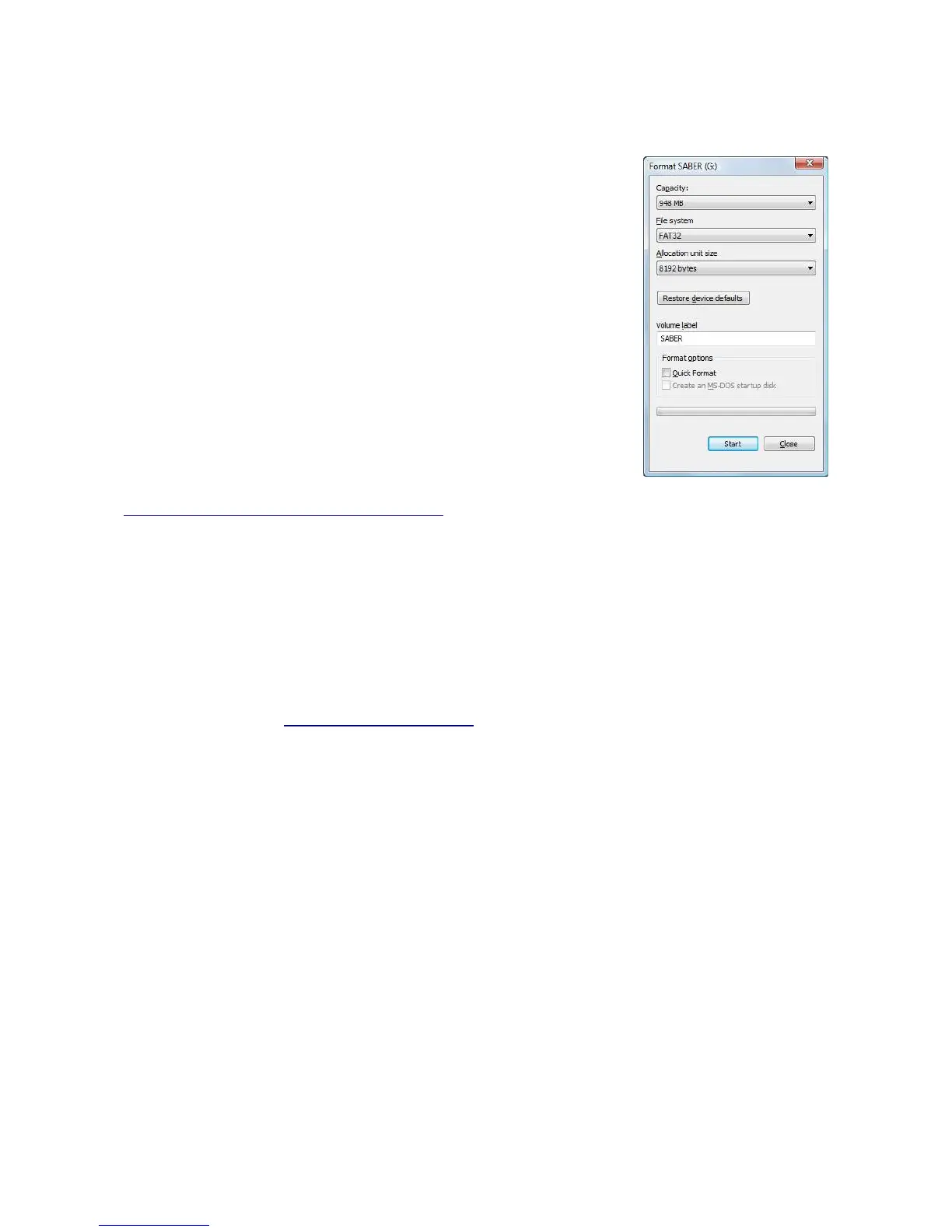
5. Right click on the drive, and select “Format”. The Format dialog
box will be displayed.
6. Confirm capacity is “948Mb”. If this is incorrect, click on
“cancel” and reselect the correct drive.
7. Select File system “FAT32”.
8. Ensure the “Quick Format” option is off.
9. Click on “Start”. The computer will take about 30 seconds to
format the Saber player.
To copy audio files back onto the player follow the instructions included
with the SaberCopy utility available from GRN. This program be downloaded from
www.globalrecordings.net/topic/sabersupport.
5.3 Further help
If you are unable to successfully identify or rectify a problem with the player, please contact us at
the email below. To assist us in helping you, please be as specific as possible with the problem you
are having.
Please include the serial number of the unit, problem description, when the problem started to
occur, and any other specific information describing the fault and how it occurred.
Our email address is: saber@globalrecordings.net
Page 14 of 15



 To Next Page