Saber Hand Wind Audio Player - User Guide
2. Operating the Saber
2.1 The Keypad
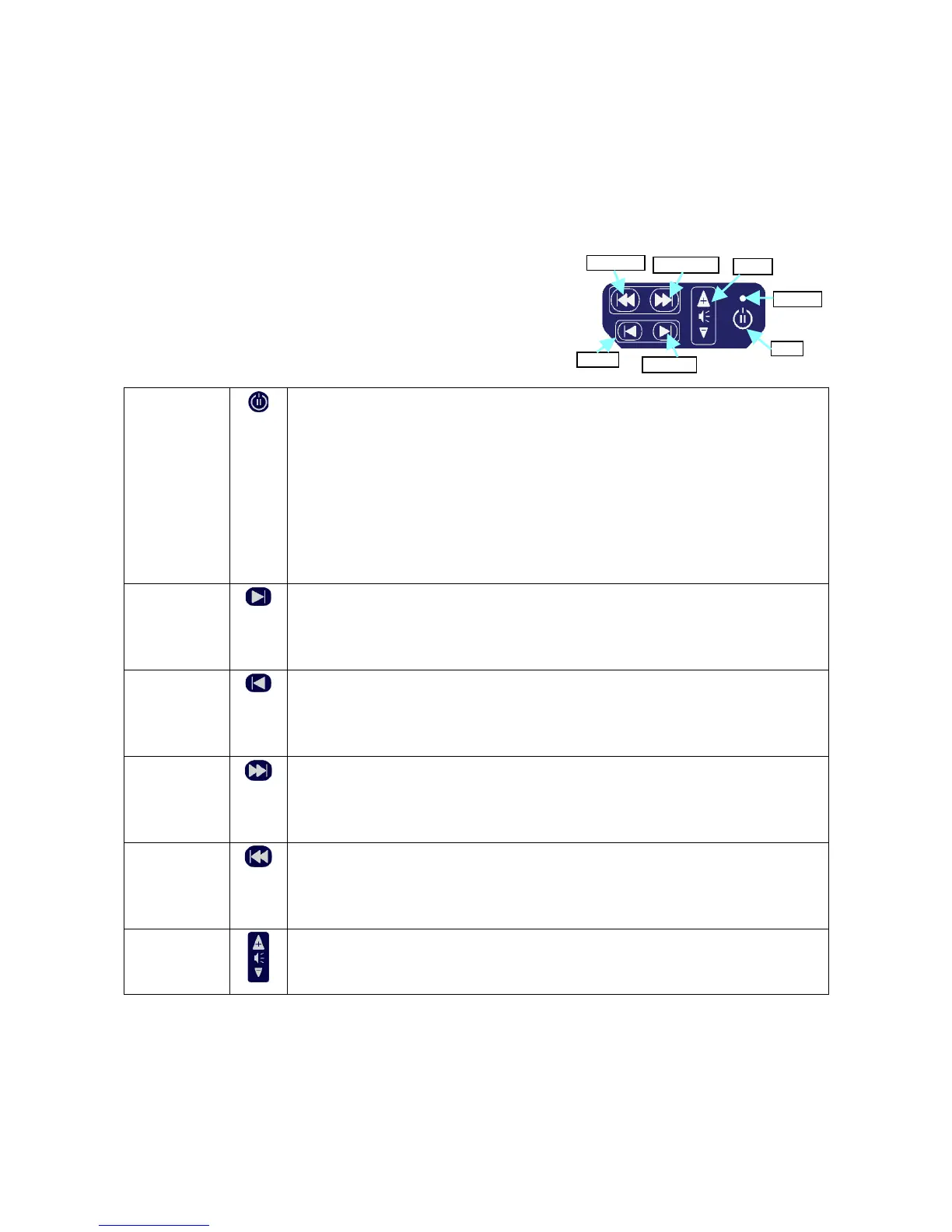
The Saber keypad controls all functions of the device.
The buttons are raised, and of different sizes, so that the player
can be used in low light or by vision impaired users.
The buttons perform the following functions:
Power
/Pause
Before turning on the machine, first turn the handle clockwise for 30
seconds. Then press and hold this button until the green light flashes. (It
will take 6-20 seconds to power on.) Continue to turn the handle until the
machine starts to play.
To pause during play press this button once. The green light will flash
slowly. To resume play press this button once again.
To turn off the machine, press and hold this button until the green light
turns off.
Forward
File
Press once to go on to the next file, which may represent an individual
message, chapter or song.
Press and hold to go fast forward (cue).
Back
File
Press once to go back to the previous file, which may represent an
individual message, chapter or song.
Press and hold to rewind (review).
Forward
Folder
Press once to go on to the next folder, which may represent a whole
program, book or album.
Press and hold to go to the last folder.
Back
Folder
Press once to go back to the previous folder, which may represent a whole
program, book or album.
Press and hold to go to the first folder.
Volume Press the top button (+) to make the sound louder.
Press the bottom button (-) to make the sound softer.
Page 4 of 15
Back Folder
button
Power
/Pause
Forward Folder
button
Back File
button
Forward File
button
Volume
Green Light



 To Next Page