SP Mode Functions
SCS_BA_EV-301_601_EN_12 groupscs.co.uk Date: 31.05.2023
info@groupscs.co.uk Issue: 1.2 / 06.2023
Page 14
6.3. Daily Ventilation Mode
The panel will automatically default to Daily Ventilation mode
on start-up or after an alarm reset if all the following condi-
tions are met:
● No alarm, override or lockout conditions exist
● Mains power supply is healthy
● Setting SW1 to Ventilation function enabled
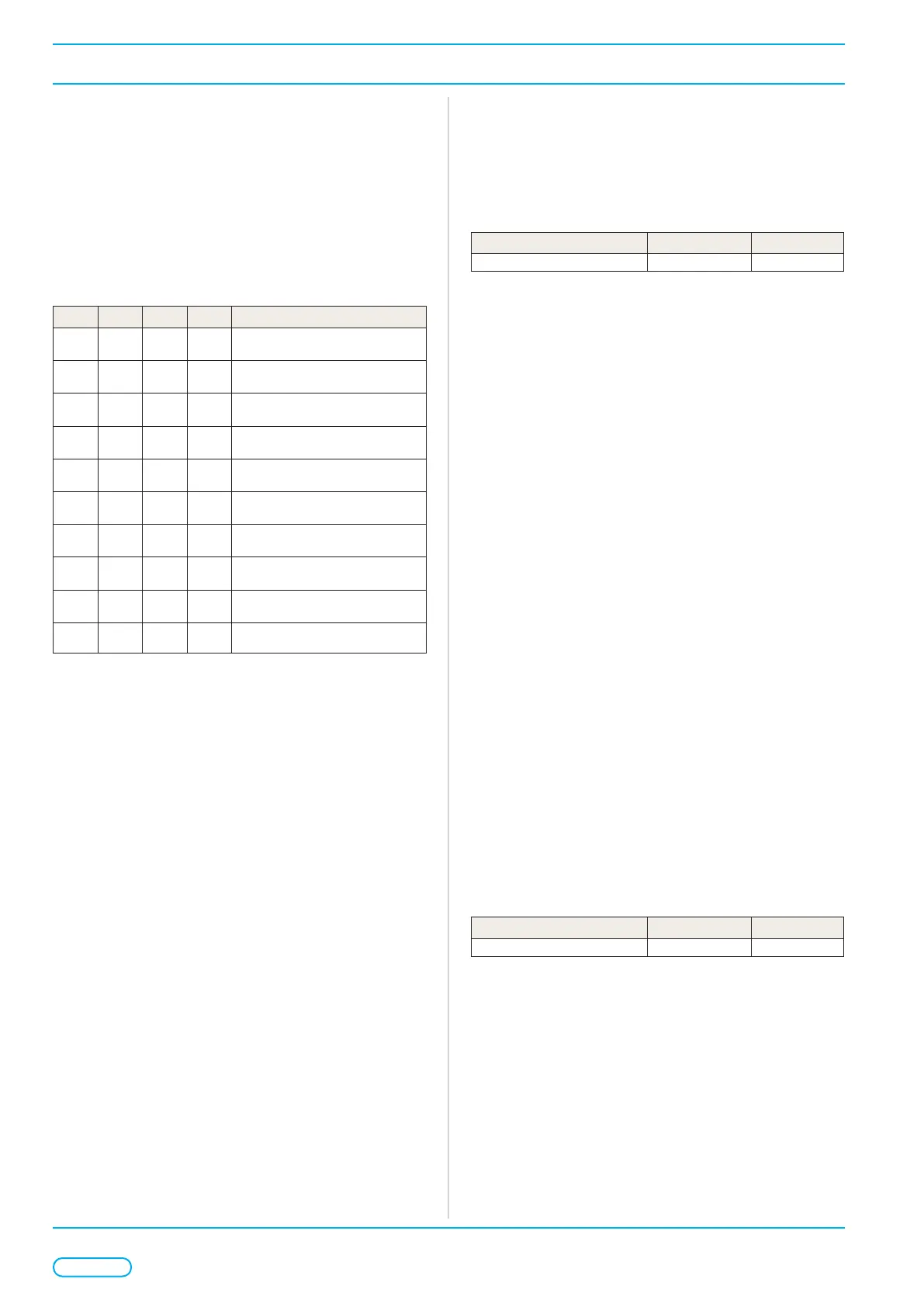
Daily ventilation functions are congured by setting the SW1
switches1 - 4.
SW1-1 SW1-2 SW1-3 SW1-4 Daily Ventilation Function
OFF OFF OFF OFF
Continuous (Fully) Open & Close
output
ON OFF OFF OFF
Dead-man Open & Close (Move
only when button pressed)
OFF ON OFF OFF
Dead-man Open, Continuous
Close
ON ON OFF OFF
Continuous Open, Dead-man
Close
OFF OFF ON OFF
Gap ventilation. Open for a pro-
grammed time.
ON OFF ON OFF
Timed ventilation. Automatically
closes after programmed time
OFF ON ON OFF
Combined Gap & Timed ventilati-
on (Modes 5 & 6)
OFF OFF ON ON
Gap ventilation programming
mode
ON OFF ON ON
Timed ventilation programming
mode
ON ON ON ON Ventilation function disabled
In daily ventilation mode the vent output responds to daily
ventilation commands and the functions set.
A daily open command can be triggered by activating Input A
for > 0.5 seconds or receiving a Databus DailyOpen com-
mand.
A daily close command can be triggered by activating Input Z
for > 0.5 seconds or receiving a Databus DailyClose com-
mand.
On receipt of both Open & Close commands together the
vent will switch o the output power and stop the vent.
6.3.1. Continuous Vent function
When operating in continuous the power output is held on
to fully open or close the vent on trigger of an open/close
command.
6.3.2. Dead-man Vent function
When operating in dead-man the open/close output power
is only switched on only whilst the respective open or close
command is active. Release of the command will remove po-
wer and stop the vent.
6.3.3. Gap Ventilation function
Gap ventilation partially opens the vent by limiting the open
stroke by a timer. The open output power is switched on
only for the programmed time following a daily ventilation
OPEN command. The dead-man open function is disabled
in this mode. The timer can be adjusted by a programming
sequence or by SIMON LINK.
Programmable Parameter Range Default
Gap ventilation 3..255 seconds 3 seconds
6.3.3.a. Gap Ventilation programming sequence
Before the programming sequence can only be performed
the panel must be in the following state:
● No alarm, override or lockout conditions exists
● Mains power supply is healthy
● Vent in the fully closed position
When all preconditions are met follow this sequence:
¾ Set daily function SW1 to Gap Ventilation Programming
mode.
Ô The onboard FAULT LED will ash to conrm the pro-
gramming mode is active.
¾ Start the programming time by triggering an open
command on input A and the vent starts to open.
¾ Once the vent reaches the desired gap open position or
open time trigger a close command on input Z to stop the
vent. The time must be between 3 - 255 seconds.
¾ Set daily function SW1 to a dierent function to save the
time and end the programming sequence.
The programming sequence can be cancelled at any-time by
selecting a dierent function. A cancellation before the se-
quence is completed will retain the previous saved time. In
the event of an invalid programming sequence the timer will
reset to the default setting.
6.3.4. Timed Ventilation function
Timed ventilation will automatically close the vent after the
programmed time following a daily ventilation OPEN com-
mand. Recycling the OPEN command will reopen the vent
and restart the timer. The timer can be adjusted by a pro-
gramming sequence or by SIMON LINK.
Programmable Parameter Range Default
Automatic close 10 minutes..18 h 10 min
6.3.4.a. Timed Ventilation programming
sequence
Before the programming sequence can only be performed
the panel must be the following state:
● No alarm, override or lockout conditions exist
● Mains power supply is healthy
● Vent in the fully closed position



 To Next Page