Need help?
Do you have a question about the GRT Avionics Mini-X EFIS and is the answer not in the manual?
Provides contact information and operating hours for technical assistance.
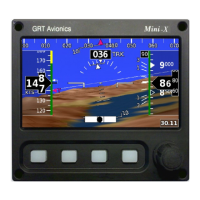
Describes the Mini-X's design goals and essential system requirements for operation.
Lists necessary installation tools and AHRS technical specifications and limitations.
Explains the Mini-X's physical controls and primary navigation interface.
Explains connector pinouts, wire colors, and general wiring best practices.
Details power connection, magnetometer installation, and transponder interface.
Covers connecting multiple displays and using serial ports for various devices.
Guidance on choosing a location and securing the unit.
Details pitot/static connections and airflow requirements.
Optimal placement guidelines for the external magnetometer sensor.
Initial power-on checks and how to navigate the system's settings menu.
Configuring user preferences and coarse instrument orientation.
Steps for validating placement and calibrating the magnetometer for accuracy.
Describes core PFD elements like airspeed and altimeter displays.
Explains other key flight instruments on the PFD.
Introduction to synthetic vision, terrain, and obstacle displays.
Explains map features and how to customize the display settings.
Covers compass rose options, map range, and the map selection tool.
Explains course deviation indication and how to create flight plans.
Procedures for entering direct-to waypoints and importing plans from USB.
Accessing airport data and executing synthetic approaches.
Instructions for controlling the autopilot and setting up the transponder.
Detailed guide to displaying and interpreting engine data from the EIS.
Tools for fuel efficiency, leaning, and recording flight data.
Visual cues for angle of attack and stall proximity.
Pitch limit indicators and audible alerts for stall conditions.
Steps to find and transfer software files to the Mini-X.
Specific instructions for updating different system components.
Details on battery status, operation, and recommended care procedures.
Procedure to recalibrate the battery meter for accurate capacity readings.
 General
| Display Type | LCD |
|---|---|
| Display Size | 3.5" diagonal |
| Resolution | 320 x 240 pixels |
| Weight | 9.5 oz |
| Operating Temperature | -20°C to 50°C |
| Inputs | RS-232, ARINC 429 |
| Outputs | RS-232, ARINC 429 |

 To Next Page