Revision A9 56
GRT Avionics Mini-X Installation, Setup & User Manual
6.4 In-Flight Map Setup
From the Map screen, press NEXT to access the softkeys shown below.
6.4.1 Compass Rose Display Options
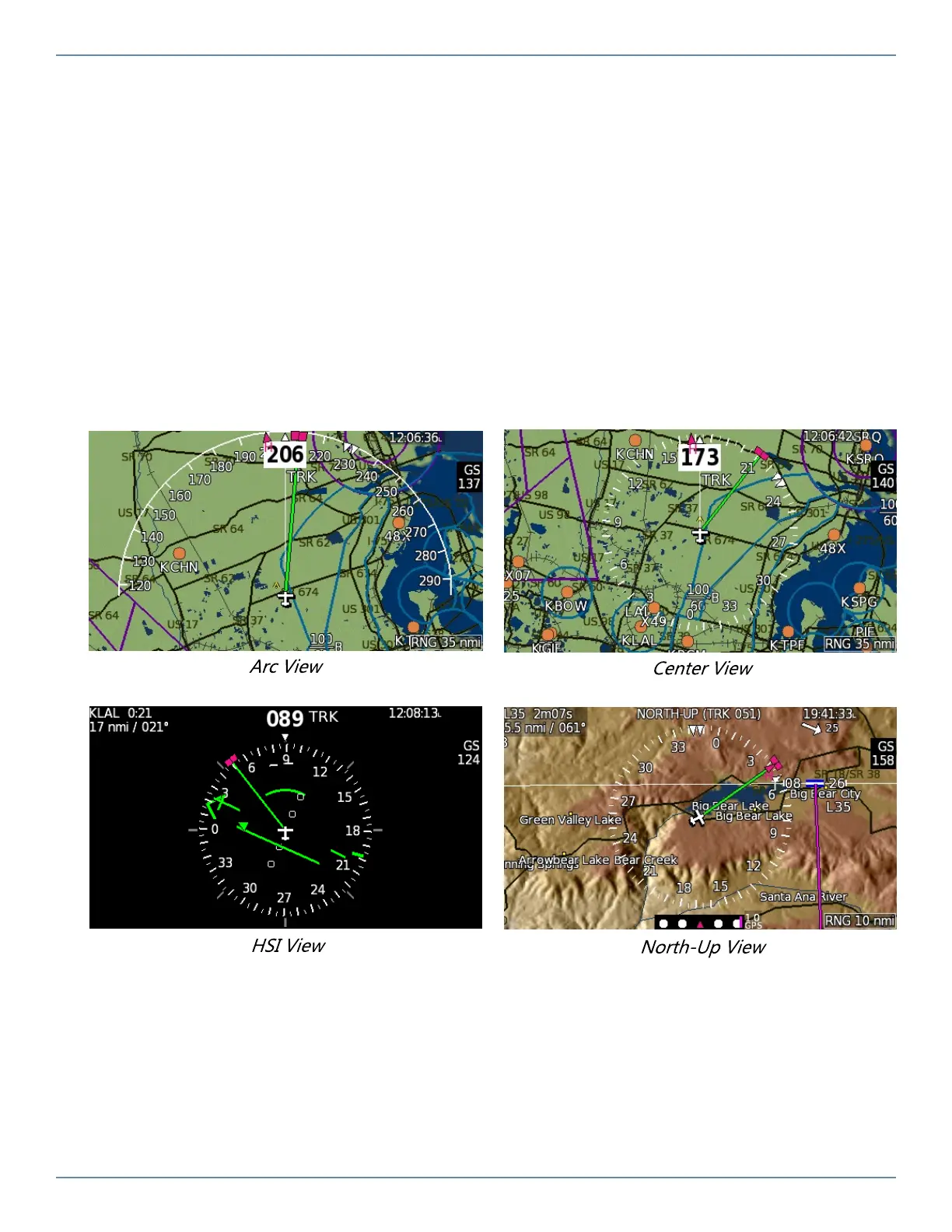
Press the MAP softkey repeatedly to cycle through the different map display options.
ARC- Displays the compass rose as a 180° arc in front of the airplane symbol.
CENTER- Displays the compass as a 360° compass rose with the airplane symbol in the center.
HSI- Displays an HSI with bearing pointers, CDI and compass rose.
NORTH- Displays the map as North UP.
6.4.2 Map Range
When the RNG label is above the knob as shown above, turn the knob to zoom in and out. The
knob controls several other functions, such as the heading bug and Map Selection Tool. Press
the knob repeatedly until the function you want is shown in the knob label. Default is Range.


 To Next Page