Mini-X Installation, Setup & User Manual GRT Avionics
Revision A9 69
8.2 Trig TT22 Transponder
The Mini can act as the control head for a Trig TT21 or TT22 Remote Transponder. See Section 2.7
of this manual for wiring information.
8.1.1 Activating TT22 Setup on the Mini
1. Go to Set Menu > General Setup.
2. If using the dedicated TT22 Port with No Adapter, scroll to TT22 A/B Port and select ON.
This activates and automatically sets up the dedicated TT22 port.
3. If using an RS-232 serial port with GRT Trig Adapter, set the Input and Output of the wired
serial port to TT22 and the baud rate to 9600.
4. Follow the instructions in the GRT Trig TT21/22 Supplement for full setup and checkout
procedures.
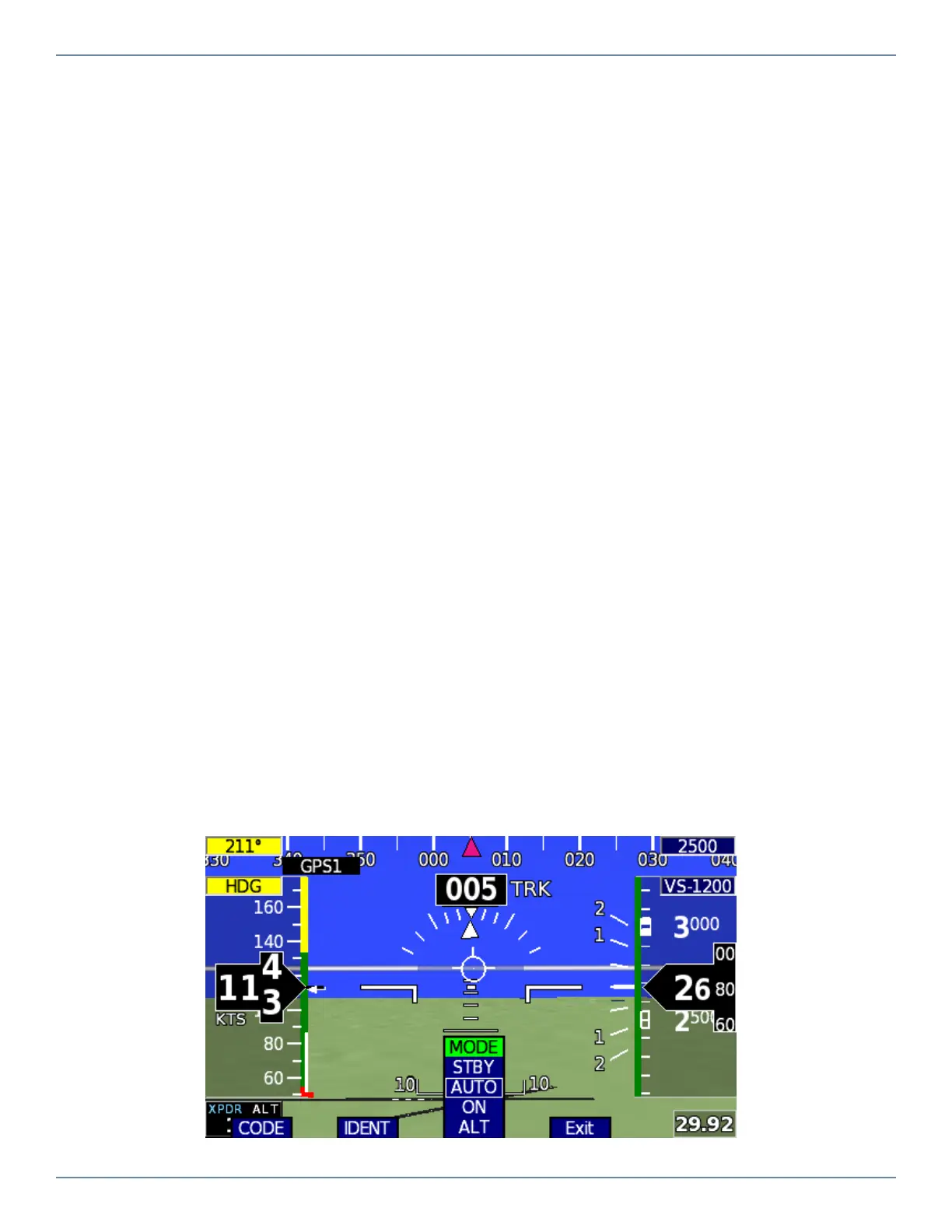
8.2.2 Transponder Mode Descriptions
STBY: The transponder is on, but will not reply to any interrogations.
AUTO: The transponder is in STBY until reaching 35 knots on takeoff, when it changes to ALT
mode automatically. It reverts to STBY mode upon landing rollout when airspeed goes below 35
knots.
ON: The transponder will respond to all interrogations, but altitude reporting is suppressed.
ALT: The transponder will respond to all interrogations, including Mode C altitude reporting.


 To Next Page