Revision A9 62
GRT Avionics Mini-X Installation, Setup & User Manual
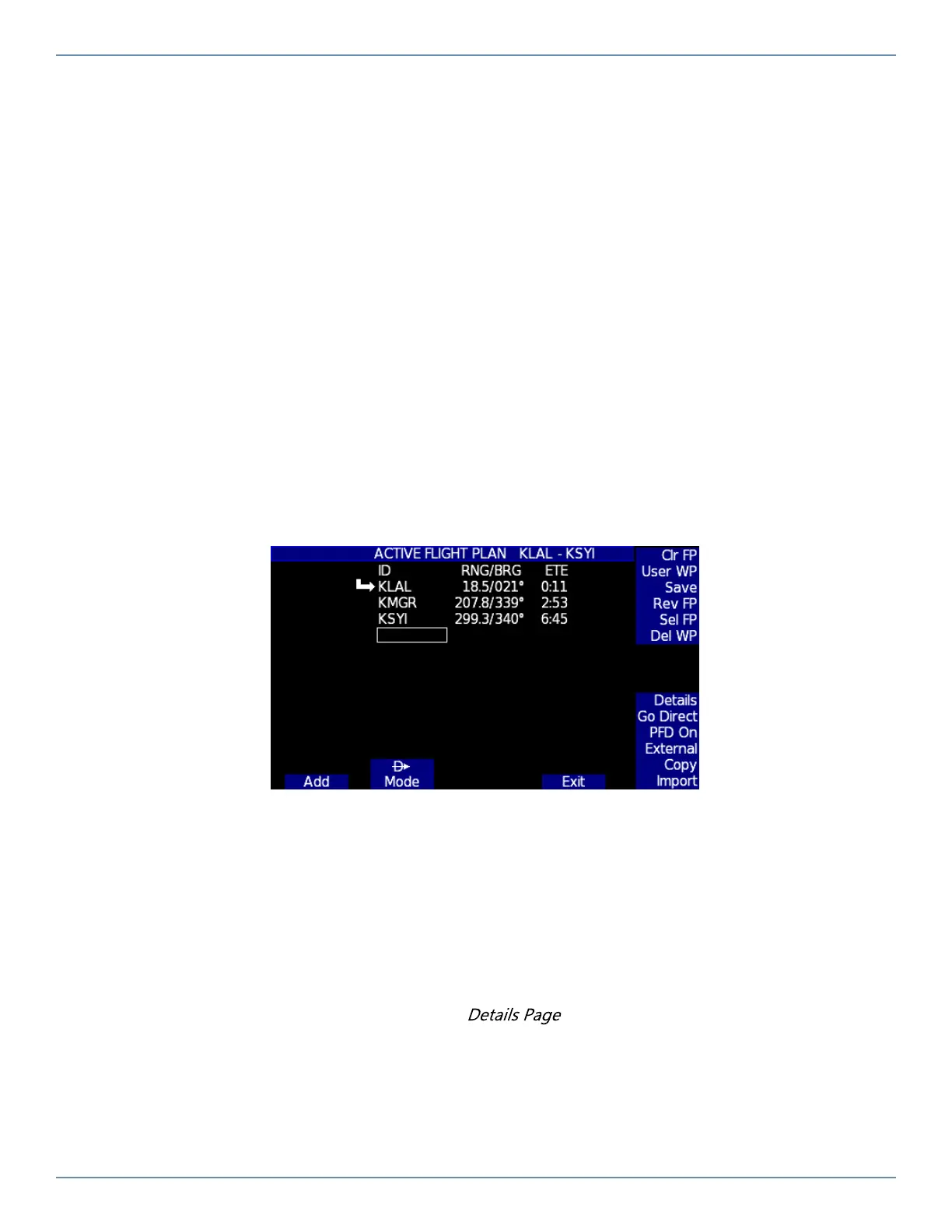
7.2.3 To Enter a Multiple-Waypoint Internal Flight Plan
1. Press FLIGHT PLAN softkey to bring up the Flight Plan Entry Page.
2. To add a new waypoint, press the ADD softkey. The waypoint entry page will appear. Follow steps 3-5
outlined in the Entering a Direct-To Waypoint section to enter the first waypoint.
3. To enter another waypoint, press ADD again and repeat step 2. Continue until all the waypoints are
entered.
4. Verify that the waypoints in the Active Flight Plan list are correct, then press EXIT.
5. Follow the GPS CDI indicator and the waypoint bearing information on the PFD.
6. At any time during the flight:
� To add a waypoint to the middle of the flight plan, highlight the adjacent waypoint and press INSERT
BEFORE, then repeat step 2.
� To activate a leg in the middle of the flight plan, highlight the second waypoint in the leg and press
SET LEG.
Knob Sidebar Functions: (Press the knob to activate the sidebar cursor)
� Clr FP: Clear all displayed waypoints and start over
� User WP: Create a custom User Waypoint or select one from your list
� Save: Saves the current Flight Plan to memory
� Rev FP: Reverses current flight plan to fly back home
� Sel FP: Displays a list of previously saved flight plans so you can select one
� Del WP: Deletes the highlighted waypoint in the current flight plan
� Details: Shows Airport/Waypoint Details Page for selected waypoint. Includes elevation, runways,
frequencies, fuel, lat/long, and city. See later in this section for more info.
� Go Direct: Go direct to the highlighted waypoint, then resume flight plan
� PFD On: Displays a basic horizon line with airspeed and altitude in the background
� External: Displays External Flight Plan from a connected external GPS
� Copy: Copies the current flight plan to the USB stick
� Import: Displays a list of available .GPX flight plans to import from the USB stick


 To Next Page