EasyManua.ls Logo

Grundfos DPC 1-3 - User Manual

Grundfos DPC 1-3
11 pages
Print Icon
To Next Page IconTo Next Page
Loading...
Version: 02.0522
DPC 1-3
Installation & Operating Instruction
DPC 1-3 For Three Phase Pumps up to 16A
For more information
The name Grundfos, the Grundfos logo, and be think innovate are registered trademarks
owned by Grundfos Holding A/S or Grundfos A/S, Denmark. All rights reserved worldwide.
Question and Answer IconNeed help?

Do you have a question about the Grundfos DPC 1-3 and is the answer not in the manual?

Summary

Introduction

Applications

Overview of the controller's diverse applications in water and wastewater management.

Features

Highlights key functionalities of the digital pump controller, including protection and display features.

Parameter and Specifications

Main technical characteristics

Details primary control characteristics like level or pressure control and working modes.

Main technical data

Lists crucial technical parameters such as rated voltage, current, and trip response times.

Protections Covered

Encompasses all built-in protection features for the pump and controller.

Other technical data

Provides supplementary specifications like ambient temperature, degree of protection, and dimensions.

Installation

Tools Used in Controller Installation

Lists essential tools required for the proper installation of the controller.

Controller Components

Identifies the main components of the controller unit for user familiarity.

LCD Screen

Details the digital display screen of the controller and its information output.

Meaning of the Icons Shown on the LCD

Terminals

Power terminals

Illustrates the connection points for incoming and outgoing power supply to the controller.

Control terminals

Shows the connection terminals for probes, float switches, and pressure switches.

DIP Switch Settings

Parameter Calibration and Erasing

Calibration

Explains the process for calibrating the controller for optimal performance and protection.

Erasing

Details the procedure for erasing previous parameters when a pump is repaired or replaced.

Connections Controls Devices and Applications

Installing Liquid Level Probes Switch

Guides on the correct installation of liquid level probes for control applications.

Float Switch Installation

Provides instructions for installing float switches for liquid level detection.

Water Supply;Transfer by Installing Probes or Float Switch

Describes water supply and transfer applications using probes or float switches.

Meaning of the Messages & Graphics Displayed on the LCD Screen

Tank Full

Indicates when the overhead tank liquid level reaches the upper probe, stopping the pump.

Dry Run

Signals when the borewell liquid level is below the pump intake, causing the pump to stop.

No Water

Indicates low liquid level in underground tank or well, stopping the pump.

Pressure Boosting Application by Installing Pressure Switch

Start Condition

Pump starts when pipeline pressure is below the set point and liquid level is adequate.

Stop Condition

Pump stops when pipeline pressure reaches the set point.

Meaning of the Messages & Graphics Displayed on the LCD screen

Explains LCD messages for pressure boosting, including FULL, DRY RUN, and NO WATER.

Drainage Application by Installing Float Switch

Start Condition

Pump starts when float switch A reaches the up position.

Stop Condition

Pump stops when float switch A reaches the down position.

Overflow Alarm

Warns of overflow condition when float switch B is in the up position.

Meaning of the Messages & Graphics Displayed on the LCD screen

Explains LCD messages for drainage, including FULL, DRY RUN, NO WATER, and OVERFLOW.

Basic Operation

Manual Mode

Allows direct control of the pump using START and STOP keys, ignoring external signals.

Auto Mode

Enables automatic pump operation based on signals from sensors, float switches, or pressure switches.

Faults and Protection

Meaning of the Messages and Graphic Shown on the LCD Screen

Application: Water Supply;Transfer (Using Probes or Floats)

Details LCD messages for water supply/transfer applications, like FULL and DRY RUN.

Application: Sewage;Drainage (Using Floats)

Explains LCD messages for sewage/drainage applications, including FULL, DRY RUN, and NO WATER.

Application: Pressure Boosting (Using Pressure Switch)

Describes LCD messages for pressure boosting applications, such as FULL.

Trouble Shooting

Flashing of Under V

Indicates low voltage; check power supply. Unit attempts restart after intervals.

Flashing of Over V

Indicates high voltage; check power supply. Unit attempts restart after intervals.

Flashing of Overload

Signals high current; check pump for jamming or motor issues. Unit attempts restart.

Flashing of No Caliber

Indicates calibration was not completed; perform parameter calibration.

Flashing of Dry Run

Indicates low liquid level; unit attempts restart after intervals or set time.

Flashing of Stalled

Signals current exceeding 200%; cut off power and repair/replace pump.

Flashing of Open Phase

Indicates missing power phase; check power supply or repair cables.

Summary

Introduction

Applications

Overview of the controller's diverse applications in water and wastewater management.

Features

Highlights key functionalities of the digital pump controller, including protection and display features.

Parameter and Specifications

Main technical characteristics

Details primary control characteristics like level or pressure control and working modes.

Main technical data

Lists crucial technical parameters such as rated voltage, current, and trip response times.

Protections Covered

Encompasses all built-in protection features for the pump and controller.

Other technical data

Provides supplementary specifications like ambient temperature, degree of protection, and dimensions.

Installation

Tools Used in Controller Installation

Lists essential tools required for the proper installation of the controller.

Controller Components

Identifies the main components of the controller unit for user familiarity.

LCD Screen

Details the digital display screen of the controller and its information output.

Meaning of the Icons Shown on the LCD

Terminals

Power terminals

Illustrates the connection points for incoming and outgoing power supply to the controller.

Control terminals

Shows the connection terminals for probes, float switches, and pressure switches.

DIP Switch Settings

Parameter Calibration and Erasing

Calibration

Explains the process for calibrating the controller for optimal performance and protection.

Erasing

Details the procedure for erasing previous parameters when a pump is repaired or replaced.

Connections Controls Devices and Applications

Installing Liquid Level Probes Switch

Guides on the correct installation of liquid level probes for control applications.

Float Switch Installation

Provides instructions for installing float switches for liquid level detection.

Water Supply;Transfer by Installing Probes or Float Switch

Describes water supply and transfer applications using probes or float switches.

Meaning of the Messages & Graphics Displayed on the LCD Screen

Tank Full

Indicates when the overhead tank liquid level reaches the upper probe, stopping the pump.

Dry Run

Signals when the borewell liquid level is below the pump intake, causing the pump to stop.

No Water

Indicates low liquid level in underground tank or well, stopping the pump.

Pressure Boosting Application by Installing Pressure Switch

Start Condition

Pump starts when pipeline pressure is below the set point and liquid level is adequate.

Stop Condition

Pump stops when pipeline pressure reaches the set point.

Meaning of the Messages & Graphics Displayed on the LCD screen

Explains LCD messages for pressure boosting, including FULL, DRY RUN, and NO WATER.

Drainage Application by Installing Float Switch

Start Condition

Pump starts when float switch A reaches the up position.

Stop Condition

Pump stops when float switch A reaches the down position.

Overflow Alarm

Warns of overflow condition when float switch B is in the up position.

Meaning of the Messages & Graphics Displayed on the LCD screen

Explains LCD messages for drainage, including FULL, DRY RUN, NO WATER, and OVERFLOW.

Basic Operation

Manual Mode

Allows direct control of the pump using START and STOP keys, ignoring external signals.

Auto Mode

Enables automatic pump operation based on signals from sensors, float switches, or pressure switches.

Faults and Protection

Meaning of the Messages and Graphic Shown on the LCD Screen

Application: Water Supply;Transfer (Using Probes or Floats)

Details LCD messages for water supply/transfer applications, like FULL and DRY RUN.

Application: Sewage;Drainage (Using Floats)

Explains LCD messages for sewage/drainage applications, including FULL, DRY RUN, and NO WATER.

Application: Pressure Boosting (Using Pressure Switch)

Describes LCD messages for pressure boosting applications, such as FULL.

Trouble Shooting

Flashing of Under V

Indicates low voltage; check power supply. Unit attempts restart after intervals.

Flashing of Over V

Indicates high voltage; check power supply. Unit attempts restart after intervals.

Flashing of Overload

Signals high current; check pump for jamming or motor issues. Unit attempts restart.

Flashing of No Caliber

Indicates calibration was not completed; perform parameter calibration.

Flashing of Dry Run

Indicates low liquid level; unit attempts restart after intervals or set time.

Flashing of Stalled

Signals current exceeding 200%; cut off power and repair/replace pump.

Flashing of Open Phase

Indicates missing power phase; check power supply or repair cables.

Overview

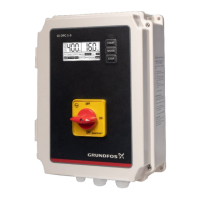
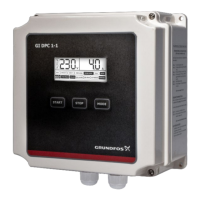
The Grundfos DPC 1-3 is a Digital Pump Controller designed for three-phase pumps with a rated output power ranging from 1.5 to 16 Amperes. This device is an easy-to-use, programmable solution for controlling pumps in various water and wastewater applications. It is suitable for water transfer, tank filling, tank emptying, and pressure boosting in hydro-pneumatic systems, making it an ideal choice for residential, industrial, and institutional segments where water and energy conservation are crucial.

Function Description:

The DPC 1-3 serves as a comprehensive control and protection unit for pumps. It can operate in two main modes: Manual and Auto. In Manual mode, the user directly starts and stops the pump using the START and STOP keys. In Auto mode, the pump's operation is governed by signals from sensors, float switches, or pressure switches, depending on the application. The controller offers various control characteristics, including level control with probes for clear water or with floats, and pressure control with a pressure switch.

Important Technical Specifications:

  • Rated Output Power: 1.5 to 16 A
  • Rated Input Voltage: AC 380V / 50 HZ / Three Phase
  • Permissible Ambient Temperature: Up to 55 Deg C
  • Degree of Protection: IP 54
  • Install Position: Vertical
  • Unit Dimensions (L X W X H): 225 x 300 x 100 mm
  • Unit Weight: 3.0kg

Usage Features:

The DPC 1-3 boasts a range of features designed to enhance usability and pump protection:

  • LCD Screen: Displays pump running information, fault conditions, and parameter settings. Icons on the LCD indicate parameter configuration, time display, and pump fault conditions.
  • DIP Switch Settings: Users can configure the controller for different applications (water supply by liquid level control, water supply by pressure control, or drainage by liquid level control) using DIP switches. The LCD will display specific messages corresponding to the selected application.
  • Calibration: Essential for optimal performance and maximum pump protection. Calibration involves setting parameters according to the connected load, ensuring the unit accurately monitors and protects the pump. This should be done during installation or after any pump repair.
  • Application Versatility:
    • Water Supply/Transfer (using probes or float switch): The controller starts the pump when the liquid level in the overhead tank is below the lower probe (or float switch is down) and the underground tank level is above the lower probe (or float switch is up). It stops the pump when the overhead tank reaches the upper probe (or float switch is up) or the underground tank level falls below the lower probe (or float switch is down).
    • Pressure Boosting (using pressure switch): The pump starts when pipeline pressure is below the set point of the pressure switch and the liquid level in the well/supply tank is above the lower probe. It stops when the pressure reaches the set point.
    • Drainage (using float switch): The pump starts when "float switch A" reaches the up position and stops when it reaches the down position. An overflow alarm is triggered if "float switch B" reaches the up position, indicating a rising sump level despite the pump draining.
  • Sensor-Free Dry Run Protection: For submersible pumps in deep wells, terminals 1, 2, and 3 can be shorted to achieve sensor-free dry run protection, providing reliable and automatic protection.
  • Automatic Recovery: After power cuts, the unit automatically resumes operation in the same mode (Auto or Manual) after 10 seconds.
  • Alarm System: Visual and audio alarms prompt for fault conditions.

Maintenance Features:

The DPC 1-3 incorporates several protection features to ensure pump longevity and safe operation:

  • Phase Loss Protection: Protects against phase loss in both incoming and outgoing power.
  • Overload Protection: Safeguards the pump from drawing excessive current. Trip response time for overload is 5 seconds to 5 minutes, with a recovery time of 30 minutes.
  • Motor Stalled Protection: Detects and protects against motor stalling. Trip current for pump stalled is 200% of rated current, with a trip response time of less than 0.5 seconds.
  • Dry Run Protection: Prevents the pump from running without water, even without a float switch. Trip current for dry run is 70% of rated current, with a trip response time of 6 seconds (or manually settable). Recovery time is 30 minutes.
  • Under/Over Voltage Protection: Protects the pump from voltage fluctuations. Trip voltage for over voltage is plus 15% of rated input voltage, and for under voltage, it's minus 15%. Trip response time is less than 5 seconds, with a recovery time of 5 minutes. These values are factory set and cannot be altered.
  • Short Circuit Protection: Responds in less than 0.1 seconds.
  • Transient Surge Protection: Protects against sudden voltage spikes.
  • Memory Function: Retains settings and operational status during power off and power recovery.
  • Fault Diagnostics: The LCD screen displays specific messages for faults like "UNDER V," "OVER V," "OVERLOAD," "DRY RUN," "STALLED," and "OPEN PHASE," along with possible causes and recommended solutions.
  • Erasure of Parameters: When a pump is repaired or replaced, previous parameters can be erased to allow for re-calibration, ensuring the controller adapts to the new or serviced pump. This is indicated by a flashing "NO CALIBER" sign on the LCD.

Safety Instructions:

It is crucial to follow all safety instructions during installation and operation to prevent personal injury or damage to the equipment. Before any installation or maintenance, the controller must be disconnected from the power supply. The cover should not be opened while the pump is running, and no foreign objects should be inserted into the controller. All electrical connections must be performed by skilled and qualified personnel. AC power should never be connected to the output U,V,W terminals. The motor, controller, and power specifications must always match. The manufacturer is not liable for malfunctions resulting from incorrect installation, damage, modification, or operation outside the specified working range.

Grundfos DPC 1-3 Specifications

General IconGeneral
BrandGrundfos
ModelDPC 1-3
CategoryController
LanguageEnglish

Related product manuals