EasyManua.ls Logo

Grundig MCD 30 - Page 5

Grundig MCD 30
9 pages
Print Icon
To Next Page IconTo Next Page
To Previous Page IconTo Previous Page
Loading...
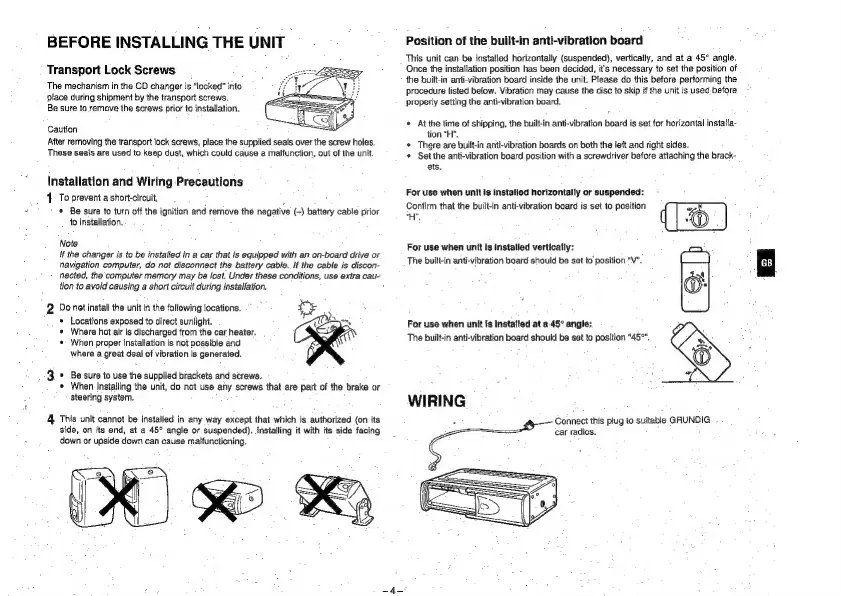
BEFORE
INSTALLING
THE
UNIT
Transport
Lock
Screws
The
mechanism
in
the
CD
changer
is
“locked”
into
place
during
shipment
by
the
transport
screws,
Be
sure
to
remove
the
screws
prior
to
installation.
Caution
After
removing
the
transport
lock
screws,
place
the
supplied
seals
over
the
screw
holes.
These
seals
are
used
to
keep
dust,
which
could
cause
a
malfunction,
out
of
the
unit.
Installation
and
Wiring
Precautions
4
To
prevent
a
short-circuit,
*
Be
sure
to
turn
off
the
ignition
and
remove
the
negative
(-)
battery
cabie
prior
to
installation.
Note
if
the
changer
is
to
be
installed
in
a
car
that
is
equipped
with
an
on-board
drive
or
navigation
computer,
do
not
disconnect
the
battery
cable.
If
the
cable
is
discon-
nected,
the
computer
memory
may
be
fost.
Under
these
conditions,
use
extra
cau-
tion
to
avoid
causing
a
short
circuit
during
installation.
2
Do
not
install
the
unit
in
the
following
locations.
“©
Locations
exposed
to
direct
sunlight.
Where
hot
air
is
discharged
from
the
car
heater.
When
proper
installation
is
not
possible
and
where
a
great
deal
of
vibration
is
generated.
Be
sure
to
use
the
supplied
brackets
arid
screws.
When
instailing
the
unit,
do
not
use
any
screws
that
are
part of
the
brake
or
steering
system.
4
This
unit
cannot
be
installed
in
any
way
except
that
which
is
authorized
(on
its
side,
on
its
end,
at
a
45°
angle
or
suspended).
installing
it
with
its
side
facing
down
or
upside
down
can
cause
matfunctioning.
Position
of
the
built-in
anti-vibration
board
This
unit
can
be
installed
horizontally
(suspended),
vertically,
and
at
a
45°
angle.
Once
the
instafiation
position
has
been
decided,
it's
necessary
to
set
the
position
of
the
built-in
anti-vibration
board
inside
the
unit,
Please
do
this
before
performing
the
procedure
listed
below.
Vibration
may
cause
the
disc
to
skip
if
the
unit
is
used
before
properly
setting
the
anti-vibration
beard.
*
Atthe
time
of
shipping,
the
built-in
anti-vibration
board
is
set
for
horizontal
installa-
tion “H”.
¢
There
are
built-in
anti-vibration
boards
on
both
the
left
and
right
sides.
*
Set
the
anti-vibration
board
position
with
a
screwdriver
before
attaching
the
brack-
ets.
For
use
when
unit
Is
instalied
horizontally
or
suspended:
Confirm
that
the
built-in
anti-vibration
board
is
set
to
position
uy,
For
use
when
unit
is
installed
vertically:
The
built-in
anti-vibration
board
should
be
set
to
position
"V”.
For
use
when
unit
js
Installed
at
a.45°
angle:
The
built-in
anti-vibration
board
should
be
set
to
position
"45°".
WIRING
Connect
this
plug
to
suitable
GRUNDIG
.
car
radios.

Other manuals for Grundig MCD 30

Related product manuals