EasyManua.ls Logo

Gtech AirRAM AR05 - Operation; Brush Bar Jam Indicator and Resolution

Gtech AirRAM AR05
28 pages
Print Icon
To Next Page IconTo Next Page
To Previous Page IconTo Previous Page
Loading...
Assembly
Operation
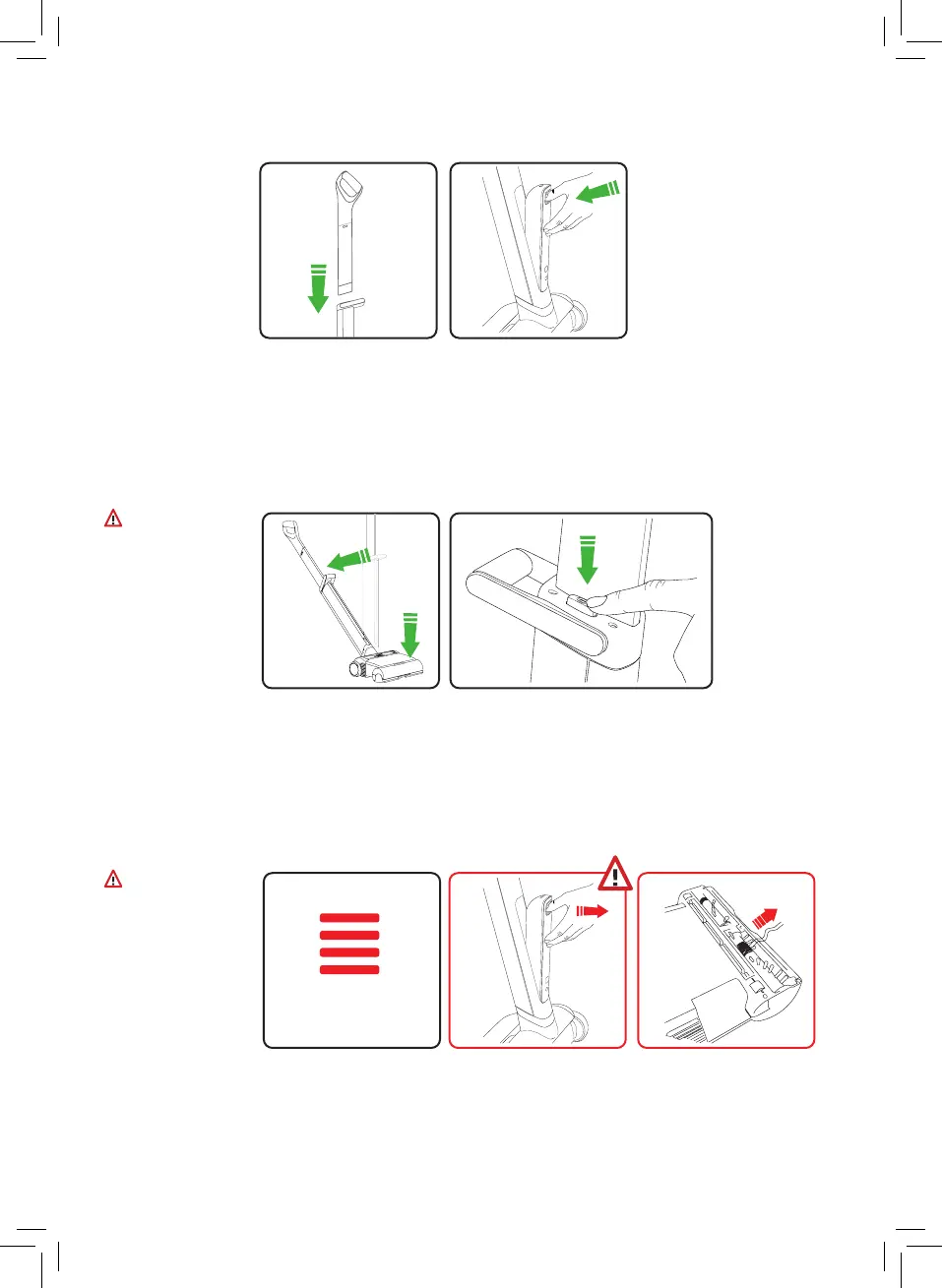
Place upper handle into
the product.
Warning:
Care must be
taken to avoid
accidental
entanglement of
the charger cord
and vacuum head.
Warning:
Care must be
taken cleaning
edges of rugs.
Do not use on
frayed carpets or
tasseled rugs.
Press foot on the
machine head and pull
the upper handle back.
Avoid picking anything up
that may jam the brush
bar. If the brush bar jams,
the product will stop and
the LED lights will stay
red for 10 seconds.
Remove battery pack and
turn product over.
Clear the blocked brush
bar. The unit will not
restart until the red
lights go off.
Insert the battery into the
rear of the product.
Press power button
located by the middle
handle.
4
Solid LEDs =
Brush Bar Jam

Related product manuals