EasyManua.ls Logo

Gtech AirRAM AR05 - Cleaning the filter; Filter Cleaning Safety; Battery Removal & Replacement; Battery Replacement Precautions

Gtech AirRAM AR05
28 pages
Print Icon
To Next Page IconTo Next Page
To Previous Page IconTo Previous Page
Loading...
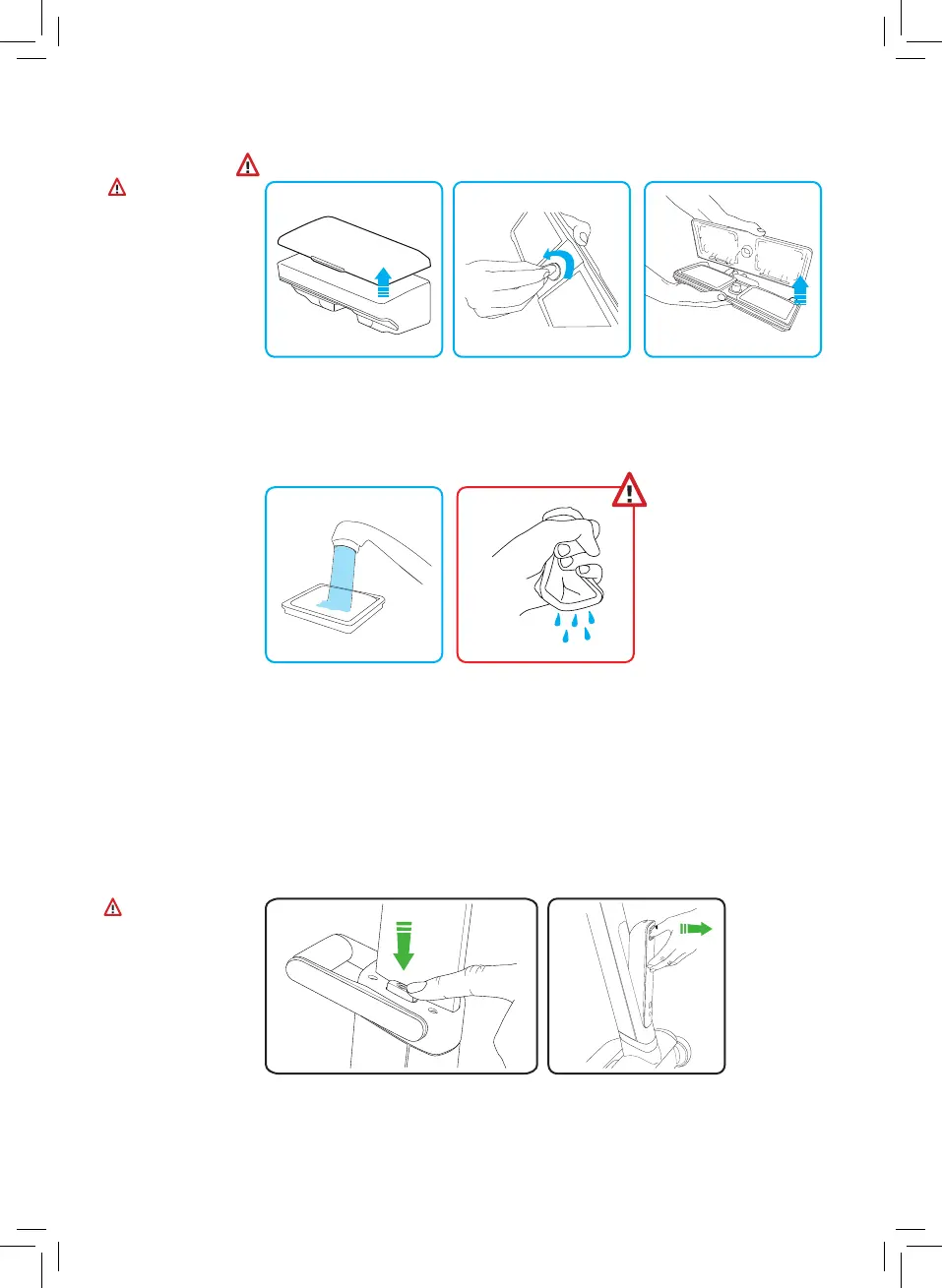
Battery Removal & Replacement
Switch off the product
and ensure the charger is
disconnected.
Press the latch to release
the power pack.
Warning:
Only use a
replacement battery
pack as supplied by
the manufacturer
and only use the
charger provided
with the product.
Using another
charger may
damage the product
and battery pack,
and will invalidate
your warranty.
Cleaning the filter
Remove bin from
product and remove filter
assembly from the bin.
Warning:
•Ensure the filter
is completely
dry then fully
reassemble the
product.
•Never use the
unit without the
filter fitted.
•The filter will be
damaged by
excessive heat.
Use a coin and turn to
the unlocked position.
Use the tabs on the filters
to remove from the filter
assembly.
Wash the filters under
a tap until water-flow
is clean.
Squeeze excess water
from filter.
Dry for 24 hours in a
warm ventilated area.
Wash the filters once a month.
6

Related product manuals