5
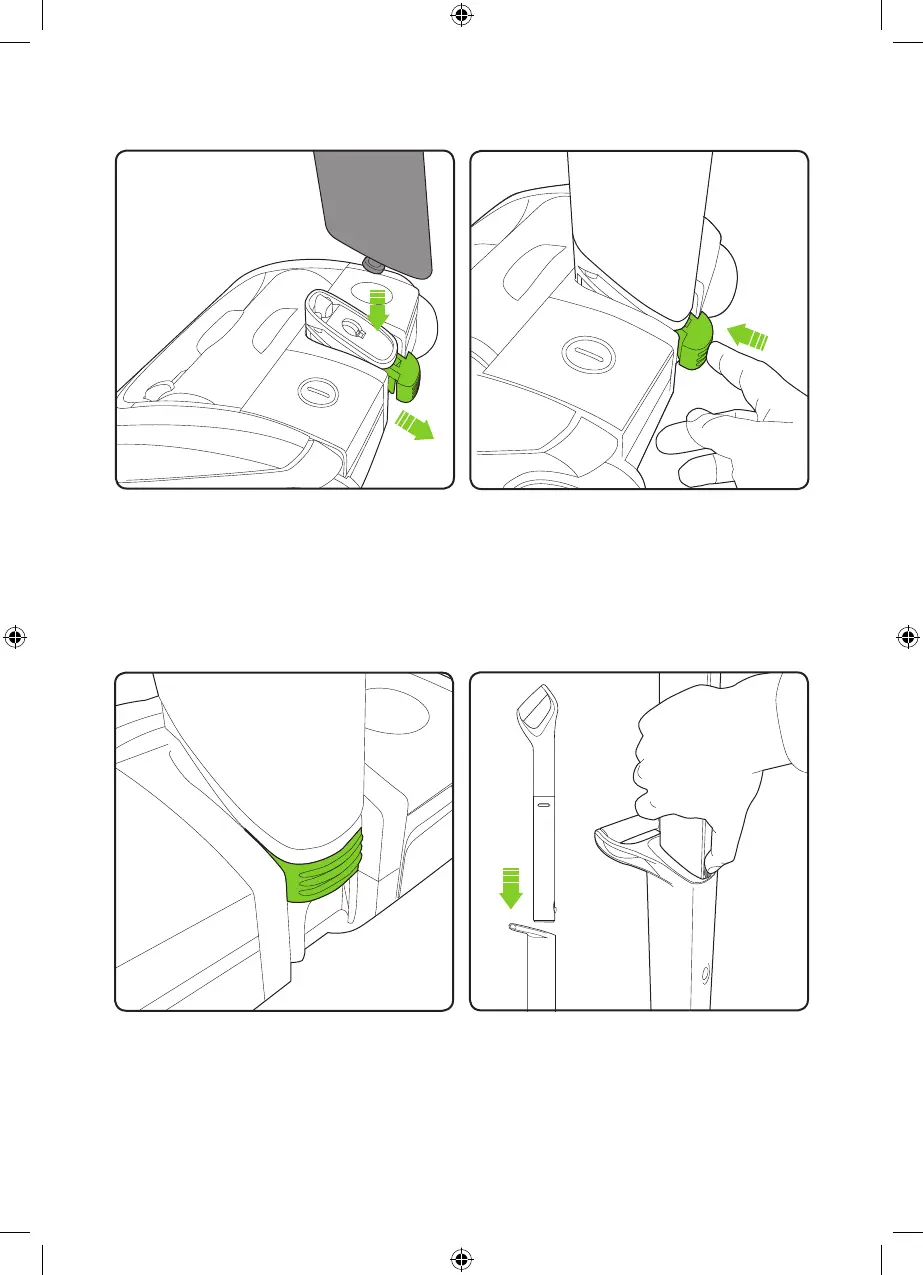
The green locking clip, when correctly
tted, will click and hold the lower handle
in place. Should the handle assembly need
to be removed the clip can be pulled out to
unlock the lower handle.
The green locking clip remains permanently
attached to the head assembly.
AirRam: Assembly
To attach the lower handle to the head
assembly, insert the metal pin on the lower
handle into the hole located on the pivot
yoke. Make sure the green locking clip is
pulled out to allow the lower handle to t.
Insert the upper handle into the lower
handle. You will need to press the button
on the upper handle to t it in.
Once it slides down you will hear it click
into place.
Ensure the lower handle is sitting completely
ush against the yoke. Then push the green
locking clip into the back of the head.
2859_System_TE_manual_update_aw.indd 5 31/05/2018 13:24



 To Next Page