16
Troubleshooting
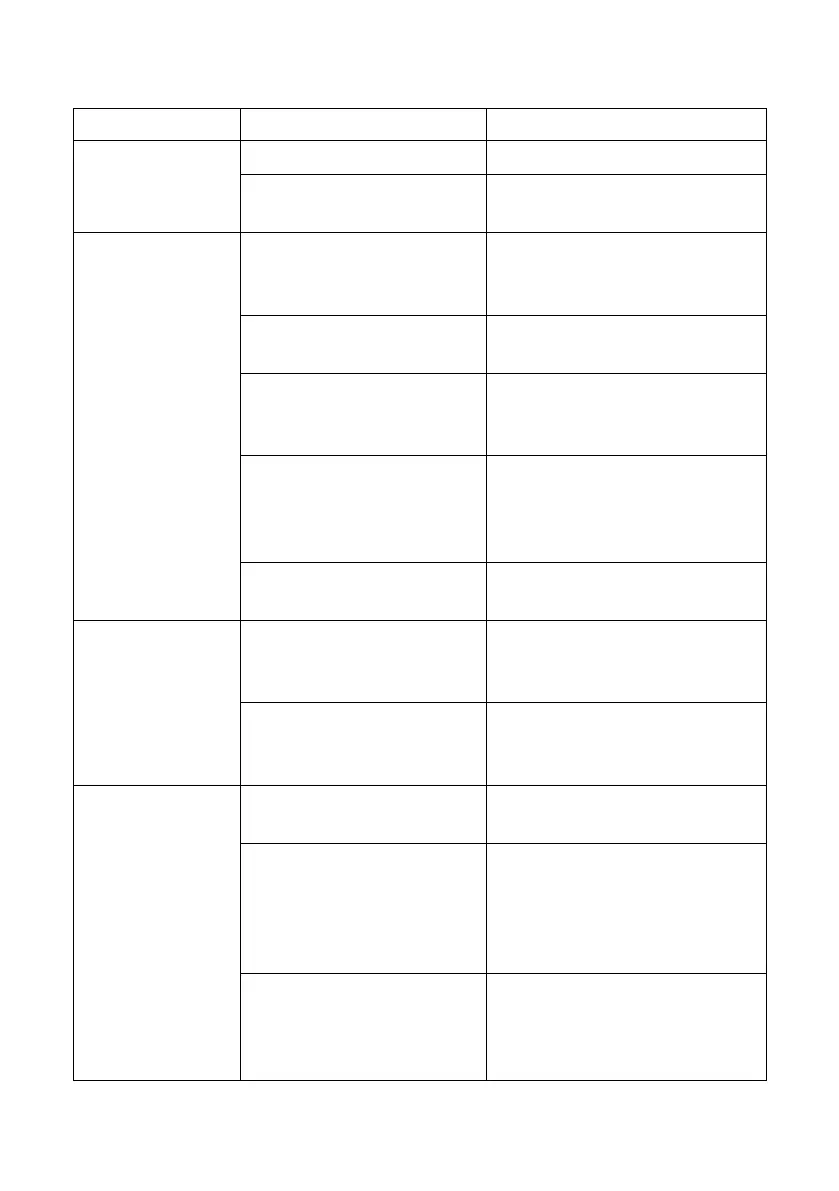
Problem Possible cause Solution
The product does
not turn on
Battery is fully discharged. Charge the product.
Handle in park position. Pull the handle back to release
and operate.
Product is not
cleaning well
The dirty water in waste
water tank has reached the
MAX line.
Empty the dirty water and then
reinstall the waste water tank.
The filter in the waste water
tank is dirty.
Clean the filter.
Blockage in the cleaning
head or air path.
Remove the mopping roller and
waste water tank and check for
blockages.
Mopping roller malfunction. Check mopping roller is
correctly fitted.
Clean and/or replace
mopping roller.
Roller cover missing or not
well fitted.
Check roller cover is correctly
fitted.
Abnormal noise Blockage in the cleaning
head or air path.
Remove the mopping roller and
waste water tank and check for
blockages.
The dirty water in waste
water tank has reached the
MAX line.
Empty the dirty water and then
reinstall the waste water tank.
Product won’t
charge
The charger is not designed
for this product
Use the original charger.
Poor electrical connection. Check the charger is correctly
plugged into the charging stand
and mains supply.
Check wall socket is switched on.
Try another wall socket.
Product is not located well
on charging stand.
Check product is well positioned
on the charging stand.
Check the charger cord is not
trapped under the product.


 To Next Page