19
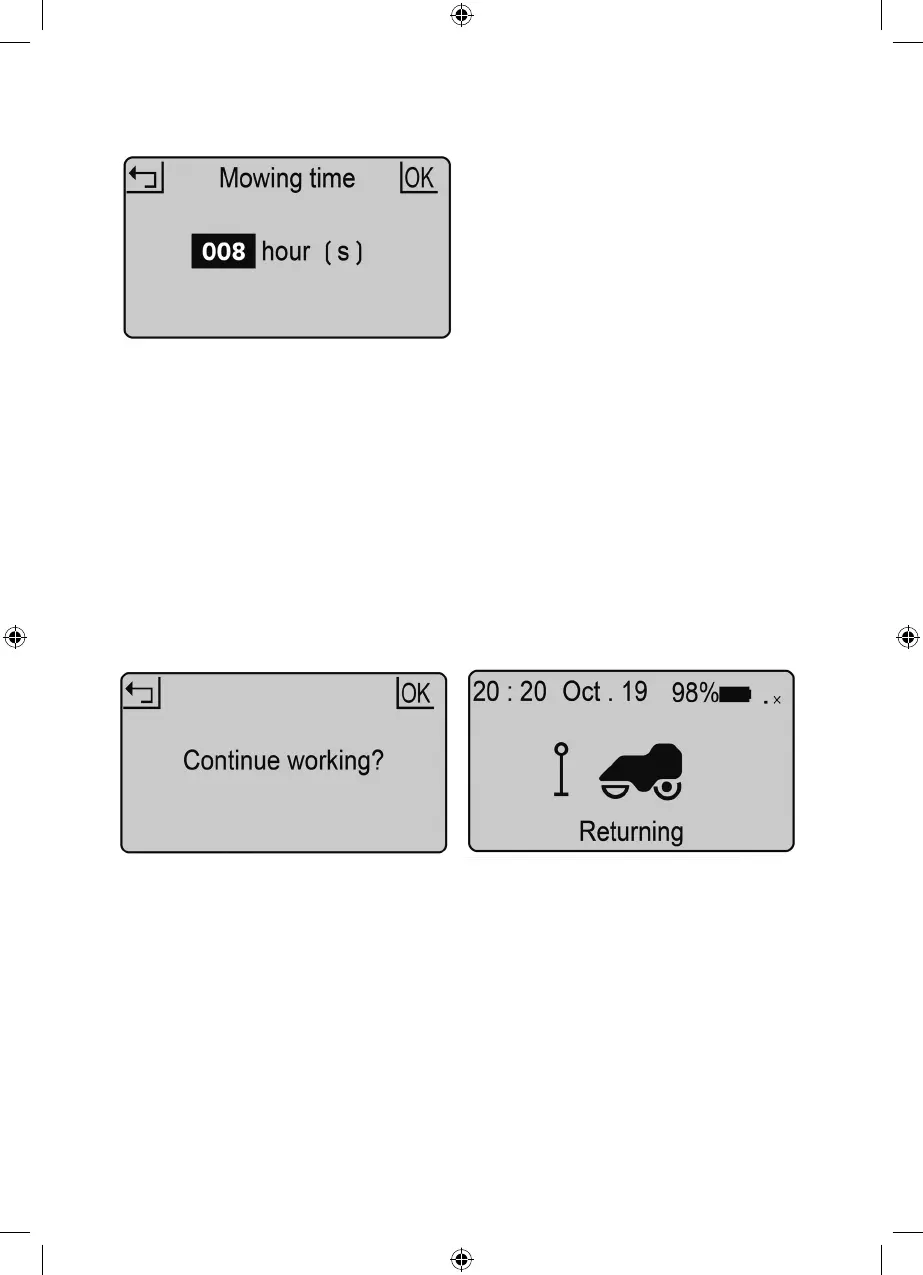
Work time setting
Stop Back to station
This is the amount of time per day the mower
will be active. This includes charging time.
For example: if set to 8 hours and the mower
is set to operate from 8:00pm it will operate
until 4:00am. In this time it may mow for
1 hour charge for 2 hours mow again for 1
hour; charge for 2 hours, mow for one hours
and return to charge ready for the next cycle.
You may want to stop the mower during
its cutting cycle. To do this:
1. Press the STOP button.
2. The mower stops immediately and the
control panel hatch opens.
3. The screen shows ‘emergency stop’.
4. Press OK or RETURN button.
5. Enter the PIN code
6. If the mower was running when the STOP
button was pressed, the screen will show
‘continue to work?’. You can then either
press OK to continue the task, or press
RETURN to cancel it.
1. Press HOME button for 3 seconds.
2. Close the cover and mower will return to
station for charging.
1. Press OK button to enter sub-menu 1.
2. Select ‘setting’ to enter sub-menu 2.
3. Select ‘work time’.
4. Set work time by UP and DOWN buttons.
(default is 8hrs)
5. Press OK button to confirm setting.
4719_Robot_Mower_manual_aw3.indd 194719_Robot_Mower_manual_aw3.indd 19 20/04/2021 16:2220/04/2021 16:22


 To Next Page