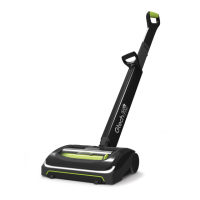
This document describes the Gtech K9 System, which includes two main products: the Gtech Multi K9 (Model number: ATF Series) and the Gtech AirRAM K9 (Model number: AR Series). Both are designed for domestic dry vacuum cleaning.
Function Description
The Gtech K9 System offers a comprehensive solution for pet-friendly dry vacuum cleaning. The AirRAM K9 is a full-size upright vacuum cleaner, while the Multi K9 is a handheld vacuum cleaner designed for versatile cleaning with various attachments. Both products feature Li-Ion batteries for cordless operation and are equipped with scented cartridges to help with pet odors.
Important Technical Specifications
AirRAM K9:
- Battery model: 103A022
- Battery: 22V Li-Ion
- Charging period: 4 hours
- Battery charger output: 27V DC 500mA
- Weight: 3.2kg
Multi K9:
- Battery model: 113A1003
- Battery: 22V Li-Ion
- Charging period: 4 hours
- Battery charger output: 27V DC 500mA
- Weight (with standard nozzle): 1.5kg
Both products utilize Gtech-supplied batteries and chargers. The scented cartridges for both models contain Linalyl acetate, Limonene, Linalool, Lilial, Lavender oil, Vanillin, Borneol, and Polysorbate 20.
Usage Features
General Safety Precautions:
- Always read all instructions before use and retain them for future reference.
- Do not use in rain or leave outdoors while raining.
- Observe basic safety precautions to reduce the risk of fire, electrical shock, or injury.
- Store indoors in a dry place, out of reach of children.
- Use responsibly; children aged 8 and above, and persons with reduced capabilities, can use the appliance with supervision and instruction.
- Do not let children play with the appliance.
- Use only manufacturer's recommended attachments.
- Take extra care when cleaning stairs.
- Keep the appliance and accessories away from hot surfaces.
- Do not block openings or hinder airflow; keep openings free of dust, lint, clothing, fingers, and all body parts.
- Keep hair away from openings and moving parts.
- Only use Gtech-supplied batteries and chargers.
- Never modify the charger.
- Check that the mains voltage matches the rating plate.
- Do not use the charger with other battery packs or appliances.
- Check the charger cord for damage or aging before use.
- Do not abuse or carry the charger by the cord.
- Grasp the plug to disconnect from a socket, do not pull the cord.
- Do not wrap the cord around the charger when storing.
- Keep the charger cord away from hot surfaces and sharp edges.
- If the supply cord is damaged, the charger should be discarded and replaced.
- Do not handle the charger or appliance with wet hands.
- Do not store or charge the appliance outdoors.
- Remove the charger from the socket before removing the battery, cleaning, or maintaining the appliance.
- Ensure the Multi K9 is off before connecting or disconnecting the motorised brush bar.
- Do not incinerate Li-Ion batteries or expose them to high temperatures.
- Liquid ejected from the battery may cause irritation or burns.
- In an emergency, contact professional help immediately.
- If battery liquid gets on skin, wash immediately with soap and water. If it gets into eyes, flush with clean water for at least 10 minutes and seek medical attention. Wear gloves to handle and dispose of the battery.
- Shorting battery terminals may cause burns or fire.
- Keep battery packs away from metal objects when not in use.
- Remove and dispose of the battery safely in accordance with local regulations when disposing of the appliance.
- Before use and after any impact, check for signs of wear or damage.
- Do not use if any part is damaged or defective.
- Repairs should be carried out by a service agent or qualified person.
- Never modify the appliance.
- Only use Gtech replacement parts or accessories.
- Designed for domestic dry vacuum cleaning only.
- Do not pick up liquids or use on wet surfaces.
- Do not pick up flammable, burning, or smoking objects.
- Do not use on concrete, tarmacadam, or rough surfaces.
- The brush bar may damage certain floor surfaces; check manufacturer's cleaning instructions.
- The product may damage delicate fabrics or upholstery; test on an inconspicuous area first.
- Some surfaces, like delicate loose-pile rugs or damaged carpets, are not suitable for cleaning with a rotary brush.
- The product has a constantly rotating brush bar; never leave the cleaning head in one spot for an extended period.
- For hard flooring, check for hard debris or objects that could damage the flooring or mark the surface.
- Do not use water, solvents, or polishes to clean the outside; wipe with a dry cloth.
- Never immerse the unit in water or clean in a dishwasher.
- Never use the appliance without the filter fitted.
- Ensure the battery is removed before changing tools.
AirRAM K9 Assembly:
- Push the two parts of the lower handle together until they click into place.
- Push the pivot yoke to the upright position.
- Pull out the green locking clip, insert the metal pin of the lower handle into the pivot yoke hole, and firmly push the clip back until it clicks.
AirRAM K9 Storage:
- Press the button on the lower handle to unlock the upper handle.
- Slide the upper handle up or down to set it in lowered (storage) or raised (use) positions.
AirRAM K9 Operation:
- Place your foot on the left side of the head and pull the handle back.
- The power button is on the left-hand side of the head assembly.
- Press the power button with your foot to turn the product on.
AirRAM K9 Battery Charging:
- When the state of charge indicator flashes one green LED, recharge the battery.
- To remove the battery, squeeze the latch underneath and pull upwards.
- The battery can be charged in or out of the product.
- A full charge takes 4 hours, indicated by 4 solid green lights.
- A 1-hour charge is sufficient for a burst of cleaning.
- To replace the battery, slide it down into the head assembly until it clicks.
Multi K9 Operation:
- The dusting brush can be slotted onto the active nozzle.
- The crevice tool is stored on board the product.
- Press the button above the handle to turn the product on and off.
- The dusting brush, crevice tool, extension tube, and power brush all attach to the active nozzle.
Multi K9 Power Brush:
- Ensure terminals on the Power Brush and Active nozzle are lined up, then gently push the Power brush onto the Active nozzle.
- Remove the battery when changing attachments.
- Gently pull the Power Brush from the product to remove it.
Multi K9 Battery Charging:
- When a single green light flashes, recharge the battery.
- After 4 hours, the LEDs turn solid green, indicating a full charge.
- A 1-hour charge is sufficient for a burst of cleaning.
- The battery can be charged on or off the main unit.
Multi K9 State of Charge Indicator:
- Shows charge level (100%-75%, 75%-50%, 50%-25%, 25%-1%).
- Green lights turn off downwards as charge is used.
- When charging, LEDs pulsate and illuminate; all LEDs are solid green when fully charged.
Maintenance Features
AirRAM K9 Emptying the Bin:
- Hold the head with one hand, pull the bin handle, and lift the bin out.
- Lift and release the green arrow latch to open the lid.
- Hold the bin over a rubbish bin and push the green lever towards the lid to empty dirt.
- Pull the green lever back towards the bottom of the bin, close the lid, and reinsert the bin.
AirRAM K9 Cleaning the Filters:
- Do this once a month or more frequently.
- Pull the filter out of the filter housing. Tap dirt from the filter and tip dirt from the housing.
- Remove the filter from the inner shroud by twisting and pulling.
- Tap the inner shroud over a bin to remove excess dirt.
- Wash the filter under a tap, squeeze out excess water, and let it dry completely (recommended water temperature 40°C). Do not use detergent or soaps.
- Never put the bin back without the filter inside, as this could damage the motor.
AirRAM K9 Replacing the Filters:
- Slide the filter onto the inner shroud.
- Slide the filter and inner shroud into the filter housing.
AirRAM K9 Removing and Cleaning the Brush Bar:
- If the brush bar jams (LEDs turn red), the product will stop. It will restart after 10 seconds.
- Remove the battery before checking for blockages.
- Rest the product on its side, locate the brush bar button on the right-hand side, press it inwards, and pull the brush bar out.
- Run the hair removal tool down the groove to cut hair, then use the comb to remove it.
- Never operate the product without the brush bar in place.
- Re-insert the brush bar, starting from the end furthest from the button, then push it in until it clicks.
- Replace the battery by sliding it down into the head assembly until it clicks.
AirRAM K9 Installing Scented Cartridge:
- Slide the filter and inner shroud out of the filter housing.
- Remove the filter from the inner shroud by twisting and pulling.
- Remove the scented cartridge from its box and slide off the plastic sleeve.
- Slide the scented cartridge into the end of the shroud.
- Replace the filter and return to the filter housing.
Multi K9 Emptying the Bin:
- The bin pulls off without a latch; wiggle it as you pull.
- Hold the bin over a rubbish bin and release the latch to empty dirt. A gentle tap helps.
- Remove the filter and tap off excess debris each time.
Multi K9 Cleaning the Filter:
- Remove the filter by pulling it from the top of the bin.
- Tap dirt from the filter and tip dirt from the filter housing.
- Before washing, remove the scented cartridge by pulling it out from the housing at the top of the filter.
- Wash the filter under a tap, squeeze out excess water, and let it dry completely (recommended water temperature 40°C). Do not use detergent or soaps.
- Use your spare filter while one dries.
- Never operate the product without the filter inside the bin, as this could damage the motor.
- Ensure the tab is refitted onto the filter before using.
Multi K9 Cleaning the Power Brush:
- First, remove the power brush.
- Rotate the latch from the lock to the unlock position and pull out the brush bar.
- Run the hair removal tool down the groove to cut hair, then use the comb to remove it.
- Never operate the power head without the brush bar in.
Multi K9 Replacing the Scented Cartridges:
- Remove the old scented cartridge by pulling it out from the housing at the top of the filter.
- Remove a new scented cartridge from its bag and slide off the plastic sleeve.
- Place the new scented cartridge into the top of the filter.
- Never operate the Multi K9 without the scented cartridge fitted.
Troubleshooting (Both Models):
- Product not cleaning well: Empty bin, check bin fitment, check filter fitment, clean/replace filter, check brush bar fitment.
- Product stopped or won't work: Charge battery, clear debris from brush bar.
- Battery will not charge: Check charger connection to battery and mains, check wall socket.
- 4 red lights displayed on battery (AirRAM K9): Brush bar jammed. Turn off product, remove battery, clear blockage.
- Low suction when bin is empty and filter is clean (Multi K9): Check for blockages in the tube and tools. Remove battery and bin, look through both ends of the tube.
Product Care (Both Models):
- Keep filters clean, brush bar tangle-free, and battery charged.
- Wipe with a dry cloth if dirty, including under the bin.
- Never wash with liquid, run under a tap, or use without the filter.
Battery Removal (Multi K9):
- Press the green buttons and pull to remove the battery.
- The battery can be charged on or off the main unit.
Warranty and Registration:
- Register your product at www.gtech.co.uk/warrantyregistration using both serial codes.
- Direct purchases are automatically registered for a 2-year warranty.
- Purchases from authorized retailers require registration within 3 months with proof of purchase.
- Warranty covers material or manufacturing faults for 2 years from purchase/delivery date.
- Proof of delivery/purchase is required for any work.
- Work carried out by Gtech or authorized agents.
- Replaced parts become Gtech property.
- Repair/replacement does not extend the warranty period.
- Warranty benefits are additional to statutory rights.
What Isn't Covered by Warranty:
- Normal wear and tear (drive belt, brush bar, batteries).
- Use of consumables (dust bags, cartridges).
- Accidental damage, faults from negligent use, lack of care, misuse, neglect, careless operation, or handling not in accordance with the manual.
- Blockages (refer to manual for unblocking).
- Use for non-domestic household purposes.
- Use of non-Gtech genuine parts or accessories.
- Faulty installation (unless installed by Gtech).
- Modification in any way.
- Repairs or alterations by non-Gtech parties.
- Purchases from unofficial third parties.
- International orders incur a delivery charge for faulty and non-faulty products.
Disposal:
- The product is covered by legislation for waste electrical and electronic products (EN2002/96/EC).
- At the end of its life, the vacuum and its Li-Ion battery should not be disposed of with general household waste.
- The battery should be removed and both should be disposed of properly at a recognized recycling facility.
- Contact your local council or visit www.recycle-more.co.uk for recycling information.


 To Next Page
 General