13
Anti-shake
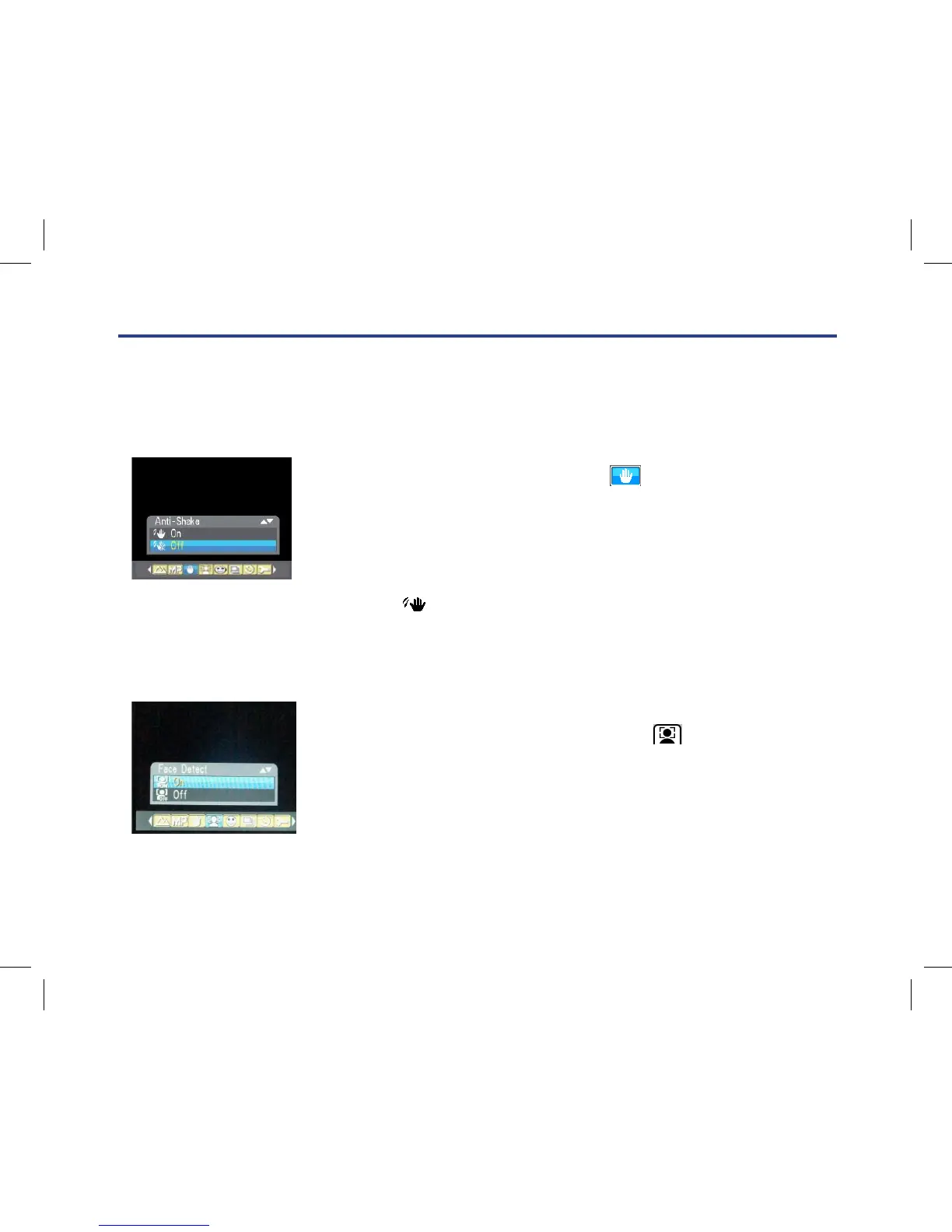
Your Digital Camera has a function that prevents some blurry photos from trembling when taking photo.
Because of this function, you are not required to use a tripod for steady shooting photos.
To set as below:
1. Press Menu button.
2. Press Right/Left button to select icon , the function menu as
below:
3. Press Up/Down button to select On/O.
4. Press Menu button to conrm. If you select ‘On’,
the icon will appear on the LCD screen.
Face Detect
Your camera supports face detecting that allows you to take better portrait photos.
1. Press the MENU button.
2. Press the Right/Left button to select the icon ,
the function menu as below:
3. Press the Up/Down button to select Face Detect On/O.
4. Press the MENU button to conrm, the Face Detect icon selected will
appear on the top of the LCD screen.
Your Digital Camera has a function that prevents some blurry photos from trembling when taking photo.
Because of this function, you are not required to use a tripod for steady shooting photos.
To set as below:
1. Press Menu button.
2. Press Right/Left button to select icon , the function menu as below:
3. Press Up/Down button to select On/Off.
4. Press Menu button to confirm. If you select ‘On’, the icon will appear on the LCD screen.
Face Detect
Your camera supports face detecting that allows you to take better portrait photos.
1. Press the MENU button.
2. Press the Right/Left button to select the icon , the function menu as below:
3. Press the Up/Down button to select Face Detect On/Off.
4. Press the MENU button to confirm, the Face Detect icon selected will appear on the top of the LCD
screen.
Smile capture
You can capture the smile face without pressing any button.
1. Press the MENU button.
2. Press the Right/Left button to select icon , the function menu as below:
3. Press the Up/Down button to select On/Off.
4. Press the MENU button to confirm, the Smile Capture icon selected will appear on the top of the LCD
screen.
Your Digital Camera has a function that prevents some blurry photos from trembling when taking photo.
Because of this function, you are not required to use a tripod for steady shooting photos.
To set as below:
1. Press Menu button.
2. Press Right/Left button to select icon
, the function menu as below:
3. Press Up/Down button to select On/Off.
4. Press Menu button to confirm. If you select ‘On’, the icon will appear on the LCD screen.
Face Detect
Your camera supports face detecting that allows you to take better portrait photos.
1. Press the MENU button.
2. Press the Right/Left button to select the icon , the function menu as below:
Your Digital Camera has a function that prevents some blurry photos from trembling when taking photo.
Because of this function, you are not required to use a tripod for steady shooting photos.
To set as below:
1. Press Menu button.
2. Press Right/Left button to select icon , the function menu as below:
3. Press Up/Down button to select On/Off.
4. Press Menu button to confirm. If you select ‘On’, the icon
will appear on the LCD screen.
Face Detect
Your camera supports face detecting that allows you to take better portrait photos.
1. Press the MENU button.
2. Press the Right/Left button to select the icon , the function menu as below:
Your Digital Camera has a function that prevents some blurry photos from trembling when taking photo.
Because of this function, you are not required to use a tripod for steady shooting photos.
To set as below:
1. Press Menu button.
2. Press Right/Left button to select icon , the function menu as below:
3. Press Up/Down button to select On/Off.
4. Press Menu button to confirm. If you select ‘On’, the icon will appear on the LCD screen.
Face Detect
Your camera supports face detecting that allows you to take better portrait photos.
1. Press the MENU button.
2. Press the Right/Left button to select the icon
, the function menu as below:



 To Next Page