Prepare Your Camera for use
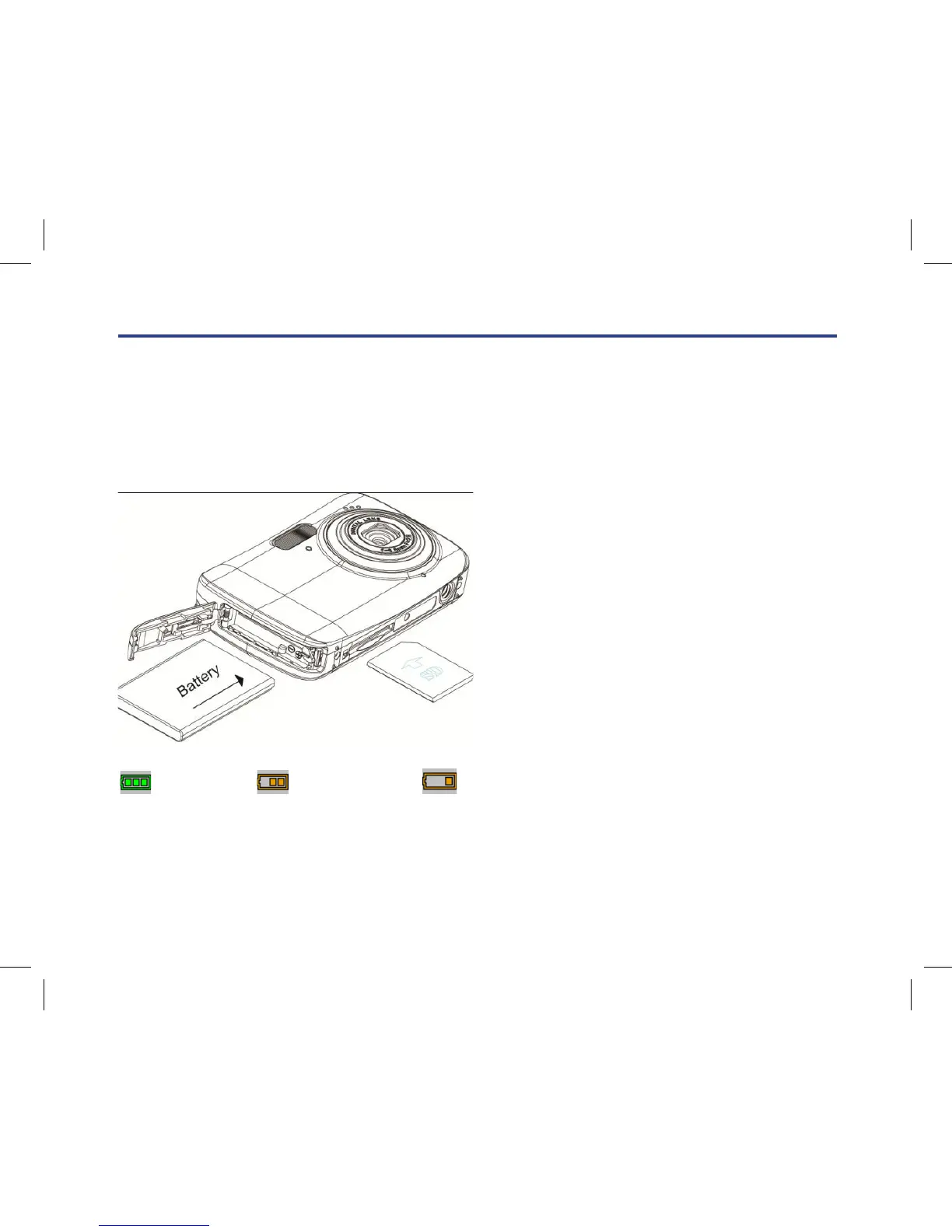
Your digital camera needs a Lithium battery in order to operate.
1. Slide and open the battery door in the right side of the camera.
2. Push aside the green button which is in the battery compartment.
3. Insert the battery correctly with the correct polarity facing up.
4. Close the battery door.
5. On powering on your camera the battery icon will appear at the bottom right of the LCD Screen.
Full battery power Medium battery power Low battery power
Note:
1. A “Low battery” message will flash on the LCD when the battery power is insufficient. Shortly thereafter
your camera will power off.
2. Tes t photos taken with the camera should be downloaded otherwise they will be lost when the camera
loses power.
Your digital camera needs a Lithium battery in order to operate.
1. Slide and open the battery door in the right side of the camera.
2. Push aside the green button which is in the battery compartment.
3. Insert the battery correctly with the correct polarity facing up.
4. Close the battery door.
5. On powering on your camera the battery icon will appear at the bottom right
of the LCD Screen.
Note:
1. A “Low battery” message will ash on the LCD when the battery power is insucient.
Shortly thereafter your camera will power o.
2. Test photos taken with the camera should be downloaded otherwise they will be lost when
the camera loses power.



 To Next Page