1
2
3
5
6
4
7
8 9
8
Connect the lamp after inserting the battery
1
2
3
5
6
4
7
8
9
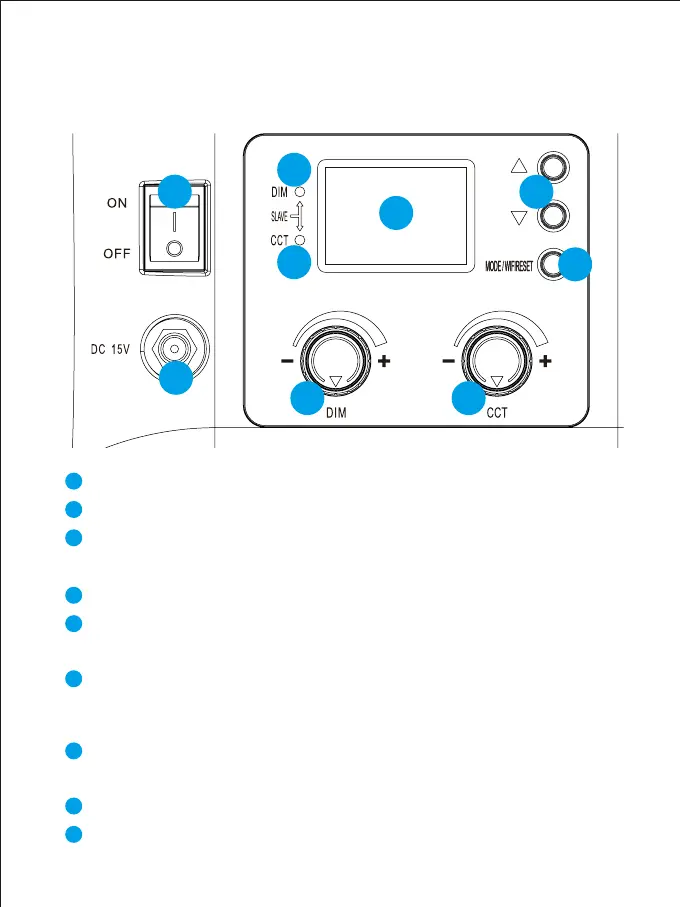
DC15V power input interface
Power switch
Mode button/WIFI reset button: Modes include host mode and slave
mode; WIFI username and password reset button
Channel addition and subtraction key: adjust channel
( 0~11 )
Brightness indicator: when adjust the brightness knob, the indicator
is on
Color temperature indicator: when adjust the color temperature knob,
the indicator is on
Nixie tube: show value including lightness, color temperature and
channel
Brightness adjustment button: adjust the brightness
( 10%~99% )
Color temperature adjustment button: adjust the color ( 3200K~5600K )
Note: indicator ⑤ and indicator ⑥ will be on simultaneously when in slave mode
Pengenalan Tombol



 To Next Page